
Accessibility Audit Cost: What You Get, What You Pay, and Which CMS Makes It Easier
A practical guide to accessibility audit scope and cost, including what is included, realistic AUD price ranges, remediation planning, and CMS considerations for Umbraco, Optimizely, Hygraph, Contentful, and Contentstack.
An accessibility audit answers a deceptively simple question: can people with different abilities actually use your website or digital product? A good audit does not stop at a tool score. It checks real pages, real journeys, real content, real components, and the CMS controls your team uses every week.
For most Australian business websites, a proper accessibility audit usually costs between AUD 1,500 and AUD 9,000. Larger ecommerce sites, SaaS products, portals, government-facing services, or multi-brand CMS platforms can range from AUD 10,000 to AUD 60,000+, depending on scope, WCAG target, sample size, manual testing depth, assistive technology coverage, and remediation support.
The key is knowing what is included. A cheap scan can be useful as a first check, but it is not the same as a WCAG audit. A serious audit follows a defined scope, tests a representative sample, validates important user journeys, identifies failures and risks, and gives your team a practical remediation plan.
What Is Usually Included?
The best accessibility audits combine automated checks, manual expert review, keyboard testing, screen reader testing, content review, CMS review, and a clear remediation roadmap.
WCAG Scope
The audit defines the target standard, usually WCAG 2.2 Level AA for modern business websites, and confirms which pages, templates, components, and journeys are in scope.
Automated Testing
Tools are used to catch common issues such as missing labels, missing alt text, invalid ARIA, contrast problems, heading errors, and broken semantic structure.
Manual Review
Human review checks the issues automated tools miss: keyboard traps, confusing focus order, screen reader meaning, content clarity, error handling, modals, filters, and forms.
Journey Testing
Important tasks are tested end to end, such as enquiry forms, search, checkout, account login, downloads, booking flows, navigation, and content discovery.
CMS Controls
The audit reviews whether editors can maintain accessible content through alt text fields, captions, headings, link text, validation, workflows, preview, localization, and reusable components.
Remediation Plan
You should receive prioritised findings, severity, WCAG references, screenshots or examples, affected templates, recommended fixes, and retest options.
What an Accessibility Audit Actually Is
An accessibility audit is a structured evaluation of a website, web app, portal, ecommerce store, or CMS-driven digital experience against accessibility standards. The most common benchmark is the Web Content Accessibility Guidelines, or WCAG.
WCAG 2.2 is organised around four principles: content should be perceivable, operable, understandable, and robust. In practical terms, that means people should be able to read, navigate, understand, and interact with your site using different devices, browsers, keyboards, screen readers, magnification, voice input, captions, and other assistive technologies.
The W3C Website Accessibility Conformance Evaluation Methodology, known as WCAG-EM, describes a sensible audit process: define the scope, explore the website, select a representative sample, evaluate the sample, and report the findings. That structure matters because most websites are too large to test every page one by one.
Audit, Scan, Review, or Compliance Statement?
These terms are often used loosely, but they are not the same.
| Option | What it is | Typical cost | Use it when |
|---|---|---|---|
| Automated scan | A tool-based check of selected pages for detectable issues. | AUD 0 to AUD 1,500 | You need a quick first look or recurring monitoring. |
| Light accessibility review | A small manual review of key pages, usually without full journey testing. | AUD 1,500 to AUD 3,500 | You have a small marketing site or want a pre-redesign baseline. |
| WCAG audit | A structured audit against WCAG A or AA, with manual testing and a written report. | AUD 4,000 to AUD 15,000 | You need reliable findings, prioritised fixes, and evidence for stakeholders. |
| Product or portal audit | A deeper audit of logged-in journeys, dashboards, tables, forms, documents, and states. | AUD 10,000 to AUD 35,000+ | The product supports important customer, staff, health, finance, education, or government-related tasks. |
| Enterprise program | Multiple audits, design-system review, CMS governance, training, remediation support, and retesting. | AUD 25,000 to AUD 60,000+ | You manage multiple sites, brands, regions, teams, or critical digital services. |
These ranges are planning estimates, not fixed quotes. The final cost depends on scope, complexity, documentation requirements, retesting, and whether remediation work is included.
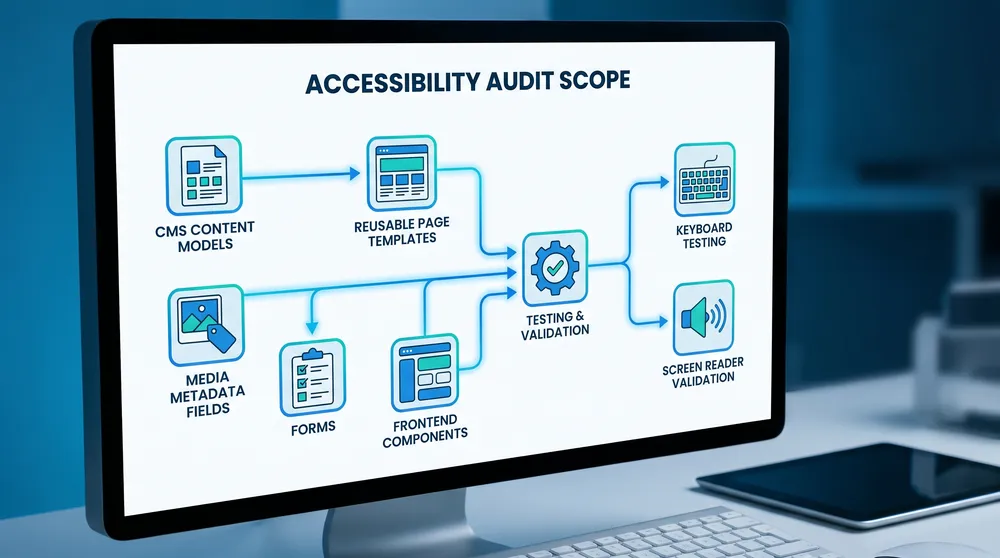
The CMS Can Make the Audit Smaller or Bigger
Accessibility problems are not only frontend bugs. They often come from CMS content models, media fields, reusable components, editor permissions, localization workflows, and publishing habits.
What Should Be Tested
A useful audit tests what users actually experience and what editors can realistically maintain after the audit is finished.
Templates
Home, service pages, articles, listings, search results, landing pages, forms, product pages, checkout, dashboards, and reusable content blocks.
Navigation
Header, footer, menus, breadcrumbs, skip links, focus order, active states, mobile navigation, and keyboard-only movement.
Forms
Labels, help text, required fields, validation, error summaries, success states, CAPTCHA alternatives, and submission flows.
Media
Alt text, captions, transcripts, decorative images, image links, videos, audio, PDFs, downloadable files, and social media embeds.
Components
Accordions, tabs, modals, carousels, filters, cards, tables, alerts, tooltips, date pickers, maps, and custom widgets.
CMS Governance
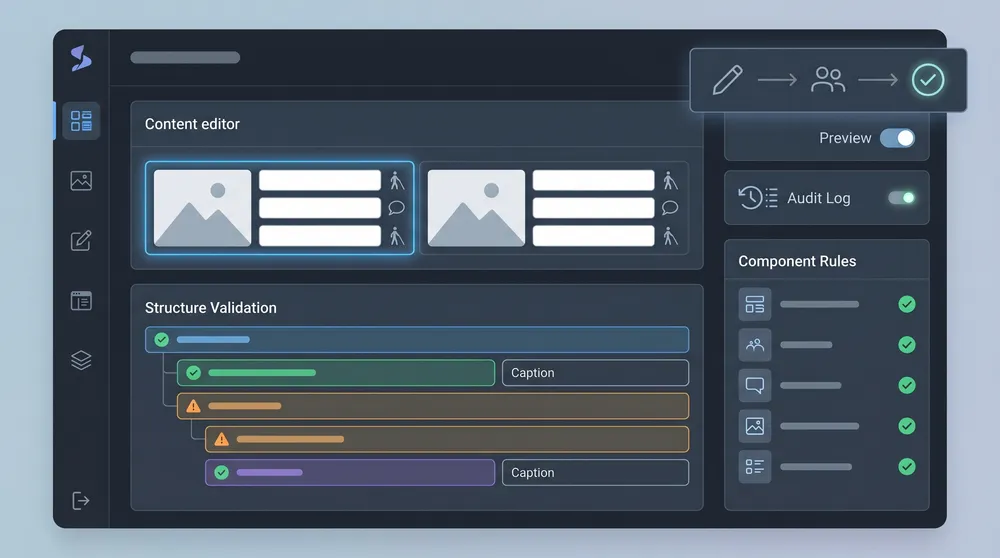
Required fields, editor guidance, preview, permissions, approval workflows, localization, content validation, and design-system rules.
Accessibility Audit Cost by Website Type
Audit cost rises when the website has more templates, more states, more user journeys, more third-party scripts, more content teams, more languages, or more risk. A five-page brochure site is not the same as a multi-brand CMS with ecommerce, gated content, and customer accounts.
| Website type | Typical audit range | Common scope | Why cost changes |
|---|---|---|---|
| Small brochure website | AUD 1,500 to AUD 3,500 | 5 to 10 pages, main templates, contact form, navigation, mobile checks. | Lower complexity, fewer components, fewer journeys. |
| Service business or corporate website | AUD 3,500 to AUD 8,000 | Key landing pages, blog templates, lead forms, downloads, CMS editor review. | More templates, stronger SEO/content governance needs, more calls to action. |
| Ecommerce website | AUD 8,000 to AUD 25,000 | Product discovery, search, filters, product pages, cart, checkout, account, transactional emails. | Checkout and product selection create high-risk task flows with many states. |
| SaaS app or customer portal | AUD 10,000 to AUD 35,000 | Login, onboarding, dashboards, tables, forms, modals, settings, notifications, error states. | Interactive components need deeper keyboard and screen reader testing. |
| Multi-site or enterprise CMS | AUD 20,000 to AUD 60,000+ | Multiple brands, languages, design system, CMS workflow, component library, templates, governance. | Findings must be mapped to shared templates, components, teams, and publishing rules. |
What Is Not Usually Included
Many audit quotes only include testing and reporting. They may not include design fixes, frontend development, CMS content-model changes, content rewriting, PDF remediation, captioning, transcript production, third-party vendor changes, retesting, or legal certification.
That does not make the quote wrong, but it should be explicit. The safest approach is to separate the work into three budgets: audit, remediation, and ongoing governance.

CMS Options: Umbraco, Optimizely, Hygraph, Contentful, and Contentstack
Your CMS choice affects audit cost because it shapes how accessible content is created, previewed, validated, localized, approved, and delivered. The frontend still carries much of the responsibility, especially in headless builds, but the CMS can either prevent recurring mistakes or make them easy to repeat.
| CMS option | Accessibility audit implications | Cost notes | Best audit focus |
|---|---|---|---|
| Umbraco CMS / Umbraco Cloud / Heartcore | Umbraco is flexible and can support accessible builds through custom document types, media fields, validation, workflows, and integrations. Umbraco states that mandatory properties such as image ALT text are easy to configure, and its open API layer allows accessibility tools to be integrated. | Umbraco CMS is open source. Umbraco Heartcore pricing checked on 13 May 2026 starts at EUR 60/month for Starter, EUR 300/month for Standard, EUR 1,100/month for Professional, with Enterprise custom. Audit and remediation are separate. | Check whether templates output semantic HTML, whether media types require alt text where appropriate, whether editors can create broken heading structures, and whether custom packages follow accessible UI practices. |
| Optimizely CMS | Optimizely is an enterprise CMS with visual authoring, workflows, embedded DAM, personalization, headless delivery, multi-site management, and Optimizely Graph. Its documentation notes that site developers handle image alt text in CMS images, so implementation choices matter. | Optimizely pricing is request-based and tailored to goals, usage, and scale. Accessibility audit cost is usually driven by enterprise templates, personalization, experimentation, multi-site complexity, and governance. | Audit Visual Builder components, personalization variants, forms, headless delivery, media metadata, DAM use, multi-site templates, and whether editor workflows preserve accessible content. |
| Hygraph | Hygraph is GraphQL-native and API-first, with content federation, schema modelling, reusable components, localization, custom workflows on Enterprise, audit logs, SSO, and roles. Assets can be extended with custom fields such as alt text and captions. | Pricing checked on 13 May 2026: Hobby is USD 0, Growth starts from USD 199/month, and Enterprise is custom. Growth includes usage limits and overages for API operations and asset traffic. | Audit the frontend implementation, GraphQL content model, required asset metadata, localized fields, reusable components, remote sources, and whether editors can publish inaccessible variants. |
| Contentful | Contentful is a composable content platform with structured content, APIs, localization, assets, app marketplace, workflows on higher tiers, and AI Actions. Contentful AI Actions include templates that can generate alt text and SEO metadata, but output still needs human review. | Pricing checked on 13 May 2026: Free is USD 0, Lite is USD 300/month, and Premium is custom. Personalization, Studio, and AI Actions are Premium-compatible expansion paths. | Audit content types, required fields, asset descriptions, rich text rendering, localization, preview, Studio components if used, and frontend rendering across channels. |
| Contentstack | Contentstack is an enterprise headless CMS / AXP with visual editing, modular blocks, workflows, timeline preview, localization, granular permissions, integrated hosting options, agents, automation, and asset metadata. Its accessibility statement says the platform is partially conformant with WCAG 2.2 Level AA and that customers control the accessibility of front-end experiences. | Contentstack official pricing is sales-led. Its pricing page lists Headless CMS, Real-time CDP, and Agentic Experience Platform options without public dollar pricing. | Audit modular blocks, visual editing output, workflow governance, asset metadata and AI suggestions, personalization, integrated front-end hosting, and cross-channel content reuse. |
Important CMS Reality
No CMS automatically makes a public website accessible. Umbraco, Optimizely, Hygraph, Contentful, and Contentstack can all support accessible outcomes, but the result depends on content modelling, frontend templates, component accessibility, editor guidance, governance, and ongoing QA.
For headless platforms especially, the CMS stores and delivers content. Your front end still decides heading structure, landmarks, focus behaviour, ARIA usage, form behaviour, colour contrast, motion, responsive layout, and keyboard interaction.
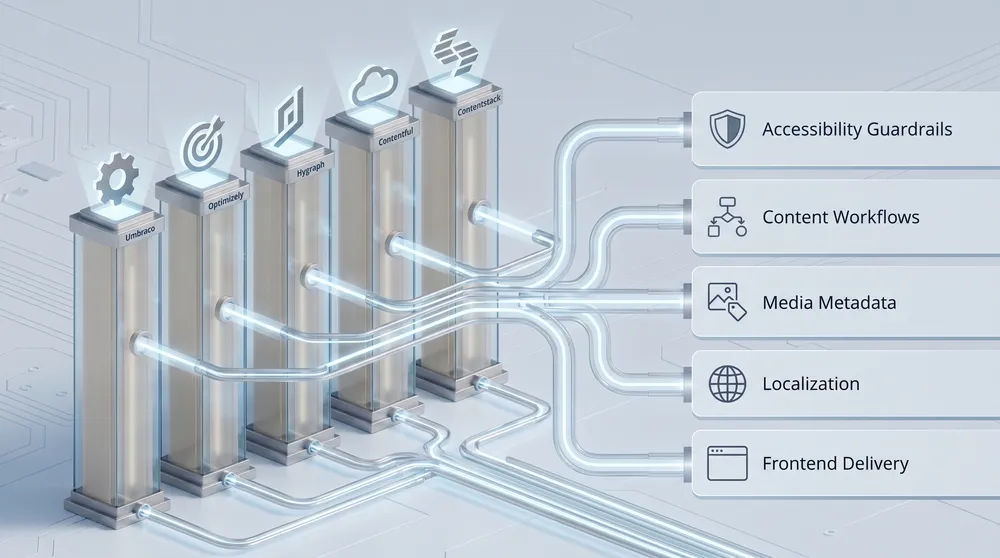
Audit the Publishing System, Not Just the Website
If editors can publish inaccessible headings, missing alt text, unlabeled downloads, vague links, or broken layouts, the same issues will return after remediation. The CMS needs guardrails.
What Drives Accessibility Audit Cost?
1. WCAG Target Level
Most business websites should target WCAG 2.2 Level AA. Level A is usually too weak for a professional public-facing site, while Level AAA is rarely practical across every page and feature. If the audit needs a formal conformance-style report, expect more time and cost than a practical remediation review.
2. Number of Templates and Components
Accessibility problems often live in templates and components. Testing one article page may reveal issues that affect hundreds of articles. Testing one modal, filter, or carousel can reveal a reusable component issue. A good audit maps findings to the source of the problem so fixes scale.
3. User Journeys
Forms, checkout, login, search, booking, product filtering, account management, and dashboard flows take longer because they include states: empty, loading, error, success, disabled, selected, expanded, collapsed, and submitted.
4. Manual Assistive Technology Testing
Automated tools cannot fully judge whether a screen reader user can understand a page, whether focus order makes sense, whether link text is useful, or whether an error message helps someone recover. Manual testing is where the most valuable findings usually appear.
5. CMS and Content Governance
If content editors manage hundreds of pages, the audit should check whether the CMS encourages accessible behaviour. That includes required fields, help text, validation, preview, link controls, media metadata, captions, transcript fields, document governance, and approval workflows.
6. Retesting and Support
A report is only the start. Many teams need developer support, design advice, content guidance, and retesting after fixes. Retesting is often quoted separately, commonly as a smaller follow-up package once remediation is complete.
Recommended Audit Packages
Starter Accessibility Review
Indicative cost: AUD 1,500 to AUD 3,500.
Best for small business websites, early-stage websites, or teams wanting a fast baseline. Usually includes automated scans, manual checks of key pages, keyboard navigation review, obvious WCAG issues, and a short prioritised report.
Business WCAG AA Audit
Indicative cost: AUD 4,000 to AUD 9,000.
Best for corporate, service, lead-generation, and content-heavy websites. Usually includes representative page sampling, manual testing, screen reader spot checks, forms, templates, mobile behaviour, CMS content controls, severity ratings, and remediation recommendations.
Ecommerce or Portal Audit
Indicative cost: AUD 8,000 to AUD 25,000.
Best for sites where users must complete important tasks. Scope should include product discovery, search, filtering, checkout, login, account areas, support flows, dashboards, documents, transactional messages, and key third-party integrations.
Enterprise CMS Accessibility Program
Indicative cost: AUD 20,000 to AUD 60,000+.
Best for multi-site, multi-brand, multilingual, or regulated organisations. This should include a design-system review, CMS governance review, reusable component audit, editor workflow recommendations, remediation support, training, and retesting.
How to Keep Audit Costs Under Control
- Define the audit goal before requesting quotes: baseline, remediation plan, procurement evidence, launch gate, compliance support, or ongoing monitoring.
- Provide a sitemap, key templates, analytics data, conversion journeys, CMS access, design system, component library, and known issues upfront.
- Audit representative templates instead of random pages only.
- Prioritise critical user journeys such as forms, checkout, login, support, and contact paths.
- Separate frontend bugs from CMS governance issues so fixes are assigned to the right team.
- Budget remediation and retesting before the audit starts.
- Use automated monitoring after remediation, but do not rely on it as the whole accessibility strategy.

Budget for Audit, Fixes, and Prevention
The best result is not a tidy report. It is a website, CMS, and content workflow that stop the same accessibility issues from coming back next month.
Final Recommendation
If you only need a quick health check, start with a light review. If your website drives leads, sales, applications, bookings, support, or public information, budget for a proper WCAG AA audit with manual testing. If your organisation manages content through Umbraco, Optimizely, Hygraph, Contentful, or Contentstack, include the CMS in scope.
The most expensive accessibility problems are the ones that keep returning. Fixing a missing alt text field once is useful. Adding the right CMS field, validation, editor guidance, component rule, and QA process is better. That is where accessibility shifts from one-off compliance cost to long-term digital quality.
Sources Checked
- W3C WCAG overview
- W3C WCAG-EM overview
- W3C involving users in evaluation
- Umbraco web accessibility features
- Umbraco Heartcore pricing
- Optimizely CMS
- Optimizely request pricing
- Optimizely add and edit images
- Hygraph pricing
- Hygraph overview
- Hygraph asset fields
- Contentful pricing
- Contentful AI Actions
- Contentstack pricing
- Contentstack accessibility statement