
Agent-Ready CMS: How MCP Changes Content Workflows
Learn what an agent-ready CMS means, how MCP changes content workflows, and how SMEs should prepare content models, permissions, APIs, staging, approvals, and audit logs.
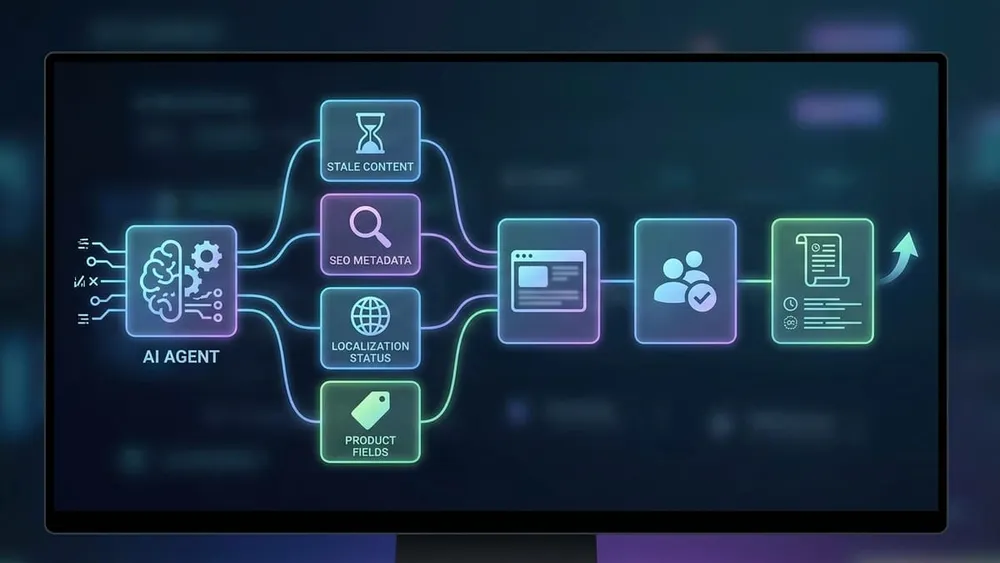
The next CMS upgrade conversation is no longer just about page builders, headless APIs, or whether AI can write a first draft. The more useful question is whether an AI tool can safely work inside the CMS: finding stale pages, checking SEO metadata, updating structured fields, preparing translations, and handing changes to a human for approval.
That is what an agent-ready CMS is about. It does not mean replacing editors or letting software publish freely. It means the CMS has clean content models, predictable APIs, permissions, staging environments, workflow states, audit logs, and integration points so AI agents can help with content operations without guessing or bypassing governance.
In 2026, this has shifted from an experimental idea to a platform trend. Umbraco announced hosted CMS Developer and Editor MCPs for Umbraco Cloud. Contentful made Remote MCP generally available on 21 July 2026. Hygraph launched its MCP Server in May 2026. Sanity reported major growth in real AI agent tool calls across content operations. For SMEs planning a CMS upgrade, content refresh, SEO program, or AI automation roadmap, this is a practical architecture signal.
Content Agents Are Moving Into Real Operations
Sanity's 2026 content operations report gives a useful signal: teams are already using agents for everyday content work, not just demos.
AI agent tool calls logged by Sanity from September 2025 to April 2026
1.46M
Monthly calls reported in April 2026, up from 7,400 in September 2025
521K
Organisations represented in the measured Sanity MCP activity
12.5K
What Agent-Ready CMS Means
An agent-ready CMS is a content platform where AI can understand the content structure, use approved tools, and operate inside clear business controls.
Structured Content
Content is broken into meaningful fields, relationships, statuses, locales, assets, and metadata instead of being trapped in one large HTML blob.
Tool Access
AI assistants can query, review, create, update, or prepare content through approved APIs or MCP tools rather than scraping screens.
Scoped Permissions
Agents inherit limited access. They should only read or write the content types, fields, locales, and environments required for the job.
Human Approval
Important changes go through drafts, staging, workflow review, preview, and sign-off before anything reaches the live website.
Auditability
Every agent action should be visible: who requested it, what changed, when it happened, why it happened, and whether it succeeded.
Operational Fit
The CMS works with SEO, localization, product data, analytics, approvals, support, and internal content processes instead of being an isolated editor.
Why MCP Matters for CMS Workflows
Model Context Protocol, or MCP, is an open standard for connecting AI applications to external systems, data sources, tools, and workflows. In CMS terms, an MCP server gives an AI assistant a governed contract for what it can discover and do: read a content model, search entries, inspect metadata, update a field, create a draft, move content through a workflow, or prepare a publishing action.
This is different from asking a chatbot to write copy in a separate window. The value is that the agent can operate against the real source of content, using typed fields and approved tools. It can see that a service page has a title, slug, hero summary, SEO description, FAQ collection, author, locale, publish status, related services, and image alt text. That structure reduces guesswork and makes automation safer.
| Old CMS AI pattern | Agent-ready CMS pattern | Why it matters |
|---|---|---|
| AI writes a draft outside the CMS. | AI reads the content model and prepares a draft inside the workflow. | Less copying, fewer missing fields, better review context. |
| Editors paste generated text into rich text areas. | Agents update specific structured fields and relationships. | Cleaner SEO metadata, reusable content, and less layout damage. |
| Developers write one-off scripts for bulk changes. | Approved MCP tools expose repeatable operations to editors and platform teams. | Less custom scripting for audits, migrations, localization, and cleanups. |
| AI access is ad hoc and hard to audit. | Authentication, permissions, staging, and logs define what agents can do. | Governance can scale beyond one trusted power user. |

Structure Is the Foundation for Safe AI Work
MCP does not magically fix weak content architecture. Agents work best when content types, metadata, references, workflow states, and permissions are already clear.
Where Businesses Can Start
Most SMEs should begin with low-risk, high-value assistance before allowing AI to make live content changes.
Content Audits
Find stale pages, missing owners, thin articles, duplicate entries, orphaned content, broken relationships, and outdated claims.
SEO Metadata
Check titles, descriptions, slugs, canonical fields, schema fields, image alt text, and internal linking gaps across important pages.
Product Updates
Prepare product descriptions, availability messages, feature fields, comparison content, and support copy from structured product data.
Localization Review
Identify untranslated fields, inconsistent locale coverage, missing regional metadata, and pages waiting for local approval.
Workflow Cleanups
Summarise drafts waiting for review, entries blocked by missing assets, expired campaign pages, and content ready for archiving.
Governed Drafting
Let agents prepare draft updates from approved source data, then require an editor to preview, edit, approve, and publish.
What Vendors Are Signalling in 2026
Umbraco's Q2 2026 product update frames its CMS as becoming agent-ready through MCP and Agent Skills. The post describes an Umbraco Editor MCP hosted on Umbraco Cloud, where editors can use an LLM client to draft, find, update, and publish content in the backoffice. It also says CMS Developer MCP and CMS Editor MCP will be hosted remote MCPs on Umbraco Cloud, with beta in July and general availability later in the summer for all Cloud plans.
Contentful made Remote MCP generally available on 21 July 2026. Its article describes a cloud-hosted, OAuth-secured server that connects external AI assistants and agent workflows to structured content, metadata, and content models. Importantly, Contentful positions adoption as staged: teams can begin with read-only tasks such as content QA, metadata reviews, and localization checks before expanding into supervised actions.
Hygraph's MCP Server post, dated 21 May 2026, says the server was available in early access for all Hygraph projects. It connects Hygraph content to MCP-compatible tools such as Claude, Cursor, Windsurf, and VS Code, and describes natural-language content operations such as querying, creating entries, updating posts, publishing content, and moving content between environments. Hygraph also says its MCP Server reuses the same models and permissions as the project's Permanent Auth Token.
Sanity adds a useful adoption signal. Its June 2026 AI content operations report says AI agent tool calls on Sanity's MCP server grew from 7,400 per month in September 2025 to 521,000 per month in April 2026. Across that period, Sanity logged 1.46 million calls from 12,300 users across 12,500 organisations. That is vendor-specific data, so it should not be treated as the entire market, but it shows agentic content work moving beyond isolated demos.
Why Structured Content Matters More Now
Contentful's structured content article makes the central architecture point: AI systems work better when meaning is declared through typed fields, relationships, and metadata instead of inferred from unstructured pages. A content model tells the agent what types exist, how they relate, and which fields are safe to use.
For a small business, this can sound abstract until you look at everyday content work. If all product information sits inside one rich text field, an agent has to guess which sentence is the price, which is the warranty, which is a feature, and which is a claim needing review. If those values are separate fields with owners, validation rules, locales, and statuses, automation can check and update them more reliably.
Guardrails Before You Give AI CMS Access
The safest path is staged adoption. Start with read-only insight tasks. Let the agent inspect content, report gaps, and suggest drafts. Then allow controlled writes in non-production environments. Only later should an agent prepare publishable changes, and even then a person should approve important updates.
| Guardrail | What it prevents | Practical SME setup |
|---|---|---|
| Scoped permissions | Agents reading or changing content they do not need. | Create dedicated roles for read-only audit, draft preparation, and supervised publishing. |
| Staging first | Unreviewed AI output appearing on the live website. | Run content updates in drafts, staging, or preview environments before production. |
| Field-level discipline | Agents overwriting full pages when only metadata or one content block needed editing. | Expose specific content types and fields, not blanket edit access. |
| Approval workflows | Publishing mistakes, brand issues, legal risk, or inaccurate claims. | Require named owners to review SEO, legal, product, and brand-sensitive changes. |
| Audit logs | Unclear ownership when something changes unexpectedly. | Log requester, agent, tool, content item, before and after state, reason, and timestamp. |
| Rollback plan | Slow recovery from a bad bulk update. | Use version history, releases, backups, redirects, and tested restore procedures. |
Agent-Ready CMS Questions
Short answers for teams planning CMS upgrades, AI content workflows, or MCP pilots.
A Practical 30-Day Readiness Plan
Week 1: Pick the First Workflow
Choose one useful, low-risk workflow: stale-page detection, SEO metadata review, missing alt text, product field completeness, draft localization review, or content owner reporting. Avoid starting with autonomous publishing.
Week 2: Audit the Content Model
Check whether the target content type has the fields an agent needs: title, slug, summary, body, metadata, owner, status, locale, related services, images, alt text, publish date, review date, and compliance notes. If the structure is weak, fix the model before adding automation.
Week 3: Design Permissions and Environments
Create a role for the agent or MCP connection. Start with read-only access. Use staging, preview, or draft workflows for any write test. Keep production publishing behind human approval until the team has tested failure modes.
Week 4: Measure and Decide
Track what the agent found, how many issues were valid, how much time editors saved, which fields were unclear, where approvals slowed down, and whether the workflow improved SEO, content freshness, localization, or product accuracy. Use those findings to choose the next workflow.
Final Recommendation
Agent-ready CMS does not mean handing your website to AI. It means designing content operations so AI can help safely: structured content, clear APIs, MCP tools, scoped permissions, staging, approvals, audit logs, and rollback.
For Australian SMEs, the smart move is to use MCP as a forcing function for better CMS architecture. If your content is structured, governed, and connected, agents can help with audits, SEO, localization, product updates, and workflow cleanup. If your CMS is a tangle of page blobs and unclear permissions, fix that foundation first.
Sources Checked
- Model Context Protocol documentation - What is MCP?
- Umbraco - Product Update and Codegarden Keynote Highlights, Q2 2026
- Contentful - Remote MCP is now generally available
- Hygraph - Introducing the Hygraph MCP Server
- Sanity - Agents leave receipts. We read 1.46 million of them
- Contentful - Structured content for AI
Plan an Agent-Ready CMS Roadmap
VaniTech can help assess your CMS architecture, content models, metadata, integrations, permissions, approvals, and automation opportunities before you connect AI agents to real content.