
Agentic Development: How to Build AI Agents with Humans in the Middle
Agentic development is the practice of building software in which an AI model can decide what step to take next, choose tools, inspect results, update its working state and continue until it reaches a goal or a stopping condition. The safest pattern is not full autonomy. It is controlled autonomy: let the agent handle reversible, low-impact work and place a human approval gate before actions with real consequences.
That approval pattern is commonly called human in the loop. “Human in the middle” is a useful way to describe the architecture: the person is positioned between the agent's proposed action and the system that would execute it. The agent prepares the work; the human reviews the exact action, edits or rejects it, and authorises execution only when appropriate.
This guide explains how to build that system, where approval gates belong, what information reviewers need, and how to keep the workflow secure, testable and auditable.
What Makes Software Agentic?
A chatbot returns an answer. An agent controls part of a workflow. It may search data, call APIs, create a plan, retry a failed step, hand work to a specialist agent, or propose an external action.
OpenAI describes an agent as a system that uses a model to manage workflow execution and tools to gather context or take action. Anthropic draws a related distinction: a workflow follows paths defined in code, while an agent dynamically directs its own process and tool use.
Not every problem needs that flexibility. If a deterministic function, rules engine or fixed workflow can solve the problem reliably, use it. Agentic systems add latency, cost, variability and new security concerns. They make sense when the task contains ambiguity, unstructured information, changing conditions or decisions that are difficult to express as fixed rules.
Good First Use Cases
- triaging support requests and drafting a proposed response;
- researching documents and preparing a structured report;
- analysing an issue, changing code in a sandbox and opening a draft pull request;
- reviewing an invoice and preparing—but not releasing—a payment;
- checking a customer record and recommending the next action;
- collecting evidence for a compliance or procurement review.
Start with workflows where success can be measured, mistakes can be detected, and high-impact actions can be held for review.
The Six Building Blocks of an Agentic System
Reliable agents are products and software systems, not prompts wrapped around an API call.
Model
The reasoning engine that interprets the goal, selects a next step and decides when the task is complete or blocked.
Instructions
The agent's role, operating procedure, boundaries, escalation rules, completion criteria and prohibited behaviour.
Tools
Narrow functions for reading data or taking actions. Each tool needs a clear schema, permissions and error contract.
State
The task history, tool results, pending approvals, decisions and resumable workflow data needed across turns.
Controls
Validation, least privilege, budgets, timeouts, guardrails, approval gates, rate limits and safe stopping conditions.
Observability
Traces, audit events, evaluation results, operational metrics and incident records that show what the system did.
How to Build an Agentic Application
1. Define the Outcome and the Stop Conditions
Write the goal as an observable result, not a vague role. “Help with customer service” is too broad. “Classify the request, retrieve the account and policy context, draft a response, and send it only after approval when the case contains a refund or complaint” is testable.
Define:
- the inputs the agent receives;
- the output or environment change that counts as success;
- what the agent may read;
- what the agent may propose;
- what it may execute without review;
- when it must pause, escalate or stop;
- maximum turns, tool calls, elapsed time and cost.
2. Map the Existing Human Workflow
Start from the real operating procedure. Interview the people doing the work and record the normal path, decision points, exceptions, policies, system access and evidence they use. This becomes the source material for instructions, tool definitions and evaluation cases.
Mark each step as one of four types:
- Read: retrieve data without changing a system.
- Reason: classify, compare, summarise or recommend.
- Write: prepare a draft, proposed update or file in a controlled workspace.
- Commit: create an external or difficult-to-reverse effect.
The commit boundary is where human approval usually belongs.
3. Start With One Agent and a Small Tool Set
Both OpenAI and Anthropic recommend starting simply. A capable single agent with a few well-designed tools is easier to understand, secure and evaluate than a multi-agent network.
Split the system only when one agent repeatedly struggles with too many tools, conflicting instructions or clearly separate areas of expertise. Even then, keep one component responsible for the final outcome and shared safety policy.
4. Design Narrow Tools
Give the model the smallest functions required for the workflow. Prefer getCustomer, draftRefund and submitApprovedRefund over one open-ended runCommand tool.
For each tool, define:
- a specific name and description;
- a strict input schema;
- validated outputs and predictable errors;
- the minimum identity and permission scope;
- idempotency for operations that may be retried;
- an approval policy;
- an audit event containing actor, target, inputs, result and correlation ID.
Separate read tools from write tools. If the agent only needs to inspect mail, do not give its credential permission to send or delete mail.
5. Build the Agent Loop
The runtime sends the goal and current state to the model. The model either returns a final result or requests a tool. Your application validates the request, checks policy, obtains approval if necessary, executes the tool, records the result and returns that result to the next model turn.
goal + current state
        ↓
model selects next step
        ↓
validate tool and arguments
        ↓
policy check → approval required?
        ↓                 ↓
      no               yes → pause → human decision
        ↓                              ↓
execute tool ← approved and resumed ──┘
        ↓
record result, update state and continue
        ↓
complete, blocked, rejected or budget exhausted
6. Add Deterministic Controls Around the Model
The model can recommend an action; application code should enforce the rules. Check permissions, amount limits, environments, recipients, data classification, resource ownership and rate limits outside the prompt.
Use a prompt to explain policy, but do not rely on the prompt as the only control protecting production systems.
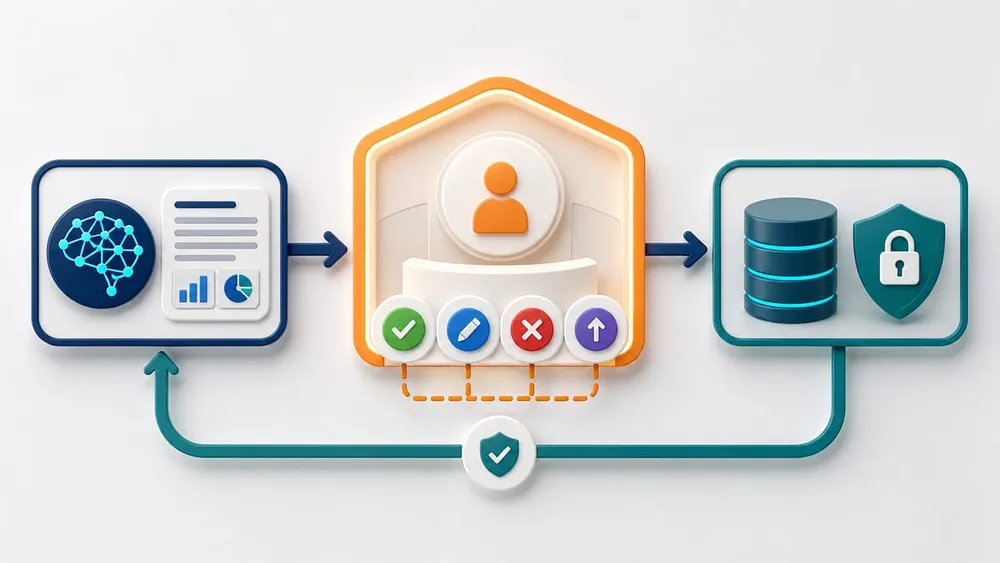
Pause at the Boundary Between Proposal and Consequence
The agent should prepare a specific action and the evidence behind it. A person then approves, edits or rejects that action before the execution tool receives permission.
How to Add a Human in the Middle
A useful approval system is risk-based. If every database read needs approval, people become a bottleneck and start approving requests without attention. If no action needs approval, the agent has excessive autonomy.
Create an Action Risk Matrix
| Action type | Default handling | Examples |
|---|---|---|
| Read-only, low sensitivity | Allow automatically within scope and rate limits. | Read a public policy, retrieve a permitted product record, inspect a test result. |
| Reversible draft | Allow in a sandbox or draft state. | Draft an email, prepare a CRM update, change code on a task branch. |
| External or customer-visible | Require review unless a narrow policy explicitly allows it. | Send a message, publish content, submit a support response. |
| Financial, legal or people-impacting | Require an authorised human and stronger evidence. | Release payment, approve refund, reject an applicant, change entitlement. |
| Destructive, privileged or production-changing | Require explicit approval, least privilege, verification and rollback planning. | Delete data, change access, rotate credentials, deploy to production. |
Show the Reviewer the Proposed Action—not Just a Summary
An approval screen should include:
- the exact tool and arguments that will execute;
- the target account, environment, recipient or resource;
- a readable before-and-after diff where applicable;
- the evidence the agent used;
- the expected effect and whether it is reversible;
- policy checks, warnings and missing information;
- who requested the action and which agent run produced it;
- options to approve once, edit, reject with a reason or escalate;
- an expiry time so old approvals cannot execute against changed state.
Do not present a green “approve” button beside an opaque sentence such as “the agent wants to continue”. The approver needs enough context to make a meaningful decision.
Revalidate After Approval
Approval is not execution. The target may change while the request waits. Before the tool runs, check the current version, balance, permissions, policy and idempotency key again. If the approved proposal is stale or materially different, cancel it and request a new approval.
Keep an Alternative Human Path
Australian Government guidance recommends maintaining human control and alternative pathways for critical functions. A user should be able to reach a person, contest a decision, report unexpected behaviour and continue essential work if the agent is paused or unavailable.
TypeScript Example: Pause Before a Production Deployment
The OpenAI Agents SDK supports approval-gated tools. When a tool requires approval, the run pauses and returns interruptions. Your application stores the run state, records the pending decision and resumes from that state after an authorised reviewer approves or rejects it.
import { Agent, RunState, Runner, tool } from '@openai/agents';
import { z } from 'zod';

const deployRelease = tool({
  name: 'deploy_release',
  description: 'Deploy a tested release to an environment',
  parameters: z.object({
    releaseId: z.string(),
    environment: z.enum(['staging', 'production']),
    expectedVersion: z.string(),
  }),
  needsApproval: async (_context, input) =>
    input.environment === 'production',
  execute: async (input) => {
    return deploymentService.deploy(input);
  },
});

const agent = new Agent({
  name: 'Release agent',
  instructions: [
    'Inspect test and security results before proposing deployment.',
    'Never deploy to production without explicit approval.',
    'Stop if the release changed after approval was requested.',
  ].join(' '),
  tools: [deployRelease],
});

const runner = new Runner({
  toolExecution: { preApprovalInputGuardrails: true },
});

let result = await runner.run(agent, userRequest);

if (result.interruptions.length > 0) {
  await approvalStore.save({
    runId,
    state: result.state.toString(),
    interruptions: result.interruptions,
    expiresAt,
  });
  return { status: 'awaiting_approval', runId };
}
After a decision, rebuild the same agent graph, restore the stored state, resolve the pending interruption and resume the original run:
const pending = await approvalStore.load(runId);
const state = await RunState.fromString(agent, pending.state);
const interruption = state.getInterruptions()[0];

if (decision.approved) {
  state.approve(interruption);
} else {
  state.reject(interruption, { message: decision.reason });
}

const resumed = await runner.run(agent, state);
The exact storage and identity code will depend on your application. Treat serialized run context as persisted data: do not place secrets in it unless you intentionally want them stored and transported with the workflow.
Approval State Machine
Use explicit states rather than a single Boolean:
RUNNING
  ├─→ COMPLETED
  ├─→ FAILED
  ├─→ BLOCKED
  └─→ AWAITING_APPROVAL
          ├─→ REJECTED
          ├─→ EXPIRED
          ├─→ SUPERSEDED
          └─→ APPROVED → REVALIDATING → EXECUTING → VERIFYING
This makes retries, expiry, changed inputs and audit reporting easier to reason about.
Guardrails, Permissions and Security
Human approval is one control, not the whole safety system. OWASP describes excessive agency as a combination of excessive functionality, excessive permissions or excessive autonomy. Reduce all three.
- Minimise tools: expose only the functions required for the workflow.
- Minimise permissions: use task-specific identities and narrow API scopes.
- Validate inputs: enforce schemas, ownership and business rules in code.
- Constrain outputs: validate generated SQL, code, messages or structured actions before use.
- Treat retrieved content as untrusted: documents, web pages and emails can contain prompt injection.
- Separate environments: use sandbox, staging and production credentials with different capabilities.
- Limit runtime: cap turns, tool calls, concurrency, spending and elapsed time.
- Verify side effects: confirm that an action produced the intended result and no unexpected changes.
OpenAI's Agents SDK distinguishes input, output and tool guardrails. Agent-level input and output checks do not automatically wrap every tool call in a multi-agent workflow. Use tool guardrails when every custom function-tool invocation needs validation, and run relevant checks before displaying a proposed action to the human reviewer.
State, Memory and Privacy
Store only the state required to resume and audit the task. Separate:
- short-lived working context;
- durable business records;
- approval records;
- long-term user memory;
- secrets and credentials, which should remain in secure infrastructure rather than prompts or general run state.
Set retention rules and access controls. Redact sensitive fields from traces and approval notifications. If a reviewer should not see personal information, do not rely on the model to hide it—remove or mask it before rendering the approval.
Tracing and Auditability
Record enough to reconstruct the workflow:
- run, user and correlation identifiers;
- agent and policy version;
- model and tool versions;
- tool requests and results, subject to privacy controls;
- guardrail outcomes;
- approval request, reviewer, decision, reason and timestamp;
- final outcome and verification result.
OpenAI's tracing can capture model generations, tool calls, handoffs and guardrails. Those traces may also contain sensitive inputs and outputs, so configure capture and retention deliberately.
Evaluate the Whole Trajectory
A final answer can look correct even when the agent used the wrong data, called unnecessary tools or nearly performed an unsafe action. Test the path as well as the outcome.
Your evaluation set should include:
- normal successful tasks;
- missing or ambiguous information;
- tool timeouts and partial failures;
- duplicate requests and retry behaviour;
- prompt injection in retrieved content;
- requests outside the user's permissions;
- actions just below and above approval thresholds;
- approval, rejection, expiry and changed-state scenarios;
- budget exhaustion and safe stopping;
- recovery after application restart.
Anthropic notes that agents operate across multiple turns, call tools and modify state, so errors can propagate. Run evaluations in an isolated environment with seeded data and inspect both the final result and the sequence of actions.
Agentic Development Mistakes to Avoid
Most production failures are architecture and operating-model problems, not a lack of prompt cleverness.
Starting Multi-Agent
Adding managers, specialists and handoffs before a single-agent baseline exists makes failures harder to isolate.
One Powerful Tool
An open-ended shell, browser or admin API is harder to validate than narrow task-specific functions.
Approval Fatigue
Requiring approval for harmless reads trains people to click through important decisions without scrutiny.
Opaque Approval
A reviewer cannot make a meaningful decision without exact arguments, targets, evidence and consequences.
Prompt-Only Policy
Instructions help behaviour, but code must enforce permissions, limits, ownership and high-impact boundaries.
No Replayable Tests
Manual demos hide regressions. Keep versioned evaluation tasks, environments, graders and trace review.
A Practical Delivery Roadmap
Phase 1: Shadow Mode
The agent reads real or representative inputs and proposes actions, but a person completes the work through the existing process. Compare the proposal with the human decision and collect failure cases.
Phase 2: Draft Mode
Allow the agent to create reversible drafts in a controlled system: a support response, CRM change set, code branch or payment proposal. Every commit remains human-owned.
Phase 3: Risk-Based Approval
Automate low-risk actions that pass deterministic checks. Pause higher-risk tools based on action type, amount, environment, recipient, data class or affected person.
Phase 4: Bounded Autonomy
Expand automation only after evaluations and production monitoring show acceptable performance. Keep kill switches, budgets, least privilege, incident response and periodic review.
Australian Governance Considerations
The Australian Government's Guidance for AI Adoption calls for clear accountability, risk assessment, testing, monitoring and human control across the system lifecycle. For each agentic system, document:
- the accountable owner and authorised approvers;
- intended use, limitations and foreseeable misuse;
- affected stakeholders and possible harms;
- the tools, data and third parties involved;
- acceptance criteria and evaluation results;
- where humans monitor, intervene, override or terminate;
- feedback, contestability and incident processes;
- alternative pathways for critical functions.
This is implementation guidance, not legal advice. Privacy, employment, consumer, financial, sector and record-keeping obligations can change what must remain under human control.
Final Recommendation
Build agents as controlled software systems. Start with one bounded workflow, narrow tools, explicit state and measurable outcomes. Let the model decide within a safe operating envelope, but use application code to enforce permissions and policy.
Place people at the boundary between proposal and consequence. A strong human-in-the-middle design lets the agent do the tedious preparation while giving an informed, accountable person the power to approve, edit, reject, pause or terminate the action.
Agentic Development FAQs
Short answers about architecture, approvals, security and human control.
Sources Checked
- OpenAI — A Practical Guide to Building Agents
- OpenAI Agents SDK — Human-in-the-loop
- OpenAI Agents SDK — Guardrails
- OpenAI Agents SDK — Tracing
- Anthropic Engineering — Building Effective AI Agents
- Anthropic Engineering — Demystifying Evals for AI Agents
- OWASP GenAI Security Project — Excessive Agency
- Australian Government National AI Centre — Guidance for AI Adoption
Start With One Valuable Process and Clear Approval Boundaries
VaniTech can help map the workflow, design tools and approval gates, build the agent, connect business systems and establish testing, monitoring and governance.