
AI Browser Automation Security: Guardrails and Monitoring
Secure browser-based AI automation with domain guardrails, least privilege, human approval, session evidence and a practical rollout plan.
Browser-based AI automation has moved from a demonstration feature to an operational control problem. A workflow that opens websites, reads pages, enters data, downloads files or submits forms can save time across reporting, support, procurement and administration. It can also reach the wrong destination, expose a credential, repeat an action or leave a business record half-finished.
The topic became especially timely in September 2026. Cloudflare added Browser Run guardrails that restrict a session to permitted hostnames on 14 September, then expanded Session Recordings on 18 September with searchable logs, network evidence, HAR export and DOM inspection. Separately, the Australian Signals Directorate published updated guidance on AI-agent identities, least privilege, logging and agentic AI harnesses.
The useful lesson is broader than one platform: do not ask a model to behave safely and hope for the best. Put enforceable controls around the browser, credentials, approvals, evidence and business outcomes.
Four changes make browser automation a business priority
The technology is becoming more capable at the same time as security guidance is becoming more explicit.
Hard destination controls
New hostname guardrails can constrain a browser session to approved websites and required dependencies.
Better failure evidence
Session recordings can now expose console logs, network activity, timing and final DOM state without reproducing the run.
Human intervention
Live browser handoff can pause automation for MFA, sensitive entry, difficult exceptions or approval.
Australian control guidance
ASD now explicitly addresses unique AI-agent identities, harness controls, least privilege, monitoring and accountability.
Treat the browser as part of the AI harness
ASD describes the agentic AI harness as the software layer connecting a model to tools, data, memory and workflows. That distinction matters because the browser is not merely a screen. It is an execution tool with cookies, storage, credentials, network access and the ability to change external systems.
A prompt such as “only use our supplier portal” is guidance. A session-level hostname allowlist is an enforceable boundary. A prompt such as “ask before purchasing” is guidance. A workflow state that cannot submit until a named person approves is an enforceable boundary.
Use the model for interpretation and planning, but place authority in deterministic code, identity controls and business rules. This reduces the consequences of prompt injection, ambiguous instructions, navigation surprises and ordinary software defects.
Map the failure before choosing the control
| Risk | Example | Primary control |
|---|---|---|
| Destination drift | A link or injected instruction sends the browser to an unapproved host | Hostname allowlist and redirect tests |
| Excess authority | One shared account can view, edit and approve everything | Unique identity, narrow role and task-scoped credentials |
| Irreversible action | The workflow submits a payment, order, deletion or customer message | Human approval and deterministic policy gate |
| Duplicate side effect | A timeout causes a form or transaction to be submitted twice | Idempotency, reconciliation and retry policy |
| Invisible failure | The script reports success although the business record was not updated | Outcome verification and session evidence |
| Sensitive evidence | Logs or recordings retain customer or authentication data | Data minimisation, redaction, access control and retention policy |
Start with business impact, not tool features. The same navigation error has very different consequences in a public content-monitoring job and an authenticated finance workflow.
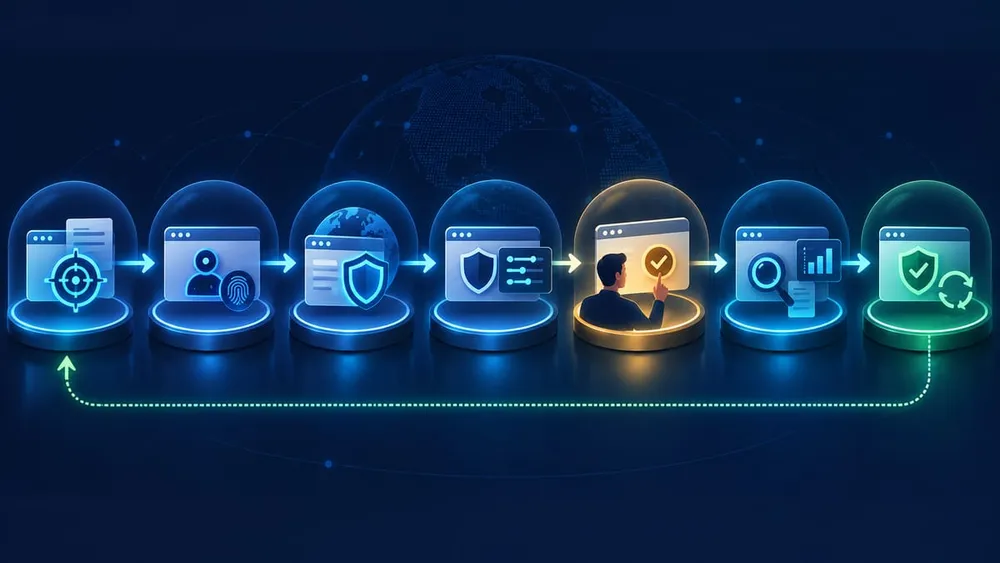
Use seven layers from task definition to recovery
A seven-layer browser automation control stack
Each layer limits a different failure mode; no single setting is enough.
1. Constrained task
Define the allowed inputs, expected result, stop conditions and actions the workflow must never take.
2. Unique identity
Give the automation its own account or service identity so its actions are distinguishable and removable.
3. Destination allowlist
Permit only the target website and dependencies proven necessary for the workflow.
4. Narrow authority
Use the minimum role, data scope, session lifetime and action set required for the task.
5. Approval gates
Pause before purchases, submissions, deletions, publishing, customer contact or other high-impact actions.
6. Evidence and alerts
Capture session, network, application and business logs, then alert on unusual routes, retries and outcomes.
7. Reconcile and recover
Confirm the intended record changed once, handle partial completion and provide a tested shutdown and rollback path.
Build domain guardrails from observed dependencies
Cloudflare's Browser Run guardrails limit HTTP and HTTPS requests to permitted hostnames. A short inline allowlist can contain up to 50 entries, while centrally maintained domain sets can support shared policies. If neither is configured, requests remain unrestricted.
Do not start with a broad wildcard because the first run failed. Build the allowlist from a controlled discovery session and classify every dependency: the primary application, identity provider, API host, static assets, fonts, analytics and payment or file services. Decide which are required for function and which are merely convenient.
- Use exact hostnames wherever possible.
- Include redirect destinations deliberately, especially for SSO.
- Test blocked navigation and missing-dependency behaviour.
- Keep development, test and production policies separate.
- Version the policy and review changes like application code.
A hostname allowlist does not decide which page, record or action is safe inside an allowed site. Pair it with role permissions, action rules and outcome validation.
Separate the agent from the person it serves
ASD's September 2026 system-access guidance says each AI agent should have an identity distinct from personnel and from other agents. For an SME, this improves both security and supportability: access can be revoked without disabling a staff member, logs can identify the actor, and each workflow can receive only the permissions it needs.
Avoid sharing an owner's or administrator's persistent browser profile. Prefer a dedicated account with a narrow role, short session lifetime and no access to unrelated functions. Keep secrets out of prompts and page content. Where a workflow needs a human's authority, use an explicit approval or handoff rather than borrowing the human's identity for the entire run.
Maintain a small register recording the workflow owner, agent identity, systems reached, credential location, permissions, data classification, approvers and emergency disable procedure. Remove identities when a workflow is retired.
Put humans at consequence boundaries
Human oversight is most useful at the point where consequences change, not as a blanket requirement to watch every click. Cloudflare's Human in the Loop workflow supports structured handoff for MFA, sensitive data entry, complex interactions and verification steps. The automation can pause, present a live session, receive a success or failure result and then continue.
Define approval gates for actions such as:
- submitting a payment, order, quote or refund;
- sending a customer or supplier message;
- publishing content or changing prices;
- deleting or overwriting records;
- accepting legal terms or changing account access;
- continuing after an unexpected page, warning or reconciliation mismatch.
A read-only Live View link is useful for observation, but Cloudflare notes that the link is still a signed credential that exposes visible page data. Generate it server-side, limit its lifetime and share it only through an approved channel.
Capture evidence that answers business questions
Cloudflare's expanded Session Recordings can show console logs, request and response details, timing, raw network data or HAR, and the final DOM. The recording itself captures structured DOM and interaction events rather than pixels. That is useful evidence, but it is not the same as proof that the business outcome was correct.
Correlate the browser session ID with application logs and the target system's record ID. For each run, record the requested task, initiating user, agent identity, policy version, approved domains, credential scope, approval decisions, final state and reconciliation result.
Alert on outcomes that matter: repeated login failures, navigation outside the expected route, an unusual number of requests, repeated submissions, unapproved downloads, an unexpected final domain, reconciliation differences or a sudden increase in session duration and cost. ASD recommends comparing agent reports with independent system logs rather than trusting self-reported success.
Treat recordings and HAR files as sensitive operational data
Cloudflare retains Browser Run recordings for 30 days and masks input-field values by default. However, recordings and network exports can still expose page content, URLs, headers, payloads, responses, identifiers and business context. Masking one field type does not make the evidence harmless.
Before enabling recording in production, decide:
- which workflows genuinely need full recording;
- who can view or export recordings and HAR files;
- which headers, query strings, payloads and responses require redaction;
- whether recordings contain personal, payment, health or commercial data;
- how provider retention aligns with internal retention and incident requirements;
- how an investigation preserves necessary evidence without copying everything indefinitely.
Also understand capture limits. Canvas, cross-origin iframes, audio, video and WebGL may not be represented fully. Treat a recording as one evidence source, not a perfect reconstruction.
Design retries around business side effects
A browser timeout does not prove that the target action failed. The request may have reached the server while the confirmation page failed to load. Blindly repeating the last click can create a duplicate order, message or record.
Before retrying a write action, query or inspect the target system for a stable business identifier. Use idempotency keys when an API is available. Record the last confirmed state, cap retry attempts and move ambiguous runs to human review. The shutdown procedure should revoke or pause the workflow, invalidate active sessions where possible and preserve enough evidence for investigation.
Test recovery deliberately: browser closure during submission, expired login, MFA challenge, blocked dependency, target-site redesign, partial download, duplicate confirmation, provider rate limit and downstream API failure. A successful demonstration is not a recovery plan.
A 30-day rollout plan for an SME
- Week 1: choose one bounded workflow. Select a repetitive, reversible task with a clear owner and measurable result. Document inputs, destinations, data and prohibited actions.
- Week 2: implement hard controls. Create the agent identity, narrow its role, build the hostname allowlist, isolate secrets and define approval and stop conditions.
- Week 3: test failure and evidence. Enable recording in a safe environment, exercise redirects and blocked hosts, force timeouts and duplicates, test human handoff and verify logs can reconstruct the run.
- Week 4: run a supervised pilot. Limit volume, reconcile every result, review exceptions daily and compare time saved against support effort, failures and risk.
Expand only when the pilot proves both business value and control effectiveness. Add one dimension at a time: more volume, another destination or a higher-impact action, but not all three together.
Measure safety and value together
| Measure | What it reveals |
|---|---|
| Successful reconciled outcomes | Whether the business result, not merely the browser run, completed correctly |
| Human interventions per 100 runs | Where the workflow still encounters uncertainty or risky decisions |
| Blocked destination attempts | Whether links, redirects or instructions are pushing beyond approved scope |
| Duplicate or partial actions | Whether retries and failure recovery are safe |
| Mean time to diagnose | Whether recordings and correlated logs actually reduce support effort |
| Hours saved after review | Whether automation produces net operational value after oversight and maintenance |
Do not reward the automation merely for completing more runs. A higher throughput of unreconciled or poorly evidenced work increases operational risk.
Questions to ask your automation partner
- Which exact domains and third-party dependencies can each workflow reach?
- What happens if a redirect or page instruction points somewhere else?
- Does every agent have a distinct identity and minimum-permission role?
- Which actions require human approval, and can code enforce that requirement?
- How are secrets kept out of prompts, recordings and downloadable logs?
- Can we correlate a browser session with the final business record?
- What evidence is retained, for how long, and who can access or export it?
- How does the system prevent duplicate writes after a timeout?
- Who can stop the workflow, revoke access and investigate an incident?
- What measurable pilot result must be achieved before authority expands?
A credible answer includes a current architecture, policy configuration, test evidence, named owners and a working recovery process.
The practical takeaway
Browser automation becomes safer when the workflow is designed as a controlled business system rather than a clever script. Restrict where it can go, separate who it is, limit what it can do, pause before consequences, keep useful evidence and verify the business result independently.
The new Cloudflare controls make two parts of that architecture easier: destination restriction and post-run diagnosis. Australian guidance supplies the broader model. The decision for an SME is not whether browser-based AI can click through a task. It is whether the organisation can explain, constrain, observe and recover that task when reality differs from the happy path.
Sources Checked
- Cloudflare Browser Run changelog
- Cloudflare Browser Run guardrails documentation
- Cloudflare Browser Run session recording documentation
- Cloudflare Browser Run Live View documentation
- Cloudflare Browser Run Human in the Loop documentation
- ASD: Agentic AI harnesses
- ASD: Careful adoption of agentic AI services
- ASD: Guidelines for system access