
BigCommerce Backorders: Setup and Integration Guide
Learn how to configure BigCommerce backorders across inventory, storefront, checkout and connected systems, with a practical testing and rollout plan.
BigCommerce made backorder messaging generally available on 1 September 2026. Merchants can now carry backorder quantities, limits and messages through more of the commerce stack, from inventory and product pages to carts, checkout, orders and headless storefront APIs.
The commercial opportunity is straightforward: keep accepting orders for stock that can genuinely be supplied later while giving customers a clearer expectation before they pay. The implementation risk is also straightforward: if your website says one thing while the warehouse, ERP, order-management system or service team sees another, the feature can create more confusion than it removes.
This guide is for Australian ecommerce owners, operations managers, customer-service leads, developers and technology decision-makers using BigCommerce. It explains what changed, which systems need attention, how to design the customer message and what to test before switching backorders on broadly.
Backorder state now travels further
The release connects shopper messaging with operational inventory and order data instead of treating backorders as a product-page label.
Shopper surfaces
Product detail, cart, checkout and order-confirmation experiences can show relevant backorder information.
Inventory controls
Settings cover quantity, availability prompts, variant messages, quantity on hand and shipping expectations.
Operational data
Inventory and Orders APIs expose backordered quantity, limits and messages for connected systems.
Headless support
Storefront REST and GraphQL data lets custom storefronts render backorder status deliberately.
Why BigCommerce backorders matter now
A backorder is not the same as an ordinary out-of-stock item. The merchant is intentionally accepting an order today because it expects to supply the item later. That can preserve revenue, improve availability for repeat customers and make demand visible to purchasing teams. It also creates a promise that must survive every hand-off.
BigCommerce's release provides a more complete data path. Store and channel settings control what shoppers see. Location inventory can expose available_to_sell, qty_backordered, backorder_limit and a per-item message. Cart responses can include a stockPosition object. Order lines can identify the quantity backordered for fulfilment and service workflows.
For Australian merchants, the message is not merely a conversion feature. The ACCC says businesses that know about a supply delay should give clear and accurate information about stock availability, likely timing and the solution if supply cannot happen on time. It also says customers should be updated proactively when delays arise after purchase. Platform configuration helps surface the facts, but the business remains responsible for the accuracy of the promise.
This is practical systems guidance, not legal advice. Have your customer terms and high-risk scenarios reviewed for your circumstances.
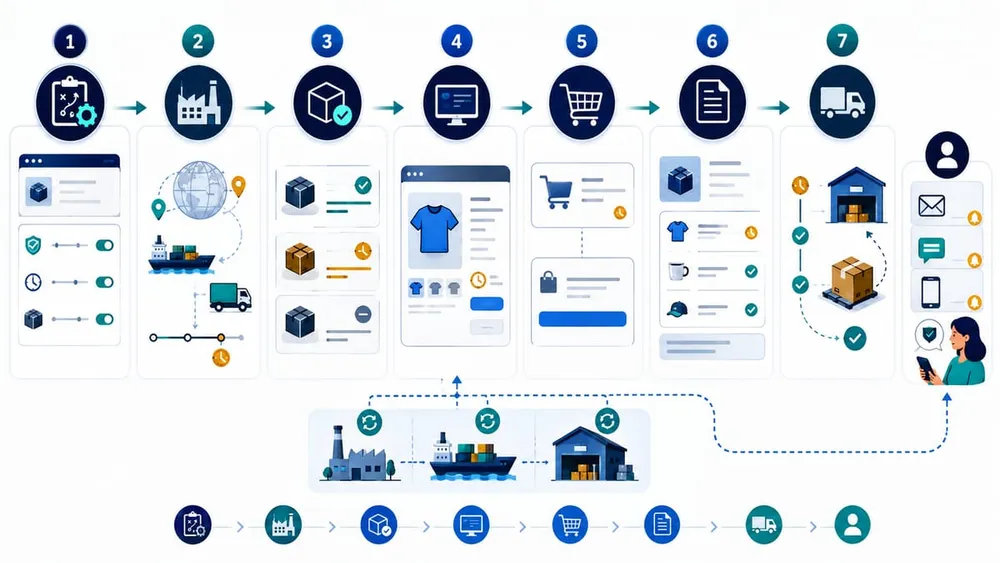
Carry one promise from stock to service
Define the backorder source of truth first
Before enabling a storefront message, decide which system owns each operational fact. BigCommerce may be the source of truth for smaller stores. A larger merchant may let an ERP, warehouse platform or order-management system own available-to-sell quantity and expected replenishment dates. Either model can work; two systems independently editing the same promise will not.
| Fact | Recommended owner | Downstream consumers |
|---|---|---|
| Whether an SKU can be backordered | Merchandising or inventory policy | BigCommerce, storefront, sales channels |
| Backorder limit | Inventory planning system | BigCommerce and order validation |
| Expected ship window | ERP, purchasing or supplier workflow | Product page, cart, service team, notifications |
| Quantity backordered on an order | Commerce order record | OMS, WMS, finance, customer service |
| Delay update and resolution | Operations or customer-service workflow | Email/SMS, helpdesk, customer account |
Write the ownership down. Include the refresh frequency, acceptable staleness, fallback message and person responsible when the feed fails. If a supplier date is uncertain, use a truthful range or a clear “we will confirm” workflow rather than turning an estimate into a false guarantee.
Configure customer messaging as a journey
The API exposes separate controls because each page answers a different customer question. Do not copy one generic “available on backorder” sentence everywhere.
- Product page: Can I buy this SKU, how much is available now and what is the likely dispatch window?
- Cart: Which units are ready and which will be delayed? Will the order ship together or separately?
- Checkout: What delivery expectation is the customer accepting before payment?
- Order confirmation: Which lines are backordered and what happens next?
- After purchase: Has the expected date changed, and can the customer cancel, substitute or split the order?
BigCommerce inventory settings include toggles for showing quantity on backorder, quantity on hand, the per-variant message, an availability prompt and a default shipping-expectation prompt. The documented defaults are off, which is a useful reminder to choose the message deliberately instead of assuming the platform will publish it for you.
Write messages that operations can keep true
Prefer concrete operational language: “Two ready to ship; three expected in 10–15 business days” is more useful than “More coming soon.” Avoid exact dates unless the supply feed and customer-update process can support them. Make split-shipment, cancellation and payment treatment clear where they affect the order.
Map every connected system
| System | What to verify | Failure symptom |
|---|---|---|
| ERP or inventory platform | Backorder eligibility, limits, replenishment date and location mapping | Website keeps selling after supply becomes uncertain |
| Stencil theme | Product, cart and confirmation templates render enabled fields accessibly | Data exists but customers never see it |
| Headless storefront | REST or GraphQL queries request and display stock position consistently | Custom frontend treats backordered units as ready stock |
| Checkout customisation | Mixed ready/backordered carts show the correct shipping expectation | Customer accepts an ambiguous fulfilment promise |
| OMS or WMS | Order-line backordered quantity survives import and allocation | Warehouse attempts to fulfil units that are not available |
| CRM or helpdesk | Agents can see status, expected window and last customer update | Support gives a different answer from the website |
| Email and SMS | Templates distinguish ready, backordered, split and delayed lines | Confirmation implies the whole order is shipping |
| Analytics and finance | Reports separate ordered, allocated, shipped, cancelled and backordered value | Revenue and demand reports hide fulfilment exposure |
For a headless build, use the platform fields as structured data. The Storefront Cart API can return quantityOnHand, quantityBackordered, quantityOutOfStock and backorderMessage inside stockPosition when the relevant sub-resource is included. Render those values through one shared component so the cart and checkout do not drift apart.
Run an end-to-end backorder test matrix
Do not approve the change after checking one product page. Test the complete order lifecycle in a non-production environment or with controlled SKUs and orders.
- Fully available: all units are ready and no backorder language appears.
- Partially available line: part of one SKU is ready and the remainder is backordered.
- Mixed cart: one line is ready and another is entirely backordered.
- Limit reached: requested quantity exceeds the allowed backorder quantity and the customer receives a usable response.
- Multiple locations: allocation and messages remain correct when stock exists in different locations.
- Supplier date moves: the source date changes after purchase and the customer-update workflow triggers.
- Cancellation or substitution: service staff can resolve a delayed line without corrupting stock or payment records.
- Integration outage: stale or missing inventory data causes a safe fallback rather than unlimited selling.
For each scenario, compare the product page, cart, checkout, confirmation, BigCommerce order, downstream order record, warehouse view, customer notification and reporting output. Capture screenshots and order IDs so defects are reproducible.
Move from policy to controlled launch
Start with a small product group and expand only after the operational promise survives real orders.
Week 1: Decide
Choose eligible SKUs, limits, message rules, system owners, customer remedies and safe fallbacks.
Week 2: Connect
Map inventory, storefront, checkout, order, fulfilment, service, notification and reporting fields.
Week 3: Test
Run the full scenario matrix, verify accessibility and reconcile each order across connected systems.
Week 4: Pilot
Launch a controlled catalogue segment, monitor exceptions daily and expand only when data stays consistent.
Monitor the promise after launch
A healthy backorder programme needs more than sales totals. Track how often the business creates a delayed promise and how reliably it closes that promise.
- backordered units and value by SKU, supplier and location
- orders that exceed the original expected ship window
- date changes and customers notified
- cancellation, substitution and refund rate for backordered lines
- support contacts caused by availability or delivery confusion
- difference between source inventory and BigCommerce state
- integration failures, stale-feed age and fallback activations
Review the highest-risk exceptions daily during the pilot. A growing backorder number is not automatically bad if the dates remain accurate and customers accept the trade-off. A small number of old, unexplained orders is more concerning.
Common implementation mistakes
- enabling backorders store-wide before defining eligible products and limits
- showing a product-page message that disappears in cart or checkout
- treating supplier estimates as guaranteed dates
- failing to pass backordered quantity into the OMS, WMS or service desk
- assuming a headless storefront receives optional stock fields automatically
- not defining what happens when the inventory feed becomes stale
- sending the original date once and never notifying customers about changes
Sources Checked
- BigCommerce: 1 September 2026 developer changelog
- BigCommerce: Update Inventory Settings
- BigCommerce: Get Inventory at Location
- BigCommerce: List Inventory at Locations
- BigCommerce: Create Cart and stockPosition reference
- ACCC: Supplying products or services that are paid for
- ACCC: Online retailer delivery enforcement outcome