
Card Surcharge Changes: Website Checklist for October 2026
Prepare for Australia's 1 October 2026 card surcharge changes with a practical checklist for websites, checkout, invoices, payments and pricing.
Australian businesses that add a fee when customers pay by card have a firm systems deadline. From 1 October 2026, eftpos, Mastercard and Visa intend to introduce no-surcharge rules for prepaid, debit and credit card payments. American Express has also decided to remove surcharging from the same date.
The Reserve Bank of Australia explains that it has removed its prohibition on no-surcharge rules, allowing card networks to implement the change through their scheme rules and merchant contracts. The ACCC's current guidance tells businesses to review pricing, remove surcharge notices from websites and apps, disable surcharging in payment systems and contact payment providers.
This is not only a point-of-sale change. Surcharge logic can sit in ecommerce checkout, booking platforms, subscription billing, invoices, payment links, mobile apps, custom APIs, accounting exports, marketing content and customer-service scripts. This guide is for Australian business owners, ecommerce teams, operations managers, finance teams and technology decision-makers who need those channels to agree on 1 October.
Four facts to anchor the change
Treat the date, payment scope, enforcement path and transition rule separately.
1 October 2026
The announced start date for no-surcharge rules across eftpos, Mastercard, Visa and American Express card payments.
Credit, debit and prepaid
The RBA guidance covers card-payment surcharges across these product types on the listed networks.
Contracts and pricing law
Networks and payment providers enforce scheme rules; the ACCC continues to oversee misleading prices and consumer-law obligations.
Current rules until 30 September
Businesses must keep following the existing surcharge rules until the new arrangements take effect.
What changes on 1 October—and what does not
The change concerns an extra fee applied because a customer pays with a card. According to the RBA, eftpos, Mastercard and Visa have each decided to introduce no-surcharge rules from 1 October; American Express has made the same decision. Final application, including any exceptions, is governed by each network's rules and can change, so businesses should confirm their position with their payment provider.
It does not automatically remove every fee shown by a business. Weekend and public-holiday surcharges, booking fees and service fees are different categories. However, relabelling a card fee does not make it compliant. The ACCC warns that describing a card surcharge as another fee can be misleading when the charge still only applies to a card payment.
Important edge cases
- B2B payments: card payments between businesses are not automatically exempt. Check the relevant network rules and merchant agreement.
- Invoices already issued: a card payment made on or after 1 October may be affected even if the invoice was sent earlier.
- Other payment methods: the RBA does not currently regulate surcharges on non-card methods in the same way, but normal price-display and misleading-conduct rules still matter.
- Discounts: businesses can offer a cash or PayID discount, but must display the full undiscounted price clearly and not make the discounted price more prominent.
- Transition: current rules remain in force through 30 September 2026.
This article provides general implementation guidance, not legal advice. Confirm your contractual position with your card network, acquirer or payment service provider.
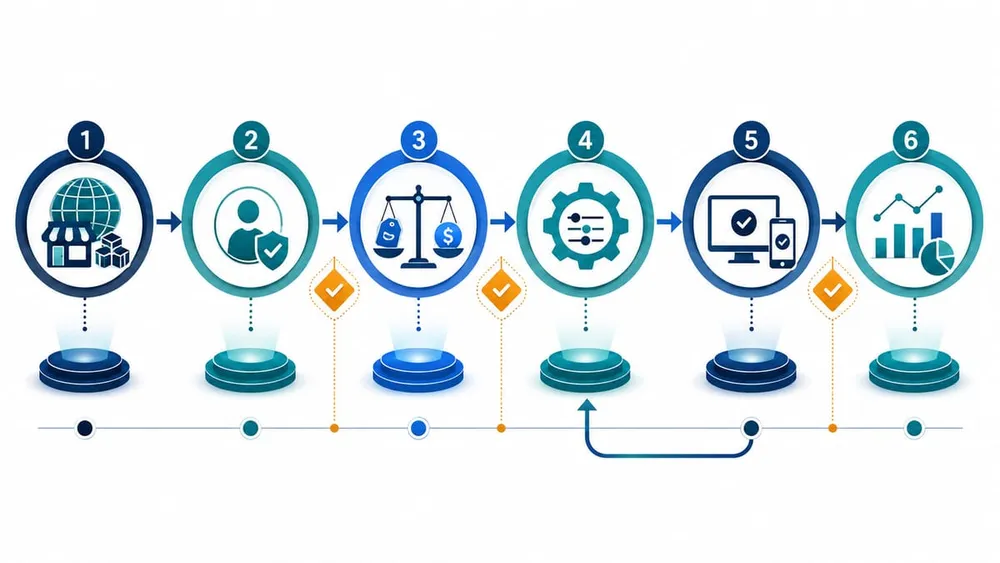
Trace every place a surcharge can appear
Build a surcharge inventory before changing settings
Start with the customer journey, then follow the resulting data into operations and finance. A single checkout switch may not update a separate booking engine, old payment link, recurring plan or custom invoice integration.
| System or channel | What to find | Evidence to keep |
|---|---|---|
| Website and ecommerce | Product pages, cart notices, checkout extensions, theme copy, scripts, terms, FAQs and structured data mentioning card fees. | URL list, screenshots and the owner of each template or integration. |
| Bookings and forms | Booking fees, card-only fees, deposits, saved quotes, confirmation emails and embedded third-party payment widgets. | Representative bookings for each payment type and fee combination. |
| Payment provider | Surcharge configuration, effective time zone, supported exemptions, payment links, virtual terminal and automatic cutover behaviour. | Provider advice, account settings and a dated configuration export or screenshot. |
| Invoices and subscriptions | Invoices issued before October, card-on-file billing, recurring fees, customer portal copy and accounting-system add-ons. | Test invoice, renewal and payment-link results on both sides of the cutoff. |
| Apps and APIs | Fee calculations, webhooks, middleware, mobile checkout and code that maps tender types to additional charges. | Code references, test cases, API payloads and deployment ownership. |
| Finance and reporting | Tax treatment, fee line items, settlement reconciliation, general-ledger mappings, dashboards and margin reports. | Before-and-after transaction journals and settlement comparisons. |
| Customer communications | Price lists, ads, proposals, signage, call scripts, receipts, refund templates and support macros. | Approved replacement copy and publication date. |
Mark each item as card surcharge, another fee, or payment-method discount. That classification determines whether it should be removed, retained with clear disclosure, or reviewed with professional advice.
Update pricing without creating a new problem
Businesses still pay to accept cards after surcharge removal. The RBA says those costs can be reflected in overall prices, and recommends reviewing payment plans and providers. But a commercial pricing decision must be separated from the technical removal of a fee.
The ACCC's price-display guidance requires a single minimum total price including taxes and unavoidable or pre-selected extra fees. If checkout shows a different price from the advertised or displayed price, the business must charge the lowest price or stop the sale until the error is corrected.
A practical pricing process
- Measure current cost. Review merchant statements by payment type, fixed fee, percentage fee, chargeback cost and transaction volume.
- Ask the provider what changes. Confirm whether the provider will disable surcharging automatically and whether account, terminal or integration changes are required.
- Choose the commercial response. Absorb the cost, adjust overall prices, change provider or plan, enable lower-cost routing where suitable, or offer a clearly disclosed payment-method discount.
- Update one source of truth. Change catalogue, service, booking and contract prices before derived displays and campaigns.
- Review the explanation. Do not tell customers a broader increase is solely caused by surcharge removal when other costs are also included.
For businesses with many products or locations, export prices and fee rules for comparison rather than relying on manual page checks alone.
Change checkout and payment integrations safely
The visible checkout total is only one layer. A useful implementation traces the amount from the cart through the gateway, order, invoice, receipt, refund, settlement and accounting export.
Configuration checks
- Disable percentage and flat card-surcharge rules for affected networks at the provider's documented cutover time.
- Check saved payment links, virtual terminals, point-of-sale devices and mobile apps separately from the website.
- Remove checkout labels, consent text and validation rules that assume a card fee is present.
- Confirm taxes, discounts, deposits, gift cards and refunds still calculate from the intended base amount.
- Update webhooks and integrations that expect a surcharge line item or map it to a finance account.
- Preserve other valid fee rules without applying them only to card users or describing them inaccurately.
Code checks
Search custom code and integration settings for terms such as surcharge, card fee, payment fee, merchant fee, tender type and network name. Also inspect generic adjustment or service-fee logic: a rule may be implemented under an internal name that never appears to customers.
Do not delete historical surcharge data from existing orders. Old transactions, refunds and reports still need an auditable record of what was charged under the rules applying at that time.
Test the cutover, not just the new steady state
Use a test environment or provider sandbox where possible, then run a small controlled production check after the change. Cover the boundary cases most likely to be missed.
- Standard online purchase. Test debit, credit and prepaid cards for each supported network. Confirm no separate card surcharge appears in cart, checkout, order, receipt or settlement.
- Invoice across the deadline. Create an invoice before 1 October and pay it after the cutoff. Confirm the link and finance record do not add an affected card fee.
- Recurring payment. Test a subscription renewal or card-on-file charge scheduled after the cutoff.
- Booking with a separate fee. Confirm a legitimate booking, weekend or public-holiday fee remains correctly classified, calculated and displayed.
- Payment-method discount. Verify the full price remains prominent and the discount appears only after the qualifying method is selected.
- Refund and cancellation. Refund an older transaction containing a surcharge and a new transaction without one. Confirm customer amount and finance treatment.
- Failure and retry. Decline a payment and retry with another card or method. Ensure stale fee data is not carried into the new attempt.
- Analytics and reconciliation. Compare the order total, gateway amount, settlement, tax, accounting journal and reporting dimensions.
Capture transaction IDs, timestamps, card network, displayed price, charged amount and downstream totals. Screenshots help explain the customer view; system records prove the integration result.
A four-week readiness plan
Week 1: inventory and confirm
- List every sales channel, provider, merchant account, payment method and surcharge rule.
- Ask providers for the effective date, time zone, automatic changes and any exceptions applying to your agreement.
- Identify invoices, subscriptions and bookings that cross 1 October.
Week 2: decide and configure
- Approve any overall price or payment-plan changes.
- Update a test environment, checkout configuration, payment links, invoice templates and affected custom code.
- Prepare replacement website, app, advertising and customer-service copy.
Week 3: test end to end
- Run the card, invoice, recurring, discount, refund and reconciliation scenarios.
- Resolve mismatches across commerce, gateway, CRM, accounting and reporting systems.
- Rehearse the production change and rollback for unrelated defects.
Week 4: release and monitor
- Publish price and content changes at the agreed cutover.
- Confirm provider and terminal settings and run sample transactions.
- Monitor payment failures, customer contacts, settlement differences and margin reporting.
- Keep evidence of provider advice, approvals, tests and the released configuration.
If the business uses several locations, gateways or custom payment integrations, assign one owner to reconcile the entire change. Individual vendors can confirm their piece; the merchant still needs to prove the complete customer and finance journey.
Australian card surcharge change FAQs
Make the surcharge cutover a controlled system change
Sources Checked
- Reserve Bank of Australia: Removal of payment surcharges from 1 October 2026 FAQs
- ACCC: Card surcharges (updated August 2026)
- ACCC: Price displays (updated August 2026)
- Visa Australia: Support for surcharge removal from 1 October 2026 (10 June 2026)
- Australian Payments Plus: Zero-surcharge limit for eftpos (4 June 2026)
- American Express Australia: Merchant response to RBA payments reform