
Contentful SAML Certificate Rotation: 21 Sept Guide
Prepare Contentful SSO for the 21 September 2026 SAML certificate rotation with an impact check, metadata update plan, login tests and recovery controls.
Contentful will rotate its SAML service-provider signing certificate on Monday 21 September 2026. The company announced the revised date on 14 September after moving the cut-over from 16 September. Organisations that verify Contentful's SAML request signatures or use its service-provider certificate to encrypt SAML assertions may need to refresh Contentful metadata in their identity provider.
The most important detail is sequencing. If your identity provider accepts multiple service-provider certificates, Contentful says to re-import the metadata before the cut-over so both certificates are available. If it accepts only one, Contentful says to re-import the metadata after the cut-over on 21 September. If the certificate is used for neither request-signature verification nor assertion encryption, the current notice says no action is required.
This guide is for Contentful organisation owners, IT and identity administrators, digital teams, security leads and support partners. The public notice does not state an exact cut-over time, so confirm any tenant-specific message or support advice rather than assuming a time zone.
Three facts to put on the change ticket
The deadline is close, impact is configuration-specific, and the update order depends on your identity provider.
21 September 2026
Contentful's revised cut-over date, announced on 14 September. The public notice does not publish an exact time.
Two affected uses
Verifying Contentful's signed SAML requests and encrypting assertions with Contentful's service-provider certificate.
Two update paths
Import before cut-over when multiple certificates are supported; import after cut-over when only one can be stored.
First decide whether your Contentful SSO is affected
Do not start by replacing certificates. Start by documenting how the Contentful enterprise application is configured in every identity provider. Contentful describes two uses of its service-provider certificate that matter for this rotation.
| Configuration | Impact indicated by Contentful | What to verify |
|---|---|---|
| Identity provider verifies signatures on Contentful SAML authentication requests | Action may be required | Whether the application trusts a pinned certificate or fingerprint from Contentful metadata |
| Identity provider encrypts SAML assertions for Contentful | Action may be required | Whether Contentful's service-provider encryption certificate is stored in the enterprise application |
| Neither feature is enabled | Contentful says no action is required | Retain screenshots or exported configuration as evidence and still confirm normal login after cut-over |
Be precise about direction. Your identity provider also has its own signing certificate, which Contentful uses to validate SSO responses. That identity-provider certificate is configured in Contentful and is not the certificate being rotated in this notice. Replacing the wrong certificate can create an outage that the vendor change would not have caused.
For Enterprise organisations with multiple SSO configurations, repeat the review for each connection. Contentful supports up to five independent identity providers, and each configuration maintains its own identity-provider details, certificate and settings.
Why metadata matters during a SAML rollover
SAML metadata communicates service-provider details such as entity identifiers, endpoints and cryptographic keys. Contentful's SSO documentation notes that most identity providers can import a metadata file instead of requiring every value to be entered manually.
The OASIS SAML metadata interoperability profile allows future signing or transport-authentication keys to appear alongside current keys to prepare for rollover. This is the technical reason a platform that can ingest multiple certificates can complete a staged change: trust the new public key while the old one is still valid, let the service provider switch, verify the new path, then remove the retired key only after the transition is complete.
Not every identity platform or application integration handles multiple service-provider keys in the same way. Some imports replace the current certificate; others merge keys; some require an administrator to select the signing and encryption uses. Treat the import result as a configuration change that must be inspected, not as a blind upload.
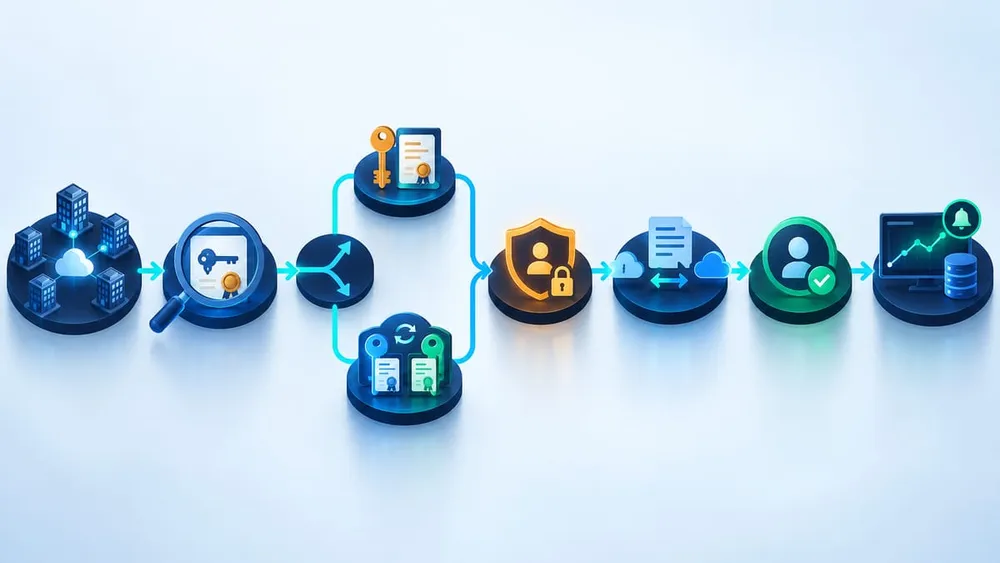
Move from inventory to verified access
Build an inventory before changing the identity provider
A short inventory prevents the team from fixing one login path while leaving another exposed. Record:
- the Contentful organisation ID and SSO name;
- every SSO connection and identity-provider tenant;
- the enterprise-application owner and a second authorised administrator;
- whether request-signature verification is enabled;
- whether assertion encryption is enabled;
- the current service-provider certificate thumbprint or fingerprint;
- whether the identity provider accepts more than one service-provider certificate;
- the Contentful metadata URL or exported file used for the integration;
- the group assignments, conditional-access rules and test users attached to each connection;
- the emergency access route, change window, rollback owner and Contentful support contact.
Capture the current state before importing anything. Export the enterprise-application configuration where the platform supports it, or retain timestamped screenshots and certificate details in the change record. Do not paste private keys, tokens or recovery credentials into the ticket.
Contentful's older certificate-rotation guidance identifies an organisation-specific metadata location using the organisation ID. Prefer the current metadata link shown in your Contentful SSO configuration or current tenant communication, and verify it with Contentful documentation or support before importing it.
Sequence the update around certificate capacity
Contentful's two instructions are mutually exclusive; use the one that matches the actual enterprise-application behaviour.
Multiple certificates supported
Before 21 September, re-import Contentful metadata and confirm both old and new certificates are present. Keep the old key through cut-over, test the new path, then remove it only when Contentful confirms retirement and your evidence is clean.
Only one certificate supported
Do not replace the working key early. Arrange an attended window on 21 September, confirm the cut-over has occurred, re-import the new metadata, inspect the resulting certificate and immediately test Contentful-initiated login.
Use a controlled change plan
Before the cut-over
- Assign owners. Name the Contentful organisation owner, identity administrator, test lead, communications contact and recovery decision-maker.
- Confirm impact. Review request-signature verification and assertion-encryption settings for every SSO connection.
- Validate recovery access. Confirm an authorised administrator can reach the required consoles without depending on the exact SSO path being changed.
- Refresh metadata only when appropriate. For identity providers that support both keys, import before cut-over and verify that the existing key was not removed.
- Prepare tests and communications. Select users from each SSO connection and major access policy; tell editors when the attended window will occur.
During the cut-over window
- Watch Contentful's status and support channels and confirm the vendor change before acting on a single-certificate integration.
- Import the current metadata through the approved identity administration route.
- Compare the certificate details and application endpoints with the expected change; stop if unrelated settings moved.
- Run service-provider-initiated tests from a fresh private browser session, followed by any supported identity-provider-initiated route.
- Record the outcome, time, tester, SSO connection and relevant identity-provider log identifiers.
After access is verified
Monitor login failures and support tickets across the next business cycle. Keep the old certificate only as long as the identity platform, Contentful advice and your security process allow. Close the change after all SSO connections and recovery controls are verified—not after one administrator signs in successfully.
Test the login journey, not only the certificate screen
Contentful recommends re-testing an SSO connection after certificate or identity-provider configuration changes. Its earlier rotation guidance also recommends starting from the Contentful SSO page in an incognito browser, which avoids treating an existing application session as proof of fresh authentication.
| Test | Minimum evidence | Failure to catch |
|---|---|---|
| Contentful-initiated login | Fresh private session reaches the correct identity provider and returns to the expected organisation | Invalid request signature, wrong entity ID or stale certificate |
| Identity-provider-initiated login | Assigned user launches the correct application and reaches Contentful | Broken launch tile, relay state or application mapping |
| Each SSO connection | One representative user per provider, subsidiary or domain | Only the primary connection was updated |
| Conditional access | Expected MFA and device or location policies are enforced | Emergency workaround unintentionally weakens normal access |
| Authorisation | User lands with expected organisation, space and role access | Authentication succeeds but assignment or routing is wrong |
| Negative case | Unassigned or deprovisioned user remains blocked | The change widens access |
| Emergency route | Documented recovery access works and is logged | Administrators are locked out when normal SSO fails |
Use test accounts and normal business-safe checks. Do not deliberately disable production SSO or remove the only trusted certificate just to demonstrate a failure.
Prepare for a lockout without weakening security
A certificate rollover is exactly the kind of fundamental authentication change that should have a tested recovery method. The Australian Signals Directorate's system-access guidance says emergency access should be documented and tested when it is implemented and when fundamental IT infrastructure changes. It also says break-glass access should be used only when normal authentication cannot be used, restricted to authorised activities and centrally logged.
For Contentful, recovery design depends on your plan, SSO enforcement and administration model. Confirm the supported route with Contentful before the change. If SSO-exempt organisation owners form part of that route, protect them with strong MFA, named custodianship, alerting and periodic access review. Contentful's own security-check command flags SSO-exempt users whose MFA is disabled.
Do not respond to a failed login by permanently disabling signature verification, removing SSO enforcement or creating a shared administrator account. If a temporary containment step is explicitly approved, time-box it, monitor it, document every action and restore the intended control as soon as service is recovered.
Monitor the cut-over as an identity incident
Identity-provider logs should distinguish a bad SAML request signature, encryption-certificate mismatch, audience or recipient error, assignment failure, conditional-access rejection and an ordinary bad credential. Route those signals to the team that can change the enterprise application.
During the attended window, track:
- successful and failed Contentful sign-ins by SSO connection;
- signature-validation or assertion-encryption errors;
- changes to the Contentful enterprise application and its certificates;
- use of emergency or SSO-exempt accounts;
- Contentful support and editor reports;
- the time of the first verified login after the vendor cut-over.
Keep browser screenshots free of tokens and personal data, and preserve only the log detail needed for the change record. A short retrospective should add the next certificate expiry or vendor-rotation watch point to the operational calendar, with a monitored distribution list and a named application owner. Microsoft similarly recommends explicit certificate-rollover ownership, an on-call contact and a monitored notification list for SAML applications.
Questions to ask your IT team or support partner
- Which Contentful organisations and SSO connections do we operate?
- Does each identity provider verify Contentful SAML request signatures, encrypt assertions for Contentful, both or neither?
- Can the enterprise application hold the old and new Contentful certificates at the same time?
- What did the metadata import change besides the certificate?
- Who can administer Contentful and the identity provider if this SSO path fails?
- Has that emergency route been tested, protected with MFA and monitored?
- Which user journeys and access policies will be tested after cut-over?
- What logs will identify a signature or encryption mismatch?
- Who has authority to invoke rollback or contact Contentful?
- Where will the next certificate lifecycle date and owner be recorded?
A credible answer includes exported configuration, a selected update path, named owners, a test matrix and recovery evidence. A calendar reminder without configuration evidence is not a cut-over plan.
Sources checked
- Contentful: SAML SP signing certificate rotation update
- Contentful: Single sign-on setup and troubleshooting
- Contentful: SSO X.509 certificate rotation guidance
- OASIS: SAML V2.0 Metadata Interoperability Profile
- Microsoft: Plan a single sign-on deployment
- Contentful: CLI security check
- Australian Signals Directorate: Guidelines for system access