
Contentstack Automation Canvas: Safe Workflow Guide
A practical guide for Australian teams using Contentstack Automation Canvas to connect CMS, CRM, notifications and business systems with safer testing, access, monitoring and rollout controls.
Contentstack released its Automation Canvas editor on 6 November 2026. It gives teams one zoomable view of a workflow's trigger, actions, If-Else branches and loops, with step configuration and testing available in a side panel.
That is timely because many CMS workflows no longer stop at publishing a page. A content event may update search, notify a campaign team, create a CRM task, call an API, send data to analytics or start an ecommerce process. When those steps live in separate screens, it is easy for business owners to underestimate what an automation can change.
The Canvas improves visibility; it does not remove operational risk. A clear diagram can still contain excessive permissions, duplicate writes, missing failure handling or silent data exposure. The practical opportunity is to use the new view as a shared design and review surface for marketing, operations and technology teams.
A Fresh Interface for Connected Business Workflows
The release combines visual clarity with production controls that matter once a CMS workflow touches other systems.
6 November 2026
Contentstack released the Canvas editor and updated its documentation for the new workflow view.
One workflow view
Triggers, actions, branches and repeat paths can now be reviewed together instead of step by step.
Same automation
Teams can switch between Canvas and form editors without changing how the underlying workflow behaves.
Production evidence
Executions expose status, duration, connectors and step-level inputs and outputs for investigation and improvement.
Rate control
Throttling helps protect downstream APIs when a content or business event creates a burst of executions.
Australian relevance
ASD guidance for small businesses emphasises restricted access, secure services, event logging and tested incident response.
What the Contentstack Automation Canvas actually changes
The Canvas changes how a workflow is represented and reviewed. The existing form editor remains available, and both editors use the same steps and labels. Moving to the Canvas is therefore not a re-platforming exercise; it is a chance to make an existing or proposed automation understandable to more people.
Builders can add a trigger, connector actions, utilities, an If-Else branch or a Loop. Each step can be configured and tested in a side panel. Notes, meaningful step names and search make a large workflow easier to navigate. Once an automation is activated, the Canvas becomes read-only, providing a useful boundary between editing and live operation.
There are limits to design around. A loop repeats over a data source or a fixed count and defaults to a maximum of 100 iterations. Contentstack also documents that a Loop cannot sit inside an If-Else branch. Treat those constraints as architecture signals: if a workflow needs deeply nested logic, high-volume fan-out or complex recovery, part of it may belong in a dedicated integration service rather than a no-code canvas.
Choose a first workflow with visible value and bounded risk
A good first candidate is repetitive, rule-based, easy to observe and inexpensive to reverse. Useful examples include notifying a campaign team when approved content is published, creating a review task when required metadata is missing, updating a search index after a controlled publish event, or passing a qualified website enquiry into a CRM with a clear owner.
Avoid starting with a workflow that can issue refunds, change many customer records, publish without review or send unbounded messages. Those processes may still be automated later, but they need stronger authorisation, idempotency, reconciliation and human approval.
| Candidate | Why it works | Main control |
|---|---|---|
| Publish notification | Low consequence and easy to verify | Correct audience and duplicate suppression |
| Content-to-search sync | Clear trigger and measurable freshness | Retry safety and index reconciliation |
| Form-to-CRM handoff | Removes re-keying and speeds follow-up | Consent, field minimisation and deduplication |
| Campaign approval task | Creates visible ownership | Escalation and stale-task monitoring |
| Bulk customer update | Potentially high efficiency | Do not use as the first pilot; require rollback and reconciliation |
Use a seven-stage path from idea to managed operation
The safest implementation treats the Canvas as one part of an operating model. Move through seven gates: define the outcome, map the data and systems, set access boundaries, design success and failure paths, test with representative cases, activate with monitoring, then review and expand.
Every gate needs an owner and a pass condition. That prevents the automation from becoming a diagram that nobody owns after the original builder moves on.
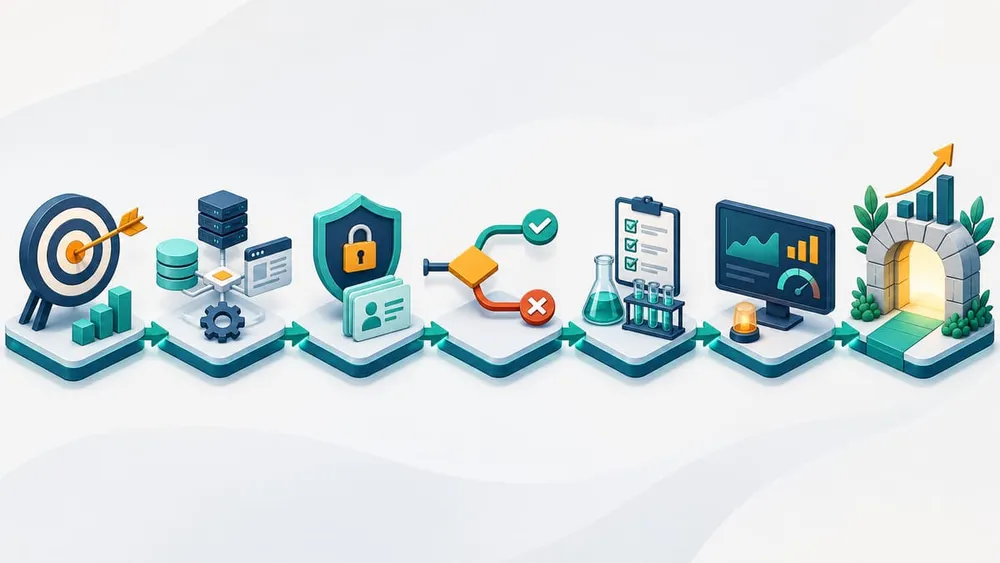
1. Define the outcome and owner
Write the business result in one sentence: ‘When an approved service page is published, update the search index and notify the campaign owner.’ Then name the process owner, technical owner and incident contact. The process owner decides whether the outcome is correct; the technical owner keeps the integration healthy.
2. Map systems, records and fields
List the trigger source, every connector, the records read or written, and the authoritative system for each field. For a form-to-CRM workflow, this includes consent evidence, contact identifiers, campaign attribution and the rule used to match an existing contact. Do not send a full payload merely because the connector makes it available.
3. Restrict access and connections
Use a dedicated connection where practical and grant only the permissions required for the actions in the Canvas. Protect HTTP triggers with an API key. Review connected-app authentication status, document who can re-authorise a connection and remove access when a supplier or staff member leaves.
4. Design the failure path before activation
For every action, decide what should happen when the destination is unavailable, the response is invalid, a record already exists or a retry arrives after the first request succeeded. A failed notification is different from a failed customer update; assign severity according to business impact.
5. Test success, edge and failure cases
Contentstack lets builders test triggers and actions before activation. Go beyond the happy path. Use missing fields, duplicate events, unexpected values, expired credentials, a slow destination, a rate-limit response and a connector error. Confirm both the business outcome and the evidence shown in the execution record.
Branches need tests for both Matches and Else paths. Loops need an empty array, one item, several items and the largest expected batch. If a workflow cannot be safely tested against a production destination, use a sandbox, non-production record set or a connector that records the request without performing the final action.
6. Activate with monitoring and a stop rule
Activation makes the Canvas read-only, which is useful only if somebody is watching the live workflow. Configure error notifications, review early executions and define a stop rule such as repeated failures, excessive queue growth, duplicate records or a mismatch between source and destination totals.
7. Review value before expanding
After a bounded pilot, compare time saved, completion rate, error rate, manual exceptions and downstream data quality. Expand only when the workflow is both useful and supportable. A successful pilot should produce a reusable checklist, not an excuse to automate every adjacent process.
Control throughput, retries and duplicate side effects
Visual workflow tools make it easy to connect systems; they do not make destination limits disappear. Contentstack's throttling queues enabled executions sequentially and is designed to reduce rate-limit failures. Use it when a publish, import or campaign event can create a burst.
Throttling is not the same as correctness. Contentstack documents automatic retries for some queued failures and manual retry options for failed executions. Any action that creates, charges, sends or updates should therefore be safe to repeat. Use a stable event or record identifier, check whether the destination already processed it, and store the result needed for reconciliation.
Estimate peak volume before activation: events per hour, actions per event, loop size and destination limits. If the process needs high concurrency, ordering guarantees or cross-system transactions, place that responsibility in an integration service and let the Canvas orchestrate the high-level flow.
Build an operating view, not just an execution log
The execution log records status, duration, connectors and step-level inputs and outputs. That is valuable for troubleshooting, but a business owner also needs outcome measures. A successful run that created the wrong CRM owner or indexed an unpublished page is still a business failure.
Use a small scorecard:
- Reliability: successful, failed, rejected and manually retried executions.
- Timeliness: queue delay and end-to-end completion time.
- Accuracy: records that reached the correct destination with the correct values.
- Exceptions: items requiring manual correction or reconciliation.
- Value: time removed, faster response or fewer missed handoffs.
- Access health: expired or over-privileged connections and unauthorised changes.
Contentstack's project audit log and Connected Apps view complement execution records. Together they help answer three different questions: what ran, who changed the environment, and which external accounts remain authorised.
Questions to Answer Before You Activate
Use these prompts in a joint review with content, operations, security and implementation owners.
Outcome
What measurable business result should one successful execution produce?
Ownership
Who owns the process, the integration and the response when it fails?
Data
Which fields cross each connector, and which system is authoritative?
Access
Can every connection read or change only what this workflow needs?
Failure
Are retries safe, duplicates detected and partial outcomes reconciled?
Evidence
Will logs and business metrics prove the right outcome occurred?
Volume
Can peak event and loop volume stay within every downstream limit?
Stop rule
Which signal requires deactivation, rollback or human approval?
Lifecycle
How will credentials, owners, connector changes and documentation be reviewed?
A practical 30-day rollout for an Australian SME
Days 1–5: select and map
Choose one low-risk workflow, record its baseline manual effort, name owners, map data and systems, and define success and stop conditions.
Days 6–12: build and restrict
Create the workflow in the Canvas, use descriptive names and notes, configure dedicated or least-privilege connections, secure external triggers and keep the automation inactive.
Days 13–18: test and reconcile
Run happy, edge and failure cases. Check outputs in every destination, verify logs, test notification routing and confirm a repeated event does not create a harmful duplicate.
Days 19–24: controlled activation
Activate for a limited content type, team, campaign or volume. Enable throttling where bursts can affect APIs. Review executions daily and reconcile source and destination totals.
Days 25–30: decide and document
Compare reliability, accuracy and time saved with the baseline. Fix the operating gaps, document the support procedure and expand only if the evidence meets the agreed threshold.
Contentstack Automation Canvas FAQs
Practical answers for business, content, operations and technology teams.
Sources Checked
- Contentstack Product Changelog: Canvas Editor for Automations
- Contentstack: Build Automations with the Canvas Editor
- Contentstack: Get Started with Automations
- Contentstack: Throttle Execution
- Contentstack: View Execution Log of Agent OS
- Contentstack: Error Notification
- Contentstack: Executions in Agent OS
- Contentstack: Agent OS FAQs
- Australian Signals Directorate: Small Business Cyber Security Handbook
Sources were accessed on 8 November 2026. Product behaviour, limits and plan availability can change; verify current Contentstack documentation and your organisation's configuration before activation.
Need Help Designing a Contentstack Workflow?
VaniTech can map your process, connect CMS and business systems, build safe failure handling, and establish the monitoring and ownership needed for a production rollout.