
Contentstack CLI 2.0.2: Safer CMS Migration Guide
Contentstack published a CLI 2.0.2 update on 21 October 2026 that fixes a serious migration problem: entries replaced with --replace-existing could lose references to other entries. For a structured-content platform, those relationships are not minor metadata. They can control page composition, related articles, product links, navigation, reusable blocks and campaign assemblies.
The practical response is broader than updating a package. Teams should confirm the CLI version used by every migration runner, review recent overwrite imports, rehearse the fixed workflow in a non-production stack and verify the resulting content graph before editors or customers depend on it.
This guide is for digital leaders, CMS owners, content operations teams, developers and migration partners who need an evidence-based way to move or synchronise Contentstack content safely.
Why Contentstack CLI 2.0.2 is timely
The 21 October release note says the Contentstack import plugin now preserves entry references when existing entries are replaced. It also fixes imports that failed when asset or entry UIDs contained special characters, and fixes CLI startup failures in package managers that do not hoist dependencies, including pnpm.
The reference fix deserves immediate attention because an import can finish while the target content is still incomplete. A missing relationship may not appear until a particular landing page, locale, nested component or related-content module is opened. That makes this an operational quality issue, not just a developer-tool update.
Contentstack's current migration documentation also highlights several behaviours that can look successful from the command line while producing an incomplete result, including legacy export layouts and missing mapping state. CLI 2.0.2 removes one known defect, but the migration still needs controlled evidence and business acceptance.
What the update changes—and what it does not
The fixed importer is essential, but migration safety still depends on repeatable inputs, mapping state and verification.
Reference-loss fix
Replaced entries should retain their links to other entries when the fixed import plugin handles --replace-existing.
Special-character fix
Imports no longer fail solely because an asset or entry UID contains characters such as a backslash or quotation mark.
Tooling compatibility
CLI startup and selected bulk-operation failures are fixed for package managers that do not hoist dependencies.
Verification still required
The release does not replace dependency ordering, persistent UID mappings, target-stack checks or editorial sign-off.
Why entry references matter to the business
Headless CMS entries are often designed as connected records rather than self-contained pages. A service page may reference a hero, testimonial group, author, related service, form configuration and reusable call to action. An ecommerce story may connect a campaign entry to products, category content and regional variations.
If those references disappear, the content can still exist in the target stack while the experience assembled from it becomes incomplete. Editors may see empty fields. APIs may return fewer linked objects. Front ends can hide sections, show fallbacks or fail at render time. Search and AI-discovery content may also lose the structured context that made the page useful.
That is why migration acceptance should test relationships, not only entry counts. The number of imported records can match the source while important connections between them do not.
Who should act now?
Prioritise a review if any of the following applies:
- Your team or implementation partner recently ran
cm:stacks:importwith--replace-existing. - You synchronise entries between development, staging and production stacks.
- You run module-by-module imports in CI/CD or a scheduled integration.
- You are preparing a Contentstack replatform, stack consolidation, regional rollout or content-model change.
- Editors have reported missing related content, empty reference fields or pages that differ between source and target.
- Different engineers or runners use different CLI installations, lockfiles or Node.js versions.
Teams that have not used overwrite imports do not need to assume their content is damaged. They should still standardise the supported CLI version before the next migration and retain version evidence with the run.
First: prove which CLI your workflow uses
Do not rely on the version installed on one developer laptop. Check every environment that can perform an import: local workstations, CI runners, migration containers, jump boxes and managed automation agents.
Contentstack CLI V2 requires Node.js 22 or later. Update the approved dependency, reinstall through the normal build process and run csdx --version on the same runner that will execute the migration. Capture the output in the change record or build log.
Where possible, pin the CLI and plugin versions through the project's dependency management instead of depending on an untracked global installation. A successful rehearsal has limited value if production silently runs a different binary.
Understand the three directories in an overwrite import
| Artifact | What it contains | Why it matters |
|---|---|---|
| Source export | The content and configuration exported from the source stack. | It is the repeatable input. Preserve it unchanged for rehearsal, production and investigation. |
| Backup or mapping directory | Old-to-new UID mappings and state used across dependent module imports. | Reuse the same directory when modules are imported separately so references can be resolved consistently. |
| Target snapshot and evidence | Pre-change export, run configuration, logs, failed-item reports and verification results. | It supports rollback, comparison, audit and handover. The CLI mapping folder alone is not a full business rollback plan. |
Contentstack documents --backup-dir as the location for mapping files required by dependent modules. Treat it as migration state, not as a substitute for a recoverable target-stack snapshot and rollback decision.
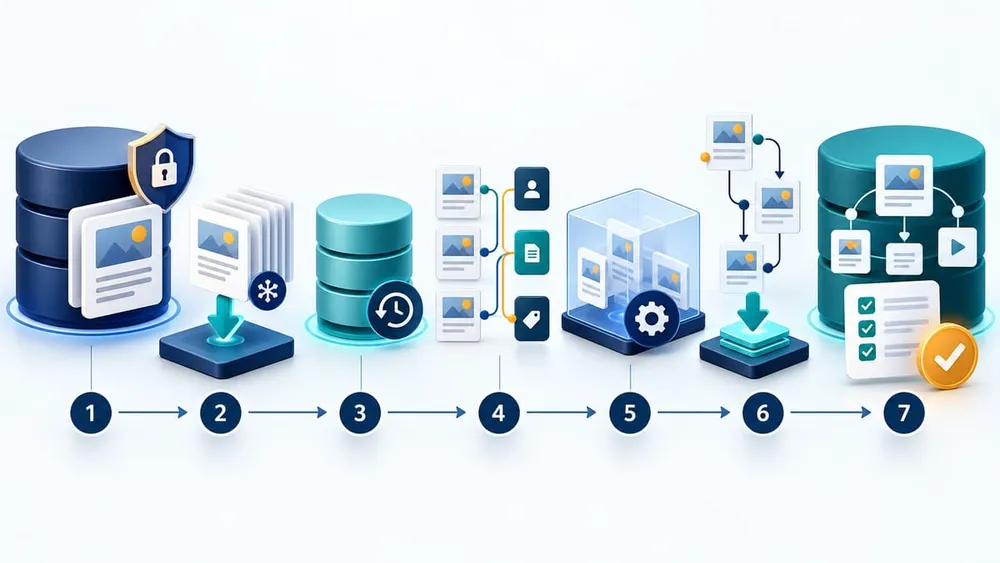
Move from version check to signed-off content graph
A seven-step safer Contentstack migration plan
1. Freeze and identify the migration input
Create a fresh source export with the approved CLI, record the source stack and branch, and store a checksum or immutable copy. Contentstack CLI V2 writes content directly into the chosen export folder, so use a separate directory for each branch and run.
2. Capture the target before changing it
Export the target stack, record current publishing state and confirm the rollback owner. If editors can change the target during migration, define a freeze window or a reconciliation plan.
3. Build mapping state deliberately
For targeted overwrites, run cm:stacks:import-setup for the required modules and retain the generated backup directory. Use that same mapping directory throughout the related module imports.
4. Rehearse in a non-production stack
Use a realistic test stack with the same content model and representative entries. Contentstack recommends validating migrations in a test space before production.
5. Import in dependency order
When importing modules separately, follow the documented sequence and ensure dependencies exist before entries. Do not create a fresh mapping directory halfway through the run.
6. Verify the content graph and experience
Compare reference fields, nested blocks, locales, entry counts, failed-item logs and a selected set of API responses. Then render the pages and journeys the business relies on.
7. Approve, monitor and retain evidence
Require technical and editorial sign-off, monitor delivery errors after release, keep the export, mappings and logs together, and document any manual recreation of users, releases or workflow assignments.
Respect Contentstack's dependency order
Contentstack documents an order for module-wise imports: locales, environments, assets, taxonomies, extensions, Marketplace Apps, webhooks, global fields, content types, workflows, entries, labels, custom roles, publishing rules, Personalize and Composable Studio.
The exact scope will vary, but the principle is consistent: import the definitions and referenced records before the entries that depend on them. A parent entry cannot be reliably linked if the target record failed to import or its old UID never reached the shared mapping state.
For a narrow entry overwrite, import-setup can generate the necessary mappers without rerunning every dependency. The generated directory must then be passed back with --backup-dir. Save the command arguments alongside the logs so another engineer can reproduce the same sequence.
Do not treat the automatic audit as final acceptance
The import command performs an audit fix by default unless --skip-audit is used. That is valuable, but Contentstack's troubleshooting guidance explains that the audit operates on the exported data. It can identify missing or invalid references in that input; it does not prove that every relationship resolved in the live target or that every page still works.
Keep the audit enabled unless a tested, documented reason requires otherwise. After the import, add target-side checks:
- Review failed-entry and mapping logs.
- Compare the source and target values for a sample of reference-heavy entries.
- Query the delivery API for nested references and locales.
- Open key entries in the editor and confirm their reference fields.
- Render the affected page types and test their customer journeys.
Migration quality is established by converging evidence, not by one green terminal message.
How to audit migrations completed before the fix
Upgrading the CLI changes future runs; it does not automatically repair relationships already written to a target stack. If an earlier workflow used --replace-existing, run a focused review before overwriting content again.
- Identify the CLI and import-plugin versions from logs, build artifacts or runner images.
- List the stacks, branches, modules and dates affected.
- Select reference-heavy content types, including nested page assemblies and multi-locale records.
- Compare source and target references by UID and field path.
- Review failed-entry and mapping logs from the original run if retained.
- Render representative website pages and check connected systems that consume the content API.
- If gaps exist, rehearse a repair import with the fixed CLI and a preserved mapping directory.
Do not repair directly in production until the team understands whether the source export, mapping state or target content has changed since the original run.
What a migration sign-off should include
Separate technical completion from business acceptance so incomplete content is caught before release.
Version evidence
Node.js, core CLI and import-plugin versions captured from the actual migration runner.
Input evidence
Source stack, branch, export location, timestamp and immutable copy identified for the run.
Mapping evidence
One persistent backup directory and the module sequence retained with the command configuration.
Graph evidence
Sampled reference fields, nested blocks, locales and API responses compared between source and target.
Experience evidence
Priority pages, navigation, search, forms and integrations checked against expected behaviour.
Ownership evidence
Named technical approver, content approver, rollback owner and post-release monitoring window.
Account for what the CLI does not migrate
Contentstack documents several boundaries that matter to project plans. CLI imports do not migrate users or releases. Workflow configurations can move, but admins and workflow-stage user assignments are not included and must be recreated.
Large imports can also encounter payload or request-timing limits. The documented default body limits are 100 MB, and teams can use smaller module batches, request delays and explicit rate-limit configuration where required. Change those settings only after a representative rehearsal; faster concurrency is not useful if the target is throttled or the run becomes difficult to diagnose.
Make these exclusions visible in the cutover checklist. An imported content graph can be correct while the operating model remains incomplete because permissions, release plans or workflow ownership have not been restored.
A practical five-day response plan
Day 1: inventory and contain uncertainty
- Find every runner capable of importing Contentstack data.
- Record Node.js, CLI and plugin versions.
- Pause non-essential overwrite imports until the fixed workflow is confirmed.
- List recent runs that used
--replace-existing.
Day 2: upgrade and prepare evidence
- Pin the approved CLI version and verify it on the runner.
- Create fresh source and target exports.
- Define affected modules, branches, locales and acceptance samples.
Day 3: rehearse
- Create mapping state with
import-setupwhere appropriate. - Run the import in a realistic non-production stack.
- Review audit, failed-item and mapping output.
Day 4: verify the graph and experience
- Compare references and nested structures.
- Test delivery API responses and representative website pages.
- Confirm users, releases and workflow assignments are covered manually.
Day 5: approve production or repair
- Obtain technical and editorial sign-off.
- Schedule a controlled production window with rollback ownership.
- Repair earlier imports only from a rehearsed, preserved input.
- Store the evidence pack with the migration record.
Turn the update into a repeatable migration standard
The most useful outcome is not a one-off CLI upgrade. It is a small, repeatable operating standard for every stack move and structured-content synchronisation.
Keep version pinning, immutable exports, shared mapping state, dependency order, audit output, target-side reference checks, page-level smoke tests and dual technical/editorial approval in the standard runbook. Add explicit handling for unsupported modules and a rollback threshold that says when the team will stop rather than continue through unexplained differences.
For businesses inheriting a Contentstack implementation, this is also a useful technical-takeover test. If no one can identify the import version, source export, mapping directory, deployment owner or acceptance evidence, the migration process needs remediation before the next high-stakes content release.
Questions CMS and content teams are asking
Sources Checked
- Contentstack product changelog: CLI Version 2.0.2
- Contentstack: Import Content Using the CLI
- Contentstack: Overwrite Existing Content using CLI Import
- Contentstack: Migrate Content Between Stacks Using the CLI
- Contentstack: CLI Troubleshooting Guides
- Contentstack: CLI-Supported Features for Export, Import, and Clone Operations
- Contentstack: CLI Limitations
- Contentstack: Install the CLI
- Contentstack: Export Content Using the CLI
- Contentstack: Migrate your Content using the CLI Migration Command
Sources were accessed on 23 October 2026. Confirm the current Contentstack release notes and documentation before running a production migration.