
Contentstack On-Demand Agents: Governance Guide
Contentstack launched On-Demand Agents, Polaris Skills and conversational agent building on 1 October 2026. Together, these features make AI automation easier for content and digital teams to start, but they also make one design choice more important: deciding when an agent should wait for a person.
An on-demand agent is deliberately human-triggered. The person running it supplies fresh inputs, uses their own connected accounts and permissions, watches the steps stream, and can answer questions during the run. That is materially different from an event- or schedule-triggered agent that acts as its author using connections configured at build time.
For an Australian small or medium business, this creates a sensible bridge between a chat assistant and unattended automation. A team can automate repetitive content work while preserving attribution, context and review. The commercial question is not simply whether the agent can complete a task. It is whether the workflow is bounded, permissioned, reviewable, measurable and reversible.
Why Contentstack On-Demand Agents are trending now
The 1 October release brought three related capabilities into the same operational model. Teams can describe an agent in Polaris and receive a draft configuration, package reusable instructions as Polaris Skills, and run published agents interactively when a person wants a job done.
The timing matters because many organisations are moving past AI experimentation. They are no longer asking only whether a model can summarise or generate content. They are asking who authorised a change, which account was used, what the agent saw, what tools it called, what it changed, how much it cost and whether the result can be checked.
Contentstack's on-demand model answers part of that need by tying the run to a person and making the work visible. Australian Signals Directorate guidance points in the same direction: start with low-risk tasks, apply least privilege, add human control points, log actions, monitor continuously and expand autonomy gradually.
The release is therefore useful beyond Contentstack customers. It illustrates a practical pattern for business AI adoption: begin with supervised automation, prove the workflow, then decide whether unattended execution is justified.
Start where errors are visible and reversible
Choose bounded content tasks with a clear input, output, owner and review point before allowing an agent to publish or update business records.
Content briefs
Turn an approved campaign request, audience and source pack into a structured brief for a human editor.
Quality checks
Check entries for required fields, broken links, naming rules, accessibility basics and missing metadata.
Draft preparation
Create summaries, descriptions, taxonomy suggestions or localisation drafts without publishing them.
Content reporting
Compile stale-content lists, workflow bottlenecks and exceptions for owners to review and prioritise.
On-demand versus unattended agents
Contentstack gives an agent one trigger, and that trigger changes the operating model.
Choose on-demand when context or judgement changes each time
An on-demand run starts when a person selects the agent. The runner provides current values, the workflow acts through their accounts and permissions, and the agent can pause to clarify missing information. This suits campaign briefs, content checks, controlled updates and other work where the objective or source material varies.
Choose an event or schedule only when the rule is stable
A background agent is useful when the input contract is predictable and the response is low risk: for example, producing a report from a fixed query or notifying an owner when a validation check fails. It acts as the author using the accounts connected during setup, so ownership and credential management must survive staff changes.
Do not choose unattended execution merely to remove a click. Choose it when the team has evidence that inputs are reliable, permissions are narrow, failures are detectable and the action can be reversed. Publication, deletion, pricing changes, customer communication and personal-data updates should normally retain explicit control points.
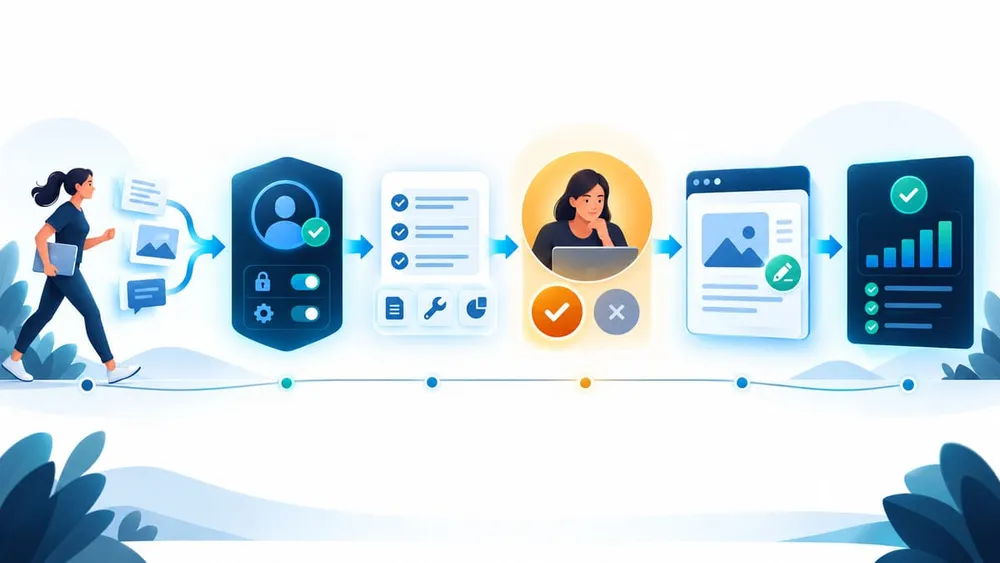
Put identity and review around every change
Design identity and permissions before instructions
On-demand agents act as the runner for connected tools, and each person's saved accounts and inputs remain their own. That is a strong accountability foundation, but it does not make every tool safe automatically.
Map the complete permission path:
- who may discover and run the agent;
- which Contentstack stacks, environments and content types the runner can access;
- which connected apps and external systems each tool can reach;
- whether a tool reads, drafts, updates, publishes, sends or deletes;
- which credentials are personal, shared or service-owned;
- how access is removed when a person changes role or leaves.
Use the minimum rights needed for the task. A content-audit agent may need read access across a stack but no publish permission. A metadata assistant may update draft fields while being unable to publish. A campaign agent may prepare an email or page but require a marketing manager to approve the final action.
Pay particular attention to tools that do not authenticate as the runner. Contentstack notes that some tools, including generic HTTP or email actions, can operate without a connected user account. In those cases, runner attribution inside the agent does not replace controls on the receiving API, endpoint or mailbox.
Use Polaris Skills as policy, not as permission
Polaris Skills can package repeatable instructions such as tone, naming conventions, accessibility checks, taxonomy rules or pre-publish review criteria. A skill can remain private, be shared with named colleagues or be made available across the organisation. An organisation administrator can mark an organisation-wide skill as required, with a documented limit of ten required skills.
That makes skills useful for consistent content operations. Examples include:
- apply the approved Australian English style and brand terminology;
- flag unsupported claims, missing sources or outdated dates;
- require descriptive image alt text and meaningful link labels;
- enforce campaign, product and region naming conventions;
- check that sensitive or personal information is not copied into an unapproved tool.
However, an instruction is not an authorisation boundary. A skill may tell an agent not to publish, but the safer design also removes publish access from the tool or runner where it is unnecessary. Treat skills as policy and quality guidance; enforce security through roles, scopes, tool configuration, approval gates and monitoring.
Keep the skill set small and owned. Record an owner, version, intended workflows, test examples and review date. Required instructions that nobody maintains can become a new source of silent process drift.
Place human approval at consequence boundaries
An on-demand agent can stream its work and pause to ask the runner a question. Use that interaction deliberately. Approval should sit immediately before an action whose cost of error is high, not as a vague final review after several systems have already changed.
Define actions by impact:
- Low impact: read approved content, produce a private summary, suggest metadata or create a draft report.
- Moderate impact: update draft fields, create new draft entries, move work between workflow stages or prepare an external message.
- High impact: publish, unpublish, delete, change customer-facing facts, send communications, update personal data or call systems that create financial or contractual consequences.
Low-impact work may run after a clear confirmation of scope. Moderate-impact work should present a preview or change set. High-impact work should require a named human to approve the exact proposed action, with separation of duties where appropriate.
The decision about which actions require approval belongs to the workflow owner, not to the agent. ASD guidance specifically recommends human control points, reversibility and preventing agents from autonomously executing high-impact actions without prior approval.
Protect customer and employee information
Content workflows often touch personal information: enquiry details, customer profiles, staff biographies, support records, event registrations and campaign segments. OAIC guidance says privacy obligations apply both to personal information entered into an AI product and to AI output that contains personal information.
Before connecting a dataset or tool, document:
- the business purpose and why each field is needed;
- whether the agent may read, transform, copy or write the information;
- where prompts, tool results, logs and outputs are stored;
- who can inspect execution evidence;
- retention and deletion requirements;
- how customers or staff are informed where transparency is required;
- what a runner must do if the agent exposes unexpected personal or sensitive information.
Do not use real customer data merely to make a demonstration realistic. Start with synthetic or de-identified examples, then introduce the minimum approved data after privacy and security review. See VaniTech's AI data safety guide for a broader business checklist.
Monitor outcomes, evidence and cost
Every on-demand run is recorded. Contentstack's execution evidence can show the runner, trigger, status, timing, chronological steps, tools, inputs, outputs and the error that caused a failure. Agent Analytics adds organisation-level views of executions, token consumption and model usage, with data reported as updating in near real time.
That evidence is useful for troubleshooting, but raw execution volume is not a business outcome. Build a scorecard across four layers:
- Outcome: time saved, turnaround time, backlog reduced or rework avoided.
- Quality: accepted suggestions, factual defects, policy failures and human corrections.
- Control: approval rates, denied actions, permission failures, unexpected tool calls and rollback events.
- Cost: tokens, AI credits, connector costs and support time per completed business task.
Contentstack lets administrators block AI operations when the monthly credit allocation is exhausted or permit a configured amount of excess usage. Because excess usage is billed at a higher rate, set a deliberate policy before a successful pilot becomes a widely used workflow.
Review a sample of successful runs as well as failures. A green status only proves that the workflow completed technically; it does not prove that the content was accurate, useful or appropriate.
A 30-day rollout for an SME content team
Week 1: Choose one bounded job
Select a repetitive task with a named owner, stable source material and a reversible output. Record the current time, defect rate and approval process. Classify the data and list every system the workflow could reach.
Week 2: Build read-only first
Describe the agent in Polaris, then review the generated draft in Agent Builder. Remove unnecessary tools, narrow accounts and permissions, create a representative test set and run the workflow without making CMS changes. Test missing inputs, hostile content, stale sources and ambiguous requests.
Week 3: Add controlled draft changes
Allow only the smallest useful write action, such as creating or updating a draft field. Require a preview, compare the proposed change with the source evidence and confirm that failures do not leave partial updates. Create or attach a small number of owned Polaris Skills where consistent rules are needed.
Week 4: Pilot with real users
Train a limited group on appropriate inputs, approvals and incident escalation. Review execution logs and business outcomes weekly. Fix recurring source-content or workflow problems before expanding access. Consider unattended execution only if the task remains low risk, inputs are predictable and monitoring has proved effective.
For a broader readiness review, use VaniTech's AI agent readiness checklist.
Six questions to answer before broader rollout
A working demo is only the start. Production needs explicit ownership, boundaries and evidence.
Job
Is the task narrow enough to describe, test and measure without relying on unstated judgement?
Identity
Can every run and external action be tied to the correct person or service identity?
Access
Do tools and accounts have only the data and actions required for this workflow?
Approval
Does a named person review the exact change before any high-impact action occurs?
Evidence
Can owners reconstruct inputs, tools, outputs, decisions, errors and resulting business changes?
Value
Do quality, time, safety and cost results justify maintaining and expanding the agent?
Sources Checked
- Contentstack: Product Changelog
- Contentstack: Run an Agent On Demand
- Contentstack: Get Started with Polaris Skills
- Contentstack: Build an Agent in Polaris
- Contentstack: View Execution Log of Agent OS
- Contentstack: Analytics for Agents
- Contentstack: AI Credits
- Australian Signals Directorate: Careful adoption of agentic AI services
- OAIC: Privacy and commercially available AI products