
Drupal 10 End of Life: Upgrade Before December 2026
A practical Drupal 10 end-of-life guide for Australian businesses covering Drupal 11 readiness, hosting, modules, integrations, testing and rollout.
Drupal 10 now has a firm finish line. The official Drupal release schedule lists 9 December 2026 as the end-of-life date for Drupal 10, and confirms that Drupal 10.6 is its final minor release.
For a business website, end of life is not simply a prompt to click an update button. A Drupal major upgrade can touch hosting, PHP and database versions, contributed modules, custom code, themes, forms, search, authentication, API integrations, deployment and editorial workflows. The more connected the site is, the more valuable it is to start while there is time to test and remediate.
This guide is for Australian business owners, marketing and operations managers, and technology decision-makers responsible for a Drupal 10 website. The practical target is Drupal 11: Drupal's upgrade documentation says major versions cannot be skipped, so a Drupal 10 site must move through Drupal 11 before it can move to Drupal 12.
Three dates that shape the upgrade plan
Treat these as planning milestones, not reasons to wait until December.
14 September 2026
Drupal 12 beta 1 is scheduled for this release week, increasing attention on the next major version and the closing Drupal 10 support window.
7 December 2026
Drupal 12 is scheduled for release this week. Drupal 10 sites still need to upgrade through Drupal 11 rather than jumping over a major version.
9 December 2026
Drupal 10 reaches end of life. Organisations still running it should not assume normal core security coverage continues beyond this date.
Why Drupal 10 end of life matters to the business
The immediate concern is security maintenance, but the operational risk is broader. A rushed upgrade can interrupt lead forms, customer portals, payments, search, single sign-on, publishing or integrations that staff depend on. Waiting also compresses vendor availability, internal approvals and change windows into the end-of-year period.
Drupal 11 is the sensible near-term target for most Drupal 10 sites. The Drupal 12 platform announcement says Drupal 11 will remain supported until at least Drupal 13, expected in mid-to-late 2028. That gives businesses a supported landing point without making a December release the first production target.
Who should start now
- Sites with custom modules or themes that may use APIs removed in Drupal 11.
- Sites with many contributed modules, especially where maintainers, compatibility releases or Composer constraints are uncertain.
- Sites on older hosting that may not meet Drupal 11's PHP or database requirements.
- Business-critical websites and portals with forms, search, payments, accounts, workflows or external integrations.
- Organisations without a current development environment, automated tests or clear technical owner.
A small brochure site using well-maintained modules may have a short path. A highly customised platform should be treated as a controlled modernisation project with evidence at each gate.
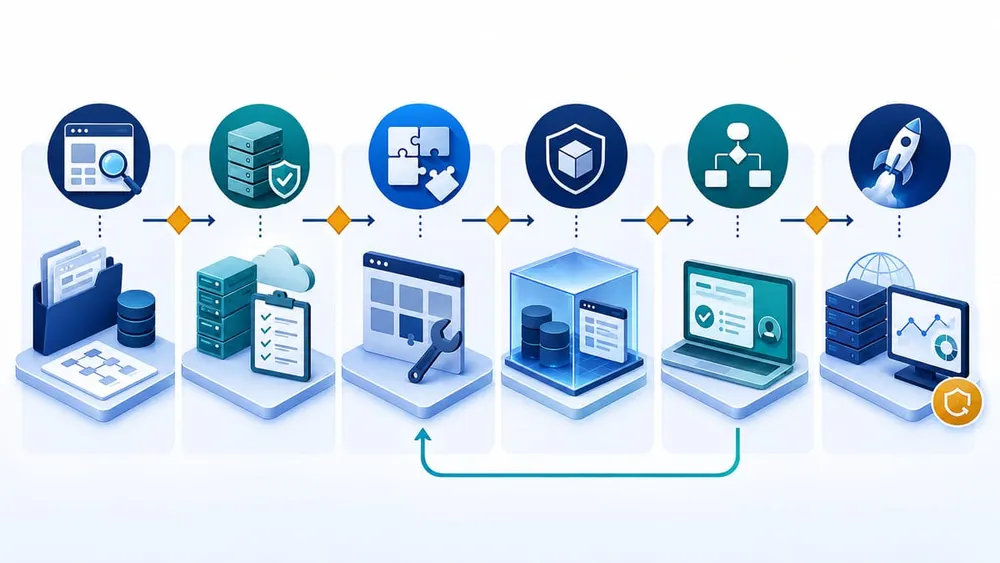
Move from unknowns to a verified release
Start with a Drupal upgrade inventory
Before changing code, establish what the website actually contains and what the business expects it to do. The inventory becomes the scope for compatibility checks, estimates, test cases and rollout approval.
| Area | What to record | Why it matters |
|---|---|---|
| Core and dependencies | Drupal core version, Composer and Drush versions, lock file, patches and repositories. | Drupal's official path requires at least Drupal 10.3 before moving to Drupal 11, and unresolved constraints can block the update. |
| Modules and themes | Installed and enabled extensions, versions, maintainers, compatibility status and replacements. | Drupal 11 removes deprecated code and several old core extensions; contributed packages may need newer releases or patches. |
| Custom code | Custom modules, themes, event subscribers, plugins, hooks, services and JavaScript. | Static scans can find many deprecated APIs, but custom business behaviour still needs review and testing. |
| Hosting | PHP, database, web server, extensions, file permissions, cron, queues, cache and search services. | The application cannot be upgraded safely if the target runtime is unsupported or differs from test environments. |
| Integrations | CRM, payments, identity, marketing, analytics, search, document storage, email and internal APIs. | An upgrade may preserve pages while breaking authentication, data exchange or background jobs. |
| Business workflows | Publishing, moderation, forms, approvals, imports, exports, reports and scheduled tasks. | Technical success is incomplete until staff can perform the work the site exists to support. |
Also record ownership. Every critical integration or workflow should have someone who can confirm expected behaviour and sign off the result.
Check hosting before touching the application
The official Drupal 10 to 11 guide requires PHP 8.3 or later. Current Drupal system requirements also list MySQL 8.0 or MariaDB 10.6 as minimums for Drupal 11, while PostgreSQL sites require version 16 or later.
That can turn a CMS upgrade into a coordinated hosting change. Confirm the target runtime in development and staging before resolving application issues. Otherwise, developers may test against a newer environment while production still runs an older PHP or database version.
Hosting questions to answer
- Can the current host run a supported Drupal 11 PHP and database combination?
- Are required PHP extensions installed in development, staging and production?
- Do deployment scripts, containers or platform settings pin old runtime versions?
- Are cron, queues, caches, search services and private file storage represented in staging?
- Can the team take a consistent database and file backup and prove the restore process?
- Is there enough observability to detect PHP errors, failed jobs, slow requests and integration failures after release?
If infrastructure changes are required, separate them into reversible steps where practical. A combined hosting, core, theme and integration cutover is harder to diagnose and roll back.
Find module and custom-code blockers while still on Drupal 10
The Upgrade Status module checks whether the environment and installed projects are ready for the next major release, and can scan custom code for compatibility issues. Drupal specifically notes that most compatibility checks should run on the current site, because removed APIs are no longer present after the upgrade.
Use the report as an evidence source, not an automatic guarantee. For every blocker, choose an explicit treatment:
- Update the module or theme to a release that supports both Drupal 10 and 11 where possible.
- Replace or remove it if the project is abandoned, unnecessary or now covered by another maintained solution.
- Refactor custom code using Drupal Rector where appropriate, followed by manual review and tests.
- Resolve Composer constraints and patches so the dependency graph installs consistently from a clean checkout.
- Document accepted risk only when there is a named owner, limited impact and a plan to remove the exception.
Pay particular attention to core extensions removed from Drupal 11. The official guide names Actions UI, Activity Tracker, Book, Forum, Statistics and Tour. A site using one of them may need to stop using it or move to an appropriate contributed replacement before the core upgrade.
A controlled Drupal 10 to 11 upgrade sequence
Perform the first complete upgrade in a development or isolated copy, not on the live website. The exact Composer commands depend on the project, but the release process should be consistent and repeatable.
- Bring Drupal 10 current. Move to a supported Drupal 10 minor and resolve existing status-report warnings before changing the major version.
- Create a clean baseline. Back up files and database, record scaffold-file customisations, confirm the repository builds from scratch and capture current smoke-test results.
- Run compatibility analysis. Scan contributed and custom code, check hosting requirements and classify every blocker by owner and treatment.
- Update dependencies in development. Adjust Composer constraints, perform a dry run, complete the update and run database updates.
- Reapply intentional scaffold changes. Drupal warns that core scaffold files, including
.htaccess, will change; carry forward only reviewed customisations. - Test the application and business workflows. Run automated tests, manual workflow checks and integration reconciliation against production-like data.
- Rehearse deployment and rollback. Measure downtime or maintenance-mode duration, verify backups and confirm who makes the go/no-go decision.
- Release and monitor. Deploy in an agreed window, run database updates and cache rebuilds, watch logs, run cron and sample critical transactions.
Drupal's guide recommends a Composer dry run, database update checks, automated tests, log monitoring and cron verification. Those steps are the technical baseline; the business should add its own acceptance evidence.
Test what customers and staff actually do
A homepage that loads is not enough. Build a compact regression pack from real journeys and record the expected result before upgrading.
- Content and publishing: create, preview, moderate, schedule, translate and publish representative content.
- Forms and leads: submit valid and invalid forms, confirm spam controls, email delivery, CRM records and consent evidence.
- Accounts and permissions: test login, password reset, single sign-on, role access and restricted content.
- Search and navigation: rebuild indexes, check filters, autocomplete, redirects, menus, breadcrumbs and 404 handling.
- Commerce or payments: test calculation, payment, confirmation, refunds and downstream reconciliation where relevant.
- APIs and background work: verify imports, exports, webhooks, queues, cron, caches and retry behaviour.
- SEO and analytics: compare canonical tags, metadata, schema, sitemaps, robots rules, analytics and campaign tracking.
- Performance and accessibility: compare key templates on mobile and desktop and check for material regressions.
Give marketing, service or operations staff a structured acceptance checklist. They can often find workflow failures that a code-level test suite will not reveal.
A practical plan for the next 90 days
Days 1–15: discover
- Confirm Drupal core, PHP, database, Composer and Drush versions.
- Inventory extensions, custom code, integrations, workflows and owners.
- Run Upgrade Status and capture the first blocker register.
- Confirm whether hosting changes or a new staging environment are required.
Days 16–45: remediate and rehearse
- Update or replace incompatible modules and themes.
- Refactor deprecated custom code and resolve dependency constraints.
- Complete the first Drupal 11 upgrade in development.
- Build the business regression pack and fix high-impact failures.
Days 46–75: prove the release
- Repeat the upgrade against a fresh production-like copy.
- Run integration, security, performance, accessibility and editorial acceptance checks.
- Document deployment steps, maintenance mode, rollback triggers and communications.
Days 76–90: release and stabilise
- Schedule the production change before the support deadline and outside critical trading or campaign periods.
- Monitor logs, queues, cron, forms, search and integrations closely after release.
- Close temporary patches, update operating documentation and schedule the next maintenance review.
If the first audit reveals unsupported modules, missing source control, no viable staging environment or unknown integrations, escalate early. Those are scope signals, not reasons to postpone discovery.
Drupal 10 end-of-life FAQs
Turn your Drupal upgrade into a controlled project
Sources Checked
- Drupal.org: Drupal core release schedule (updated 23 July 2026)
- Drupal.org: How to upgrade from Drupal 10 to Drupal 11 (updated 21 August 2026)
- Drupal.org: Upgrading Drupal
- Drupal.org: Upgrade Status project
- Drupal.org: PHP requirements (updated 4 August 2026)
- Drupal.org: Database server requirements (updated 19 May 2026)
- Drupal.org: Drupal 11.0.0 release
- Drupal.org: Drupal 12.0.0 platform requirements announcement (14 January 2026)