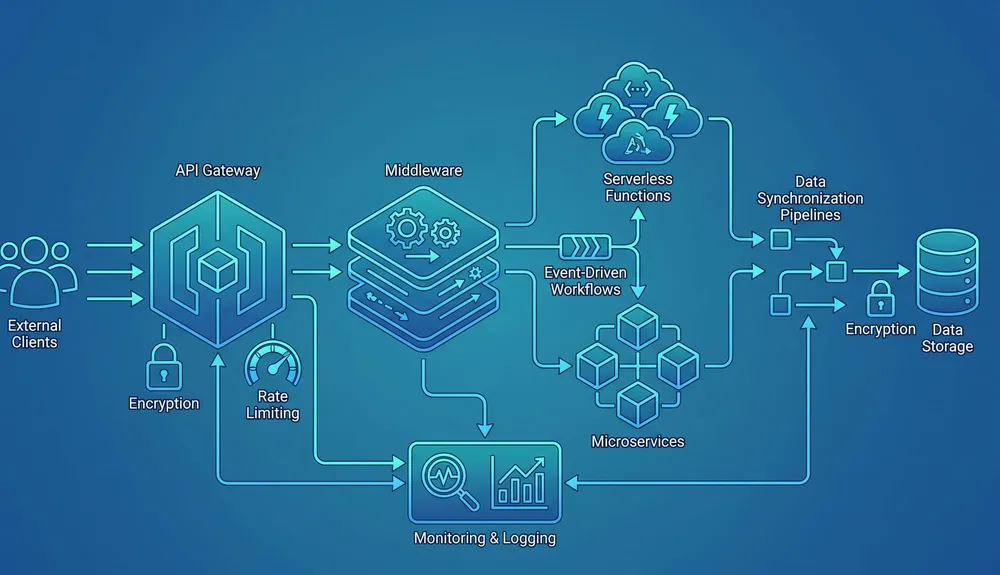
Different Enterprise CRM Options and CRM Integration Services
A CRM becomes valuable when teams trust it as the operational record for customers, opportunities, support, activity, and revenue. For enterprise organisations, that trust depends on more than choosing a well-known platform. It depends on data design, integrations, governance, reporting, user adoption, and a support model that keeps the CRM aligned with business change.
This guide compares common enterprise CRM options and explains the CRM integration services that usually sit around them. It is written for Australian businesses that need to connect a CRM with websites, forms, ERP, accounting, marketing automation, customer service, ecommerce, data warehouses, and internal workflows.
What Matters in an Enterprise CRM Decision?
The best CRM is the one your teams can operate, integrate, govern, and improve over time.
Fit to Process
Match the CRM to sales, service, marketing, account management, quoting, field operations, and customer lifecycle needs.
Integration Readiness
Check APIs, webhooks, middleware support, connector ecosystem, data limits, authentication, and event patterns before committing.
Data Governance
Define ownership for accounts, contacts, leads, opportunities, consent, duplicate handling, permissions, and audit trails.
User Adoption
Prioritise workflows, screens, automations, dashboards, and mobile access that reduce admin instead of adding it.
Reporting Model
Decide whether CRM reporting is enough or whether data should also flow into Power BI, Tableau, Looker, or a warehouse.
Support Model
Budget for configuration changes, integration monitoring, data cleanup, release testing, documentation, and training.
Major Enterprise CRM Options
The enterprise CRM market includes broad customer platforms, sales-focused systems, ERP-connected suites, and lower-cost challengers. The right option depends on the surrounding technology stack and how much customisation, governance, and integration the business needs.
| CRM option | Good fit | Integration considerations |
|---|---|---|
| Salesforce Sales Cloud / Agentforce Sales | Large sales teams, complex pipelines, partner ecosystems, advanced automation, AI-assisted sales workflows, and organisations that need a mature platform ecosystem. | Salesforce offers multiple APIs, including REST, SOAP, Bulk API 2.0, Pub/Sub API, Metadata API, and GraphQL API. API access depends on edition, so confirm licensing before integration design. |
| Microsoft Dynamics 365 Sales | Businesses already invested in Microsoft 365, Azure, Power Platform, Teams, Outlook, Power BI, or Dataverse. | Dynamics 365 Sales runs on Microsoft Dataverse. Integration planning should consider Dataverse tables, security roles, environments, Power Platform governance, and the Dataverse Web API. |
| HubSpot Enterprise Customer Platform | Marketing-led and revenue operations teams that want sales, marketing, service, content, data, and revenue tools connected through HubSpot Smart CRM. | HubSpot provides CRM object, association, properties, schema, search, pipeline, webhook, and app integration APIs. It can be fast to adopt, but enterprise data model design still matters. |
| Zoho CRM Enterprise | Cost-sensitive organisations that want a broad business software suite, CRM customisation, workflow automation, and integration with other Zoho products or third-party systems. | Zoho CRM V8 APIs include metadata, core, composite, bulk, notification, and query APIs. Plan API limits, module design, OAuth scopes, and data synchronisation carefully. |
| SAP Sales Cloud | B2B organisations with SAP ERP, SAP S/4HANA, lead-to-cash processes, CPQ, complex product configuration, or strong back-office alignment requirements. | SAP integration often depends on SAP Integration Suite, SAP APIs, OData, SOAP, communication arrangements, and message monitoring across A2A, A2X, and B2B patterns. |
| Oracle Fusion Cloud CX Sales | Enterprises already using Oracle Fusion applications across finance, supply chain, HR, sales, service, marketing, subscription, or CPQ. | Oracle Integration provides adapters, mapping, monitoring, and hybrid cloud/on-premises connectivity. It is strongest when Oracle CX needs to connect with the wider Oracle estate. |
There are other valid CRM categories, including industry-specific CRMs, customer service platforms, donor management systems, membership CRMs, ecommerce CRMs, and custom CRM builds. They should be considered when the business process is specialised enough that a general enterprise CRM would need heavy modification.
What CRM Integration Usually Includes
CRM integration is the engineering work that turns the CRM from a database into an operating system for customer-facing work.
Website Lead Capture
Connect forms, landing pages, chat, campaign pages, and quote requests to leads, contacts, deals, tasks, and notifications.
ERP and Finance
Synchronise account, product, quote, order, invoice, credit, subscription, and fulfilment data where business rules allow it.
Marketing Automation
Connect consent, segmentation, campaign attribution, lifecycle stage, email activity, and lead scoring across marketing tools.
Customer Support
Link tickets, cases, service history, SLAs, assets, subscriptions, and account context so service teams see the full relationship.
Reporting Data
Move clean CRM data into dashboards, warehouses, and executive reporting without breaking source-of-truth rules.
Automation and AI
Prepare reliable customer data, events, permissions, and audit trails before adding agents, recommendations, enrichment, or workflow automation.
How to Choose Between Enterprise CRM Platforms
Start with business operations, not product demos. A CRM that looks impressive in a vendor walkthrough can still fail if it does not match the way leads are qualified, accounts are owned, quotes are approved, support cases are escalated, or revenue is reported.
Choose Salesforce when ecosystem depth matters
Salesforce is often a strong fit when the organisation needs a large partner ecosystem, mature sales automation, advanced forecasting, API breadth, custom objects, approvals, marketplace apps, and integration through MuleSoft or other middleware. It is usually not the cheapest option, and governance is important because unmanaged customisation can become expensive.
Choose Microsoft Dynamics 365 when Microsoft alignment matters
Dynamics 365 Sales is attractive where Microsoft 365, Outlook, Teams, Power BI, Azure, Power Apps, and Dataverse are already central. Microsoft documentation says Dynamics 365 Sales runs on Dataverse and supports model-driven app design, which makes the surrounding Power Platform architecture part of the CRM decision.
Choose HubSpot when adoption speed and connected revenue tools matter
HubSpot Enterprise can suit teams that want a more intuitive customer platform spanning marketing, sales, service, content, data, and revenue operations. HubSpot positions Smart CRM as the shared foundation across its hubs, and its developer documentation exposes CRM objects, associations, properties, schemas, search, pipelines, webhooks, and other APIs.
Choose Zoho when value and suite coverage matter
Zoho CRM Enterprise can be compelling for organisations that want broad software coverage and customisation without the budget profile of the largest enterprise suites. Its official enterprise page emphasises security, scalability, reliability, integration with existing systems, and a suite that spans sales, marketing, analytics, productivity, finance, HR, and low-code development.
Choose SAP or Oracle when back-office alignment matters
SAP Sales Cloud and Oracle Fusion Cloud CX Sales are strongest when the CRM must sit close to ERP, CPQ, supply chain, finance, subscription, service, or large enterprise process management. SAP highlights connected lead-to-cash and deep ERP integration, while Oracle positions CX within the broader Fusion application context and supports integration through Oracle Integration.
CRM Integration Patterns That Affect Cost and Risk
CRM integration services should identify the right pattern for each data flow. Not every integration should be real time, and not every system should be allowed to update every field.
| Pattern | Use when | Watch for |
|---|---|---|
| Native connector | The vendor supports a maintained app or certified connector for common systems such as email, calendars, marketing tools, accounting, or ecommerce. | Field mapping limits, sync frequency, hidden transformations, duplicate rules, and upgrade behaviour. |
| Direct API integration | A website, portal, app, or internal system needs a focused CRM operation such as creating a lead, updating a deal, or retrieving account status. | Authentication, rate limits, retries, error handling, API versioning, and audit logging. |
| Middleware or iPaaS | Multiple systems must be orchestrated, monitored, transformed, retried, and governed through one integration layer. | Licensing, operational ownership, mapping complexity, monitoring, and whether the platform fits future workloads. |
| Batch or bulk sync | Large volumes of contacts, accounts, products, activities, or historical data need to move on a schedule. | Incremental keys, deduplication, partial failures, load windows, and source-of-truth rules. |
| Event-driven integration | Downstream workflows should react when a lead changes stage, an order ships, a support case escalates, or a subscription renews. | Event ordering, idempotency, dead-letter handling, replay strategy, and subscriber permissions. |
| Reporting extract | Analytics teams need CRM data in a warehouse or BI model without turning the CRM into a reporting bottleneck. | Privacy, consent, ownership of calculated metrics, refresh timing, and whether deleted records are handled correctly. |
For many businesses, the safest architecture is a mix: native connectors where they are reliable, direct APIs for focused workflows, middleware for cross-system orchestration, and a separate reporting pipeline for analytics.
A Practical CRM Integration Roadmap
- Discovery: document sales, service, marketing, finance, support, and reporting workflows before platform configuration starts.
- Data model: define accounts, contacts, leads, opportunities, products, quotes, tickets, activities, consent, and custom objects.
- Source of truth: decide which system owns each field and which systems can only read it.
- Integration design: choose native connectors, APIs, middleware, batch sync, event patterns, and reporting extracts for each flow.
- Migration: clean duplicates, standardise fields, map historical activities, validate ownership, and test sample records before bulk import.
- Security: configure roles, permission sets, service accounts, OAuth apps, secrets, MFA, logging, and least-privilege access.
- Testing: test happy paths, validation failures, retries, duplicates, permission failures, rate limits, and rollback plans.
- Launch and support: monitor queues, errors, adoption, reports, data quality, release changes, and user feedback after go-live.
VaniTech's integration services can support this roadmap across API design, middleware, website lead capture, CRM data flows, reporting, and operational support. Where the CRM depends on a website or CMS, the integration plan should also include form behaviour, consent capture, campaign tracking, and post-submit automation.
Common CRM Integration Mistakes
- Connecting forms to CRM before the lead qualification model is agreed.
- Syncing every field both ways instead of defining ownership.
- Ignoring duplicate records until sales and service teams lose trust.
- Building custom code where a maintained connector or middleware flow would be easier to support.
- Using admin accounts for integrations instead of dedicated service accounts and scoped permissions.
- Forgetting unsubscribe, consent, privacy, and retention requirements.
- Creating dashboards before agreeing how revenue, pipeline, lifecycle stage, and attribution are calculated.
- Launching without monitoring, retry handling, documentation, and a support owner.
Final Recommendation
Shortlist enterprise CRM platforms by business fit first, then test the integration model before signing off the implementation plan. Salesforce, Dynamics 365, HubSpot, Zoho, SAP, and Oracle can all be the right answer in different environments. The deciding factors are usually surrounding systems, governance, process complexity, reporting needs, budget, and who will maintain the platform after launch.
The CRM integration service is not an afterthought. It is the part that determines whether website leads arrive cleanly, sales and service see the same customer, finance can trust quote and order data, marketing can segment responsibly, and executives can read accurate reports.
Sources Checked
- Salesforce: Sales Cloud / Agentforce Sales guide
- Salesforce Help: Which API Do I Use?
- MuleSoft: Connect Salesforce across your business
- Microsoft Learn: Dynamics 365 Sales overview
- Microsoft Learn: Dataverse Web API
- HubSpot: Enterprise Customer Platform
- HubSpot Developers: Understanding the CRM APIs
- Zoho: Enterprise CRM
- Zoho CRM V8 APIs
- SAP: Sales and CRM software
- SAP Help: Solution Guide for SAP Sales Cloud
- SAP Integration Suite: Application integration
- Oracle: AI for Customer Experience
- Oracle Docs: About Oracle Integration
Enterprise CRM and CRM Integration FAQs
Short answers for teams comparing CRM platforms and integration approaches.
Plan a CRM Integration That Teams Can Trust
VaniTech can help compare CRM options, design CRM integrations, connect websites and systems, clean data flows, and support the platform after launch.