
How to Update Old Blog Content for AI Discovery
A practical guide to refreshing old blog content so it can be found, understood, cited, and measured across Google AI Overviews, AI Mode, ChatGPT, Perplexity, Copilot, Gemini, and traditional search.
Updating old blog content for AI discovery is not about adding a few AI keywords and changing the date. It is about making an existing page more useful, more current, easier to crawl, easier to understand, and easier for search and AI answer engines to cite.
Google says there are no special AI-only requirements for appearing in AI Overviews or AI Mode. The same SEO foundations still matter: crawl access, indexability, snippet eligibility, helpful people-first content, internal links, important text visible on the page, good page experience, high-quality supporting images or videos, and structured data that matches the visible content.
For businesses, this is good news. You do not need to rebuild every old article. Start with the posts that already have impressions, backlinks, rankings, conversions, or topical relevance. Then improve the answer quality, freshness, entity clarity, examples, evidence, internal links, schema, media, and measurement.
Choose the Right Update Path
Not every old blog post deserves the same treatment. Some need a light update, some need consolidation, and some should be retired.
Refresh in Place
Keep the same URL, update facts, add missing sections, improve headings, add new examples, fix links, and preserve existing authority.
Expand the Answer
Turn a thin post into a complete guide with definitions, steps, comparisons, FAQs, examples, visuals, and a clear next action.
Merge Duplicates
Combine overlapping posts into one stronger page, redirect weaker URLs, and reduce confusing internal competition.
Build a Hub
Use one refreshed guide as the hub, then link to supporting posts, service pages, case studies, tools, and related FAQs.
Change the Intent
If the search journey has changed, reposition the post around current questions, comparison criteria, risks, and decision points.
Retire or Noindex
If the topic is obsolete, legally risky, thin, or no longer aligned with the business, archive it, redirect it, or remove it from search.
Options and Cost Snapshot
Pricing checked on 11 May 2026. US-dollar prices are converted to AUD using the requested planning rate of 1.7x. Treat these as budget estimates because vendors can change pricing, limits, currencies, taxes, and packaging.
| Option | Cost snapshot | Best for | What it helps with | Limitations |
|---|---|---|---|---|
| Manual content refresh workflow | AUD 0 in software cost, plus internal or agency time. | Small sites, subject-matter experts, and service businesses with a manageable blog library. | Audit old posts, update facts, add examples, improve structure, strengthen internal links, add FAQs, and refresh calls to action. | Slow at scale and easy to make inconsistent editorial decisions without a scoring system. |
| Google Search Console and Google Analytics | Free. | Every website. | Find old pages with impressions, declining clicks, low CTR, query gaps, indexing issues, and conversion or engagement changes after updates. | Search Console includes AI features in overall Web search reporting rather than giving every AI surface a separate breakout. |
| Google Trends and SERP/manual AI answer review | Free, plus research time. | Teams validating whether an old topic is still in demand and how questions have changed. | Compare language, spot emerging questions, inspect cited pages, review competitor answers, and identify missing subtopics. | Manual checks are not statistically complete and can vary by location, account, device, and personalization. |
| Screaming Frog SEO Spider | Free up to 500 URLs. Paid licence is listed at GBP 199/year for one user, with bulk licence discounts. Check checkout currency for final AUD cost. | Technical SEO audits and structured content inventories. | Find broken links, redirects, missing titles, duplicate pages, crawl depth, metadata gaps, schema validation issues, internal links, custom extractions, and integrations with Search Console, Analytics, and PageSpeed Insights. | Desktop tool with a technical learning curve. The paid licence is per user. |
| Semrush AI Visibility Toolkit | USD 99/month, about AUD 168.30/month. Extra domains, users, or prompt limits can add cost. | Teams that want to monitor whether refreshed content is improving visibility in AI-generated answers. | AI visibility score, prompt research, prompt tracking, brand performance, competitor gaps, and site audit checks for AI search blockers. | Measurement and research tool. It does not replace content editing, technical fixes, or subject-matter expertise. |
| Ahrefs Brand Radar and Custom Prompts | Brand Radar lists USD 199/month for a single AI visibility index, about AUD 338.30/month, and USD 699/month for all indexes, about AUD 1,188.30/month. Custom prompt packages list USD 50, USD 100, and USD 250/month, about AUD 85, AUD 170, and AUD 425/month. | SEO teams tracking AI citations, brand mentions, competitor visibility, and prompts after updating old content. | Shows AI Overview and AI assistant visibility, cited pages, source domains, search demand, web visibility, and custom prompt performance. | Best when AI search visibility is a recurring KPI. It does not make the content better by itself. |
| Clearscope | Essentials is USD 129/month, about AUD 219.30/month. Business is USD 399/month, about AUD 678.30/month. Enterprise is custom. | Content teams that want optimization guidance, prompt tracking, brand visibility tracking, and query fan-out awareness. | Topic recommendations, draft workflows, content optimization, prompt tracking across ChatGPT and Gemini, brand visibility, and AI search-oriented content guidance. | Useful for content quality and workflow, but still needs human editorial judgment and real expertise. |
| MarketMuse | Free plan includes limited use and 10 queries/month. Paid tiers are demo-led on the pricing page, with packages for Optimize, Research, and Strategy. | Teams with larger content inventories that need prioritization, topic authority, content briefs, and refresh planning. | Content inventory, topic modeling, content briefs, site heatmaps, topic authority signals, and prioritization for what to update or create. | Paid pricing is not fully self-serve on the public page, so teams need sales or demo engagement for final cost. |
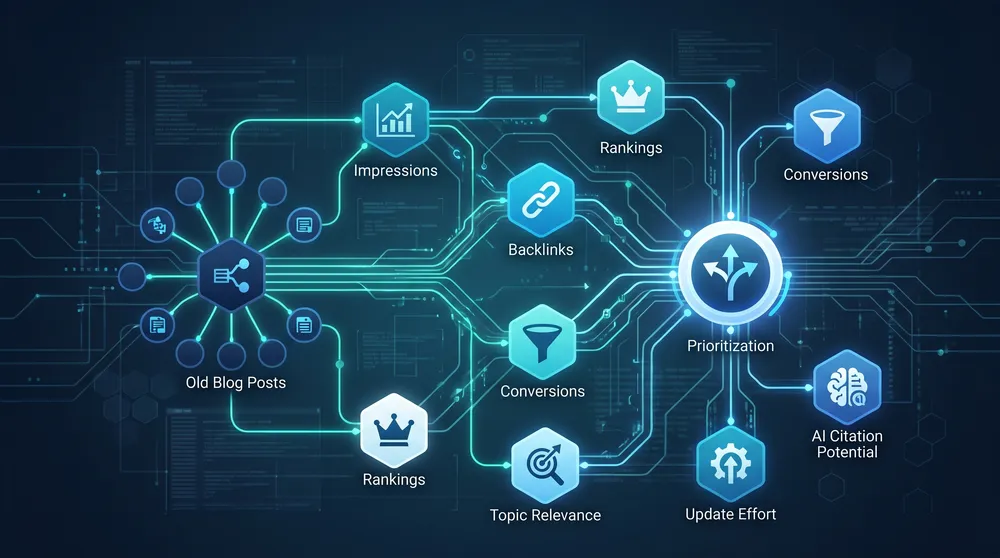
Start With Pages That Already Have Signals
The highest-return refreshes usually come from pages that already have impressions, backlinks, rankings, internal links, or conversion history.
AI Discovery Refresh Checklist
Use these checks when deciding whether an old post is ready for modern search and AI answer engines.
Recheck Intent
Compare old rankings, current queries, AI answers, competitor pages, and buyer questions to confirm what the page should answer now.
Add Expertise
Add firsthand examples, screenshots, case notes, process detail, limitations, author context, and evidence that shows real experience.
Update Facts
Refresh statistics, screenshots, pricing, dates, product names, regulations, screenshots, steps, and source links.
Structure Answers
Use clear headings, definitions, comparison tables, FAQs, ordered steps, and internal links so humans and machines can parse the page.
Fix Technicals
Check crawlability, indexability, canonicals, broken links, schema, image alt text, page speed, mobile layout, and snippet eligibility.
Measure Lift
Track impressions, clicks, CTR, conversions, AI mentions, cited URLs, engagement quality, assisted leads, and internal link clicks.
The 10-Step Refresh Workflow
1. Build a Content Inventory
Export URLs, titles, publish dates, updated dates, categories, word counts, organic clicks, impressions, conversions, backlinks, internal links, and target services. Add a column for business value so you do not refresh content that no longer matters.
2. Score Pages by Opportunity
Prioritize posts with declining clicks but steady impressions, rankings around page one or page two, strong backlinks, high-value service relevance, or topics that AI answer engines already discuss. Ignore vanity traffic if the topic does not support the business.
3. Re-map the Search Intent
Old posts often target old wording. Compare the page against current search results, AI Overviews, AI Mode-style answers, ChatGPT, Perplexity, Copilot, Gemini, and customer questions. Look for new subtopics, comparison needs, definitions, risks, objections, and decision criteria.
4. Preserve the URL When Possible
If the post has backlinks, rankings, or historical value, update it in place. Use a new URL only when the topic has changed enough that the original page cannot satisfy the new intent. If you merge pages, redirect the weaker URLs to the strongest canonical version.
5. Improve the Answer, Not Just the Length
AI discovery rewards pages that are easy to understand and useful to cite. Add concise definitions, direct answers, step-by-step instructions, examples, edge cases, comparison tables, decision frameworks, screenshots, source links, and practical recommendations. Remove filler.
6. Add Experience and Proof
Google's people-first guidance asks whether content demonstrates firsthand expertise and whether readers leave feeling they have learned enough to achieve their goal. Add what only your business can know: project lessons, client examples, test results, before-and-after notes, implementation details, and tradeoffs.
7. Clarify Entities and Relationships
AI systems need clear entities. Define the topic, related services, product names, locations, authors, tools, standards, people, organisations, and use cases. Link to authoritative supporting pages and your own relevant service, case study, and guide pages.
8. Make the Page Technically Eligible
Check that crawling is allowed, the page is indexable, the canonical is correct, the page can show a snippet, important content is text-based, images have descriptive alt text, schema matches visible content, and the page is included in relevant internal links and sitemap workflows.
9. Update the Date Honestly
Only update the visible date or modified date when the content has materially changed. Google specifically warns against changing dates to make pages seem fresh when the content has not substantially changed.
10. Measure for 30 to 90 Days
Track Search Console clicks, impressions, CTR, average position, conversions, engagement quality, AI visibility prompts, citations, and assisted leads. A good refresh often improves relevance before it improves traffic, so watch query mix and lead quality as well as raw sessions.

What to Add to an Old Blog Post
Most old posts underperform because they answer only the first version of the question. AI answer engines often need a broader context window: definitions, related entities, use cases, risks, alternatives, and proof. Add the missing context without burying the answer.
Add a Direct Answer Near the Top
Open with a short answer that explains the topic, who it is for, and what the reader should do next. This helps visitors, featured snippets, and AI systems understand the page quickly.
Add a Decision Framework
Decision frameworks are easier to cite than vague advice. Include tables such as "best option by budget", "when to use this method", "pros and cons", "common mistakes", or "what to do next".
Add Original Examples
Examples separate refreshed content from generic AI-written summaries. Use anonymised client scenarios, process screenshots, workflow notes, implementation details, or lessons learned from your own work.
Add Related Questions
Use real customer questions, Search Console queries, sales objections, support tickets, People Also Ask-style questions, and AI prompt research. Answer them clearly with enough context that the page can satisfy follow-up questions.
Add Internal Links With Purpose
Link from the refreshed blog post to relevant service pages, case studies, pricing pages, tools, glossary pages, and deeper guides. Also link from newer high-traffic pages back to the refreshed post so crawlers and users can rediscover it.
Add Structured Data Carefully
Use Article, BreadcrumbList, FAQ, HowTo, Product, Service, LocalBusiness, or Organization structured data only where it matches the visible page content and the supported Google feature guidelines. Structured data should clarify the page, not invent information.
What Not to Do
- Do not change the date without materially improving the page.
- Do not add generic AI-generated paragraphs that repeat what competitors already say.
- Do not stuff the page with every related keyword or prompt variation.
- Do not delete a URL with backlinks or rankings without a redirect plan.
- Do not add schema that does not match visible content.
- Do not rely on AI visibility tools without improving the human usefulness of the page.

Track AI Discovery as a Quality Signal
Measure whether refreshed posts earn better queries, stronger engagement, more internal clicks, higher-quality leads, and more citations across AI answer surfaces.
Recommended Refresh Plan by Budget
Budget: AUD 0/month
Use Search Console, Google Analytics, Google Trends, manual AI answer checks, spreadsheets, and editorial review. Refresh the top 10 to 20 old posts that have the strongest combination of impressions, business relevance, and update potential.
Budget: AUD 85 to AUD 220/month
Add Ahrefs Custom Prompts Basic, Semrush AI Visibility Toolkit, Clearscope Essentials, or another focused tool if AI discovery and content quality need regular monitoring. Use free or low-cost crawler checks for technical validation.
Budget: AUD 220 to AUD 680/month
Add more robust AI visibility, content optimization, or content inventory tooling. This budget fits teams refreshing content monthly across multiple services, markets, or authors.
Budget: AUD 680+/month
Use Ahrefs Brand Radar all indexes, Clearscope Business, MarketMuse paid plans, Semrush One, agency support, or a combined content and technical SEO workflow for larger content libraries.
90-Day Refresh Cadence
| Week | Action | Output |
|---|---|---|
| Weeks 1 to 2 | Export content inventory, Search Console data, Analytics data, backlinks, and current rankings. | Prioritized refresh backlog. |
| Weeks 3 to 6 | Refresh the first batch of high-value posts, update internal links, fix technical issues, and publish honestly updated dates. | Improved pages with clearer answers and stronger crawl signals. |
| Weeks 7 to 10 | Review Search Console query movement, AI prompt visibility, engagement, and conversions. Add missing sections or internal links. | Second-pass improvements based on early data. |
| Weeks 11 to 13 | Compare against the baseline and decide which pages need consolidation, stronger proof, new media, or follow-up content. | Next-quarter refresh plan. |
Final Recommendation
Update old blog content like an editor, not like a search shortcut. Keep URLs that have authority, remove outdated claims, add firsthand experience, answer the modern search journey, strengthen internal links, make the page technically eligible, and measure whether the page earns better visibility and leads.
The best refreshed post is not simply newer. It is clearer, more useful, easier to verify, and easier for both people and AI systems to connect to the rest of your business.
Sources Checked
- Google Search Central - AI features and your website
- Google Search Central - creating helpful, reliable, people-first content
- Google Search Console Help - about Search Console
- Google Search Console Help - Performance report
- Google Search Central - sitemaps
- Google Search Central - structured data
- Screaming Frog SEO Spider pricing
- Semrush AI Visibility Toolkit pricing
- Ahrefs Brand Radar pricing
- Clearscope pricing
- MarketMuse pricing