
Kentico Xperience 13 End of Support: Migration Plan
Kentico Xperience 13 technical support ends on 31 December 2026. From 1 January 2027, Kentico says it will no longer provide updates, hotfixes, security patches, repairs or technical support for the version.
The website will not automatically stop working at midnight. The practical change is more important: it becomes an internet-facing business system without a vendor-backed path for future product defects or newly discovered security vulnerabilities.
For Australian organisations still on Xperience 13, the useful decision is no longer whether to note the deadline. It is whether to complete a controlled migration, begin a phased move, or operate temporarily under a documented legacy-risk plan while the replacement is delivered.
Why Kentico Xperience 13 is trending now
The support date has been known, but the planning pressure changed in October. Kentico's October changelog now points customers to consolidated upgrade guides, the Kentico Migration Tool and KentiCopilot-assisted migration workflows. At the same time, the 31 December cutoff is close enough that a complex site may not have time for an unplanned full migration before year-end.
That combination makes the topic commercially urgent. Teams need an evidence-based scope, not a product brochure: what can be transferred, what must be rebuilt, which integrations are business-critical, what acceptance evidence is required and what controls apply if the site remains on Xperience 13 after support ends.
The issue affects more than the CMS editor. A Kentico implementation can sit across lead generation, customer portals, member services, ecommerce, search, marketing automation, identity, CRM, payments, analytics and operational reporting. The migration plan has to protect those journeys, not only reproduce pages.
What changes after 31 December 2026
End of support is not a shutdown, but the risk and ownership model changes immediately.
The site keeps running
Kentico says Xperience 13 installations will not be switched off when support ends. Hosting and existing code can continue operating.
Vendor fixes stop
Kentico will cease updates, hotfixes, security patches, maintenance, repairs and technical support from 1 January 2027.
Risk moves to the owner
The organisation and its service partners must manage defects, vulnerabilities, dependencies, incidents and replacement decisions without Xperience 13 vendor support.
The destination is different
Xperience by Kentico uses newer architecture, APIs and content patterns. Treat the work as a migration and modernization program, not a routine in-place patch.
Do not estimate from page count alone
A 200-page brochure site with two custom integrations may be harder to migrate than a 2,000-page site built mostly from consistent structured content. The estimate depends on architecture, not just content volume.
| Inventory area | Questions to answer |
|---|---|
| Platform and hosting | Exact Xperience 13 hotfix, .NET runtime, hosting, database, deployment pipeline, environments and owners |
| Content model | Page types, reusable content, taxonomies, cultures, workflows, permissions and custom fields |
| Page Builder | Widgets, sections, templates, inline properties, personalization and legacy patterns |
| Codebase | Controllers, services, scheduled tasks, custom modules, search, caching and third-party libraries |
| Integrations | CRM, identity, payments, booking, marketing, analytics, DAM, email, ERP and internal APIs |
| Commerce | Products, customers, carts, checkout, pricing, discounts, shipping, tax, orders and fulfilment |
| Operations | Backups, monitoring, security scanning, incident response, releases, support access and technical documentation |
Record business criticality and an owner for each item. A dependency without an accountable owner is a likely migration delay.
The Migration Tool helps, but it does not migrate the whole solution
Kentico's Migration Toolkit provides a supported Kentico Migration Tool for moving from Xperience 13 to Xperience by Kentico. It can transfer structured content, Page Builder content, database objects and related media, subject to the tool's version matrix and documented feature coverage.
That is valuable, but it is not the same as moving an application unchanged. Kentico explicitly notes that the tool cannot transfer every data type or feature. Custom code, unsupported content, third-party dependencies and architecture-specific behaviour require manual adaptation.
Plan the migration in three workstreams:
- Transfer: content and supported data the tool can move predictably.
- Transform: models, widget data, references and fields that need mapping into newer patterns.
- Rebuild: custom presentation, integrations, commerce logic and operational tooling that depend on the older APIs or architecture.
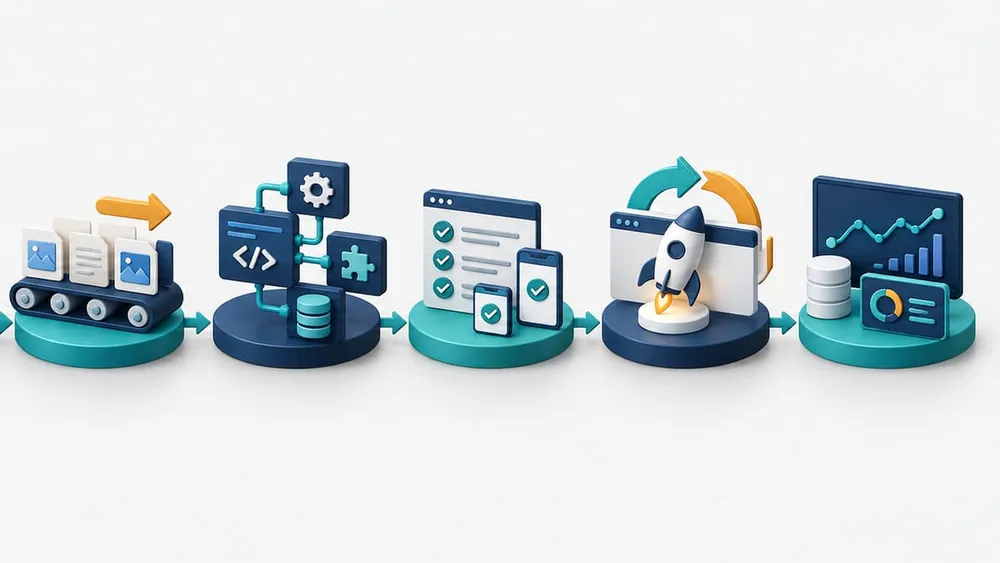
Move from discovery to supported operations
An eight-stage Kentico migration plan
1. Confirm the operating position
Record the exact hotfix, runtime, hosting model, support agreement, repository access, deployment method and production owner. Apply all available Xperience 13 security hotfixes before the support window closes.
2. Inventory the complete solution
Catalogue content types, cultures, media, widgets, custom code, scheduled jobs, search, identities, integrations, data flows and business-critical journeys. Capture real usage rather than assuming every legacy feature still matters.
3. Classify transfer, transform and rebuild work
Map each dependency to a migration path. Identify anything the Migration Tool does not cover and assign an estimate, owner and acceptance method.
4. Design the target architecture
Choose hosting, content patterns, reusable fields, channels, identity, integrations, deployment, observability and support ownership before moving production data.
5. Run a representative rehearsal
Use a safe target environment and a production-like source copy. Record duration, failures, manual corrections, data counts and repeatable configuration. Never make the first full run the production cutover.
6. Adapt code and integrations
Move controllers, widgets, services and APIs in tested increments. Add contract tests around CRM, payments, search, identity, email and other external systems.
7. Prove business acceptance
Compare source and target content, routes, forms, checkout, search, editorial workflows, permissions, analytics, accessibility, performance and error handling.
8. Cut over with rollback and monitoring
Freeze or reconcile late content changes, take recoverable backups, define DNS and cache steps, retain source access, monitor critical journeys and set a clear rollback decision point.
Choose a widget strategy deliberately
Page Builder widgets often decide whether the project is a straightforward transfer or a redesign. Kentico documents three broad approaches.
| Approach | Best fit | Trade-off |
|---|---|---|
| Legacy-mode transfer | Fast initial migration where retaining presentation is the priority | Leaves legacy patterns, limits newer Content hub use and creates later modernization work |
| Map built-in properties | Widgets based mostly on standard editing components | Improves the editing experience but may preserve the old content model |
| Remodel during migration | Teams seeking reusable content, cleaner architecture and multichannel use | Requires more design, code, content mapping and editorial change management now |
Do not make one choice for the whole site by default. A campaign widget may justify a quick transfer, while service, product and compliance content may benefit from structured reusable models.
Map integrations as contracts, not a list of logos
An integration inventory should capture what enters and leaves Kentico, who owns each endpoint, how authentication works, what happens on failure and how records are reconciled.
- CRM and lead routing: field mappings, consent, duplicate handling, retries and ownership after submission.
- Identity and member access: user migration, SSO, roles, password strategy, sessions and account recovery.
- Payments and commerce: cart state, tax, discounts, shipping, payment callbacks, orders, refunds and downstream fulfilment.
- Search: indexed fields, permissions, facets, synonyms, freshness and re-index recovery.
- Marketing and analytics: consent, events, campaign attribution, forms, email audiences and historical data requirements.
- Internal systems: API contracts, batch jobs, file transfers, network access, service accounts and support escalation.
For each contract, test success, timeout, duplicate delivery, invalid data, expired credentials and downstream unavailability. A green homepage does not prove the business application works.
Commerce needs a separate decision track
Kentico's guidance makes clear that commerce migration can require substantial custom development. Depending on the current solution and target approach, teams may need to redesign checkout, cart behaviour, shipping, payment methods, integrations, discounts and coupons.
Start with a capability matrix rather than assuming feature parity. Mark each capability as retain, replace, integrate, redesign or retire. Include customer and order history, product relationships, stock ownership, pricing rules, promotions, tax, fulfilment, returns, support tooling and reporting.
A business may decide to keep content and digital experience in Xperience by Kentico while moving transaction responsibilities to a dedicated commerce platform. That can be valid, but it changes integration, data ownership and support boundaries. Make the decision before rebuilding the old checkout by habit.
Use KentiCopilot as an accelerator, not acceptance evidence
Kentico documents KentiCopilot capabilities for auditing a Xperience 13 content model, generating a migration plan and tool configuration, analysing code, transforming common patterns and evaluating results. This can reduce repetitive discovery and migration work.
The safe operating model is still human-owned. Keep the source snapshot and migration plan versioned. Review generated mappings and code. Run tools against non-production data first. Require peer review, automated tests, visual comparison and business acceptance before cutover.
AI assistance is most useful when the input is deterministic and the output is verifiable. It should help the team move through a controlled plan faster, not replace the plan, the test evidence or the person accountable for the release.
Prove the target works before cutover
Use evidence from the target system, not a general statement that migration completed.
Content completeness
Compare counts, cultures, media, relationships, URLs, metadata, owners and publishing states between source and target.
Customer journeys
Test navigation, search, forms, accounts, checkout, payments, emails and service workflows on desktop and mobile.
Editorial operations
Verify roles, approvals, previews, scheduled publishing, media work, localization and recovery from rejected changes.
Technical quality
Check redirects, analytics, schema, accessibility, performance, caching, security headers, logs, alerts and error paths.
If migration cannot finish before the deadline
Do not call the delay acceptable merely because the current site still loads. Australian Signals Directorate guidance treats unsupported online services as legacy risk that should be removed, replaced or explicitly managed when immediate replacement is not possible.
Create a written, time-bound interim plan with:
- a named executive risk owner and technical support owner;
- the last available Xperience 13 hotfix and dependency baseline;
- restricted administrative access, multi-factor authentication and credential review;
- vulnerability scanning, logging, alerting and critical-journey monitoring;
- tested backups, restoration steps and an incident-response contact tree;
- temporary removal or isolation of unused modules and exposed endpoints;
- a provider escalation path for custom remediation where feasible; and
- a funded migration milestone and final decommission date.
Compensating controls reduce exposure; they do not restore vendor support or create future security patches. Treat them as a bridge with an expiry date.
A practical 60-day response plan
Days 1–10: discover and decide
Confirm ownership, apply available hotfixes, capture the architecture and dependency inventory, identify business-critical journeys and decide whether the target is a full migration, phased migration or interim risk plan.
Days 11–25: design and prove the route
Establish the target environments, select widget and content-model strategies, configure a representative Migration Tool rehearsal and prove the hardest integration or custom-code path early.
Days 26–45: migrate in repeatable increments
Version configuration, automate repeatable transfers, adapt code and integrations, fix reconciliation gaps and build the acceptance matrix with content and business owners.
Days 46–60: rehearse cutover and close risk gaps
Run a full dress rehearsal, measure content freeze and migration duration, confirm rollback, train editors, complete business acceptance and either cut over or activate the documented interim controls with an approved completion date.
Complex projects may need longer. The value of the 60-day plan is to force evidence and decisions quickly, not to promise an unrealistic date.
Questions to ask a Kentico migration partner
- Which parts of our solution can the Migration Tool transfer unchanged?
- Which content models, widgets and references need transformation?
- Which code, integrations and commerce features require rebuilding?
- How will source-to-target counts and relationships be reconciled?
- What is the content freeze and late-change strategy?
- How will forms, identity, search, CRM, payments and analytics be tested?
- What evidence is required for business and editorial acceptance?
- What is the cutover, rollback and post-launch support model?
- Which risks remain if the site operates after 31 December 2026?
- Who owns the supported target platform after migration?
If these answers are not yet available, begin with a discovery and risk assessment. A defensible scope is more valuable than a fixed-price promise built from page count alone.
What business and technology teams are asking
Sources Checked
- Kentico: Product Support Lifecycle Policy
- Kentico: Upgrade from Kentico Xperience 13
- Kentico Documentation: Xperience by Kentico changelog
- Kentico Documentation: Migration Toolkit
- Kentico Documentation: Upgrade to Xperience by Kentico
- Kentico Documentation: KentiCopilot
- Kentico Documentation: Upgrade widgets from Xperience 13
- Kentico Documentation: Adjust code and adapt the project
- Australian Signals Directorate: Essential Eight maturity model
- Australian Signals Directorate: Transitioning from the Essential Eight
Sources were accessed on 26 October 2026. Confirm current Kentico tooling, version compatibility, licensing and support terms before beginning a production migration.