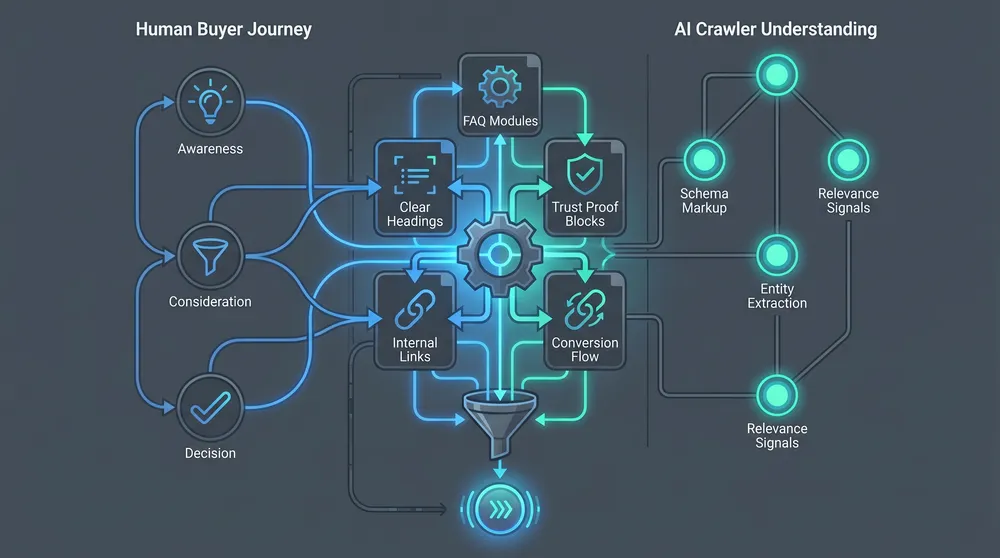
Make a Guide Website AI-ready With Markdown
Learn how to make a guide website AI-ready using Markdown files, frontmatter, headings, internal links, schema, sitemaps, and llms.txt.
If you are building a guide website, documentation hub, knowledge base, product manual, developer portal, or learning library, Markdown files can make the site much easier to maintain and much easier for AI systems to interpret. The goal is not to create magic AI markup. The goal is to make the content clear, crawlable, consistent, and reusable.
Google says the same foundational SEO practices apply to AI features in Search, including crawl access, internal links, useful textual content, page experience, images and video where useful, and structured data that matches the visible page. Google also says there are no additional technical requirements or special AI schema required for AI Overviews or AI Mode. That is good news for guide websites: the boring foundations still matter.
A Markdown-first guide website gives you one clean source of truth. From `.md` files you can generate public HTML pages for humans, JSON-LD schema for search engines, XML sitemaps for discovery, RSS feeds for updates, and optional files such as `/llms.txt` or `.md` page mirrors for AI tools. VaniTech can support this through CMS architecture, SEO, schema, AEO and GEO services, integration services, and ongoing support.
What Makes a Markdown Guide AI-ready?
AI readiness is mostly content architecture. The Markdown files should explain the topic clearly, link related ideas, and publish into crawlable web pages.
One Topic Per File
Each `.md` file should answer one guide question or explain one concept, task, decision, reference item, or troubleshooting path.
Strong Frontmatter
Store title, description, canonical slug, updated date, category, audience, summary, and related links as structured metadata.
Clean Headings
Use one H1, ordered H2 and H3 sections, descriptive headings, concise introductions, and predictable patterns across guide pages.
Internal Links
Link concepts, prerequisites, next steps, examples, reference pages, glossary terms, and comparison pages from the source Markdown.
Generated Outputs
Use the Markdown source to generate HTML, breadcrumbs, Article or HowTo schema, sitemap entries, search indexes, and optional Markdown mirrors.
Crawl Controls
Allow important public guide pages to be crawled, keep private drafts out of indexes, and separate AI search access from training reuse decisions.
Start With the Right File Structure
A guide website should be easy to understand from the folder tree. If people cannot navigate the content source, AI systems and search engines will inherit that confusion through shallow pages, weak links, duplicated content, and missing context.
A practical Markdown guide structure might look like this:
content/
  guides/
    getting-started/
      overview.md
      setup-checklist.md
    concepts/
      content-models.md
      structured-data.md
      ai-crawler-access.md
    how-to/
      create-a-guide-page.md
      add-schema.md
      publish-llms-txt.md
    reference/
      frontmatter-fields.md
      content-components.md
    troubleshooting/
      page-not-indexed.md
      duplicate-content.md
The folder names should match how users think: getting started, concepts, how-to, reference, troubleshooting, examples, glossary, or integrations. Avoid dumping every guide into one folder unless the site is tiny. A clear information architecture gives you better navigation, breadcrumbs, sitemaps, internal links, and AI retrieval chunks.
Use Frontmatter as the Content Contract
Frontmatter is the structured block at the top of a Markdown file. It is where the guide page declares what it is, who it is for, how it should be published, and how it connects to the rest of the site.
---
title: "Create an AI-ready Guide Page"
description: "How to structure a Markdown guide page so it is useful for readers, search engines, and AI assistants."
slug: create-ai-ready-guide-page
category: how-to
audience: content teams
updated: 2026-07-08
summary: "Use clear headings, concise answers, examples, links, schema, and review metadata."
related:
  - structured-data
  - publish-llms-txt
  - page-not-indexed
robots: index
schemaType: HowTo
---
Do not treat frontmatter as decoration. A build pipeline can use it to generate page titles, meta descriptions, canonical URLs, breadcrumbs, table of contents, related links, structured data, update badges, sitemap entries, and guide index pages. It also gives AI systems a clean summary when your content is transformed into search indexes or retrieval documents.
Anatomy of an AI-ready Markdown Guide
Each guide page should be readable as Markdown, useful as HTML, and transformable into structured outputs.
Clear Summary
Open with a short answer that states who the page is for, what it solves, and what the reader should do next.
Ordered Headings
Use H2 sections for major ideas and H3 sections for steps, examples, risks, or alternatives.
Examples
Include short code, config, YAML, command, folder, or content examples where they remove ambiguity.
Links
Link prerequisites, related guides, deeper references, glossary terms, and conversion pages from the Markdown source.
Metadata
Track updated dates, owners, audience, canonical slugs, schema type, and review status in frontmatter.
Validation
Run checks for broken links, missing descriptions, heading order, duplicate slugs, schema validity, and stale pages.
Write Markdown for Readers First, Then AI
Markdown is useful because it encourages structure without hiding the words behind layout controls. CommonMark describes Markdown as a plain-text format for writing structured documents, and notes that readability is one of the defining goals of the format. That is exactly what guide content needs.
A strong guide page should include:
- A direct answer near the top.
- Definitions for important terms.
- Prerequisites and assumptions.
- Step-by-step instructions where the topic is procedural.
- Decision tables where the reader must compare options.
- Examples that match real implementation scenarios.
- Warnings for privacy, security, SEO, or data risks.
- Links to next steps and deeper reference pages.
- A visible update date when accuracy changes over time.
For AI-readiness, avoid vague headings such as "Overview", "Details", and "Other Information" when a specific heading would help. Use headings such as "When to Use Markdown Mirrors", "How to Generate JSON-LD From Frontmatter", or "What Not to Put in llms.txt". Specific headings are easier for humans to scan and easier for retrieval systems to match to user questions.
Turn Markdown Into Reliable Web Outputs
The `.md` file is not the final experience. The public website still needs fast, accessible, crawlable HTML. Google explicitly says important content should be available in textual form, internal links should make content findable, and structured data should match visible text. Your build pipeline should enforce those rules.
| Output | Generated from | Why it matters |
|---|---|---|
| HTML guide page | Markdown body, frontmatter, layout, navigation, components. | The human-readable, crawlable page remains the primary public asset. |
| Meta title and description | Frontmatter title and description fields. | Supports search snippets, sharing, and clear page purpose. |
| Breadcrumbs | Folder path, category, parent field, or navigation config. | Clarifies hierarchy for users and search systems. |
| Structured data | Schema type, title, description, steps, FAQs, author, dates. | Gives search engines explicit page meaning when it matches visible content. |
| XML sitemap | Published guide URLs, updated dates, canonical slugs. | Helps search engines discover and recrawl important guide pages. |
| Search index | Plain text, headings, summaries, tags, URLs, related links. | Supports internal site search and AI retrieval workflows. |
| Optional Markdown mirror | Canonical Markdown source or cleaned rendered Markdown. | Can help AI tools and developer workflows consume documentation with less HTML noise. |
Use Schema Where It Matches the Guide
Structured data is useful when it describes the visible page accurately. Google states that structured data helps Google understand page content and that structured data should match visible content. It also says there is no special schema required for generative AI search. So use schema for clarity, not as an AI shortcut.
For a guide website, useful schema patterns often include:
Articlefor explanatory guide pages.HowTofor procedural steps where the page is genuinely a how-to.FAQPageonly when real FAQs are visible on the page.BreadcrumbListfor hierarchy.Organizationfor site identity.SoftwareApplication,Product,Service, orCourseonly when the guide content genuinely supports those entities.
The most maintainable approach is to generate schema from frontmatter and content blocks. Do not hand-code schema separately from the page content, because it will drift. If a Markdown guide has a visible FAQ block, generate FAQ schema from that same block. If the guide has steps, generate HowTo schema from the visible steps. If it does not, use Article schema and move on.
Generate Sitemaps and Internal Links
Google says sitemaps can help Google discover URLs on a site, especially on large sites, new sites, sites with rich media, or sites with few external links. For a guide website, sitemap generation should be automatic. Every published `.md` file with `robots: index` should produce a canonical URL in the sitemap. Drafts, private guides, duplicate pages, and noindex pages should not.
Internal links matter just as much. A guide site should not rely only on the sitemap. Each page should connect to prerequisites, next steps, related concepts, examples, and troubleshooting pages. If a Markdown file has no inbound or outbound links, it is probably isolated content, and isolated content is harder for both people and AI systems to understand in context.
Make AI Crawler Access a Deliberate Decision
Do not accidentally block the guide content you want discovered. Google says pages need to be crawlable and indexable to appear as supporting links in AI features in Search. OpenAI documents separate crawler controls for different use cases: OAI-SearchBot is used to surface websites in ChatGPT search, while GPTBot is used for crawling content that may be used in training OpenAI's generative AI foundation models.
That separation matters. A guide website may want AI search visibility while still limiting training use. For example, the site might allow traditional search crawlers and AI search crawlers, while disallowing training crawlers for certain content. This is a business and licensing decision, not a pure SEO setting.
User-agent: *
Allow: /

User-agent: OAI-SearchBot
Allow: /

User-agent: GPTBot
Disallow: /premium-guides/

Sitemap: https://www.example.com/sitemap.xml
Do not treat this sample as universal. Check current crawler documentation, licensing goals, server logs, paywall rules, and business risk before copying robots.txt rules. Also remember that private content should be protected by authentication, not only robots.txt.
Add llms.txt Carefully
The `/llms.txt` idea is a public proposal, not a search-engine requirement. The proposal describes a Markdown file at `/llms.txt` that gives language models a concise site overview and links to important Markdown-friendly resources. Google explicitly says you do not need to create new machine-readable files, AI text files, or special markup to appear in Google's AI features. Those two facts can coexist.
For a guide website, `/llms.txt` can still be useful as a curated table of contents for AI tools, developer workflows, and users who want a compact source map. Treat it as optional. It should complement HTML pages, structured data, and sitemaps, not replace them.
# Example Guide Site

> Practical guides for implementing content, SEO, CMS, and AI-ready documentation workflows.

## Core Guides
- [Getting started](https://www.example.com/guides/getting-started.md): Overview and setup path.
- [Markdown file structure](https://www.example.com/guides/markdown-file-structure.md): Recommended guide source layout.
- [Schema from frontmatter](https://www.example.com/guides/schema-from-frontmatter.md): How to generate JSON-LD from Markdown metadata.

## Optional
- [Glossary](https://www.example.com/guides/glossary.md): Terms used across the guide website.
- [Changelog](https://www.example.com/guides/changelog.md): Recent documentation changes.
The safest llms.txt policy is boring: keep it short, link only public pages, describe each link honestly, and regenerate it from the same guide index that powers your navigation.
Quality Checks Before Publishing
Markdown makes guide content easier to manage, but only if the publishing workflow checks the details. Add automated validation before content reaches production.
| Check | What to validate | Why it matters |
|---|---|---|
| Frontmatter | Title, description, slug, updated date, audience, summary, schema type, robots field. | Prevents missing metadata and inconsistent outputs. |
| Heading order | One H1, sensible H2/H3 hierarchy, no skipped levels. | Improves accessibility, scanability, and chunking. |
| Links | Broken internal links, redirect chains, orphan pages, missing related links. | Keeps the guide connected and crawlable. |
| Schema | JSON-LD validity, visible-content match, duplicate FAQ or HowTo claims. | Prevents structured data drift. |
| Robots and sitemap | Indexable guides in sitemap, private or noindex guides excluded. | Prevents accidental exposure or accidental invisibility. |
| AI retrieval test | Can an internal search or RAG test answer key guide questions from the Markdown? | Shows whether the content is actually understandable and complete. |
Implementation Checklist
- Define the guide taxonomy. Choose folders such as getting started, concepts, how-to, reference, troubleshooting, examples, and glossary.
- Create a frontmatter schema. Require title, description, slug, summary, category, updated date, audience, robots, and related links.
- Write one topic per file. Keep each Markdown page focused enough to answer a specific user question or task.
- Generate HTML pages. Use accessible layouts, clean headings, internal navigation, breadcrumbs, and readable text.
- Generate schema from content. Create Article, HowTo, FAQ, Breadcrumb, and Organization data only where it matches visible content.
- Generate sitemap entries. Include only canonical public guide pages that should be indexed.
- Add optional Markdown mirrors. Provide `.md` versions for public docs if your audience or AI workflow benefits from them.
- Add optional llms.txt. Curate a concise Markdown index of the most important public guide resources.
- Validate before deploy. Check metadata, links, heading order, schema, robots rules, sitemap output, and stale dates.
- Measure discovery. Use Search Console, analytics, server logs, site search data, and AI visibility checks where relevant.
Common Mistakes
- Publishing Markdown as HTML but leaving important guide text hidden behind JavaScript-only widgets.
- Using the same generic title and description pattern across every guide page.
- Letting frontmatter fields drift between pages without validation.
- Creating isolated guide files with no internal links.
- Adding FAQ or HowTo schema that does not match visible content.
- Adding `/llms.txt` and assuming it replaces sitemaps, internal links, or SEO fundamentals.
- Blocking AI search crawlers while trying to appear in AI search answers.
- Exposing private drafts, customer documentation, or paid content through Markdown mirrors.
Final Recommendation
The best way to make a guide website AI-ready with Markdown is to make the guide genuinely well structured. Use `.md` files as the canonical source, frontmatter as the metadata contract, HTML as the primary public experience, schema as a clarity layer, sitemaps as discovery support, and optional Markdown mirrors or `/llms.txt` as a curated convenience for AI tools.
Do not chase AI-only tricks. Build a documentation system where every guide page has a clear topic, direct answer, strong headings, useful examples, internal links, visible update history, and generated outputs that stay in sync. That is useful for people, useful for search engines, and useful for AI systems that need reliable context.
If you want help designing or rebuilding a Markdown-first guide website, VaniTech can help with CMS architecture, SEO and AI search optimisation, integration workflows, and long-term support.
Sources Checked
Markdown AI-ready Guide FAQs
Short answers for teams building guide websites, documentation hubs, and knowledge bases with Markdown files.
Build a Markdown-first Guide Website
VaniTech can help design the content model, Markdown workflow, schema generation, sitemap rules, AI crawler policy, and publishing pipeline for an AI-ready guide website.