
Microsite Capability in CMS: Launch Fast Without Rebuilding Everything
A practical guide to microsite capability in CMS platforms, comparing Umbraco, Optimizely, Hygraph, Contentful, and Contentstack for fast, low-budget campaign sites, product launches, event sites, and brand experiments.
Do you need to launch a microsite fast, keep the budget under control, and avoid rebuilding the same website foundations again? That is exactly where CMS microsite capability matters. A good CMS should let you spin up a small, focused site using reusable templates, content models, design components, preview, publishing controls, analytics, and domain setup without turning a campaign into a full platform project.
A microsite might be a campaign site, event site, product launch, recruitment hub, investor page, partner portal, regional landing site, competition page, or temporary brand experiment. The business wants speed. Marketing wants control. Developers want guardrails. Finance wants the project to avoid becoming a second website platform. The CMS choice should serve all four.
Vendor documentation was checked on 13 May 2026 across Umbraco, Optimizely, Hygraph, Contentful, and Contentstack. Features vary by product version, plan, implementation, and contract, so confirm limits, hosting assumptions, domains, workflow features, and release controls before procurement.
What a CMS Needs for Microsites
A microsite is small, but it still needs serious foundations. The trick is reusing the foundations instead of rebuilding them.
Site Creation
Create a new site root, space, stack, project, route group, branch, or content collection without disrupting the main website.
Reusable Templates
Use landing page templates, reusable sections, blueprints, content model templates, components, and brand-safe page layouts.
Domain and Routing
Support campaign domains, subdomains, folders, localized URLs, redirects, canonical rules, and safe launch routing.
Preview and Approval
Editors need draft preview, stakeholder review, legal approval, scheduled publishing, and rollback before the site is promoted.
Launch and Expiry
Microsites often have start and end dates. Scheduled publish, unpublish, releases, and cleanup rules matter more than teams expect.
Cost Control
Reuse design systems, content types, hosting, analytics, forms, consent, SEO fields, and integrations to keep build cost low.
What Counts as Microsite Capability?
Microsite capability is not one feature. It is the ability to launch a focused website quickly while reusing the organisation's existing content operations. A CMS with good microsite capability should support rapid setup, safe editing, controlled publishing, clear ownership, analytics, SEO, consent, forms, and a cleanup plan.
The biggest mistake is treating a microsite as disposable. Even a temporary site can create SEO risk, brand risk, privacy risk, security risk, and analytics gaps. The fastest safe approach is a repeatable microsite kit: approved templates, reusable content blocks, domain rules, workflow, tracking, forms, redirects, and an expiry process.
Microsite Architecture Options
| Option | Best for | Speed | Watch-outs |
|---|---|---|---|
| New site root in the existing CMS | Campaigns, brands, or regions that can share the main platform, schema, components, hosting, and governance. | Usually fastest when the CMS already supports multisite or multiple roots. | Can increase shared-platform complexity and affect editor workflows if every campaign becomes a new site. |
| Microsite section under the main domain | SEO-friendly campaigns, guides, product hubs, event pages, and content that should strengthen the main website. | Fastest when templates and components already exist. | Less brand separation. Campaign teams may want more visual freedom than the main site allows. |
| Separate headless workspace or stack | Independent campaign teams, external agencies, special governance, experiments, or brand-separated launches. | Fast if content model templates and deployment patterns are already prepared. | Can duplicate schemas, roles, integrations, hosting, analytics, and content if standards are weak. |
| Federated microsite | Product launches or event sites that need data from commerce, PIM, DAM, CRM, search, inventory, or registration systems. | Fast only when integration patterns already exist. | Do not copy product, price, availability, or attendee data into the CMS if another system owns it. |
| No-code landing page tool outside the CMS | Very small paid campaigns where speed matters more than governance, long-term SEO, and content reuse. | Very fast at first. | Can create brand drift, tracking gaps, consent risk, duplicate assets, and migration debt. |

Fast Microsites Need a Reusable Kit
The lowest-cost microsite is not the cheapest one-off build. It is the one that reuses approved templates, components, domains, workflow, analytics, and launch rules.
The Minimum Microsite Toolkit
If the CMS can support these items, marketing can launch smaller sites faster without losing platform discipline.
Template Library
Approved page templates, hero patterns, forms, content blocks, campaign sections, legal copy, and brand-safe layouts.
Domain Plan
Rules for subdomains, folders, campaign domains, SSL, redirects, canonicals, sitemap inclusion, and expiry handling.
Editor Workflow
Drafting, preview, comments, stakeholder review, legal approval, scheduled publishing, and safe rollback.
Analytics Setup
GA4, conversion events, campaign parameters, consent mode, CRM attribution, form tracking, and dashboard ownership.
Content Reuse
Shared assets, product facts, testimonials, locations, authors, FAQs, pricing notes, and compliance snippets.
Sunset Rules
End dates, unpublishing, redirects, archive status, lead export, report capture, asset cleanup, and ownership after launch.
How the CMS Options Compare
| CMS | Microsite capability | Best fit | Watch-outs |
|---|---|---|---|
| Umbraco | Multiple root nodes, hostnames mapped to root nodes, language/domain mapping, shared schema, scheduled publish and unpublish, user groups, permissions, rollback, and flexible .NET implementation. | Fast microsites that can share the main Umbraco project, templates, content types, media, and governance. | Umbraco docs note that one-project multisite can increase resource usage, affect editor workflows, and limit schema-change flexibility. Umbraco Cloud Baselines may be better for stability. |
| Optimizely | Multi-site setup in one running CMS instance, unique URLs and start pages, shared media and blocks, site-specific assets, Visual Builder, reusable blueprints, approval sequences, scheduled publishing, and enterprise governance. | Enterprise microsites, campaign hubs, partner sites, and event sites that need visual composition and governance. | Check licensing, CMS SaaS versus CMS 13 feature path, front-end implementation, and whether the microsite should share the same database and codebase. |
| Contentful | Spaces, environments, environment cloning, content model templates, structured content, references, roles, scheduled publishing, Launch releases, release validation, and live preview patterns. | Composable microsites that reuse content models and campaign release practices across brands, regions, or product launches. | Separate spaces give isolation but can duplicate work. A microsite in an existing space may be faster if the content model and governance are already suitable. |
| Contentstack | Stacks, branches, environments, aliases, Live Preview, Visual Builder, workflow stages, publish rules, releases, Launch environments, and multi-environment publishing. | Enterprise microsites where preview, visual editing, approval rules, branch isolation, and coordinated content deployment matter. | Powerful but process-heavy. For small microsites, avoid overusing branches, workflows, and stacks unless isolation is truly needed. |
| Hygraph | Projects, environments, locales, DRAFT and PUBLISHED stages, custom stages by plan, scheduled publishing and releases by plan, GraphQL APIs, Remote Sources, and content federation. | Headless microsites that need structured content, GraphQL delivery, external data, reusable entries, localization, or product/event data integration. | Microsite speed depends on front-end templates and preview setup. Hygraph is strongest when your team already has a reusable headless microsite front end. |
Platform Notes
Umbraco: quick when the microsite can be another root
Umbraco's multisite setup uses multiple root nodes in the Content section, with each root acting as a separate website. Hostnames can be mapped to each root using Culture and Hostnames. This is attractive when the microsite can share schema, templates, media rules, and hosting with the existing Umbraco project.
Optimizely: strong for campaign sites with visual building
Optimizely CMS supports multi-site setups where multiple websites can share one CMS instance, file structure, database, media, and blocks. For microsites, Visual Builder and blueprints are especially useful because editors can create campaign-style experiences from reusable layout templates while approvals and scheduled publishing protect launch quality.
Contentful: strong when microsites reuse structured models
Contentful is useful when microsites are content-led and composable. Environments let teams test changes without affecting live content, content model templates can reuse structures across spaces and environments, and Launch helps group related entries and assets into coordinated releases.
Contentstack: strong when microsites need workflow and preview
Contentstack is compelling for enterprise microsites because branches can isolate content model work, environments represent publishing destinations, Live Preview supports real-time review, and releases group entries and assets for deployment. Publish rules and workflows add control when legal, brand, or regional approval is required.
Hygraph: strong when the microsite is API-first
Hygraph works well when the microsite is part of a headless architecture. Content stages separate draft and published content, scheduled publishing can publish or unpublish individual entries or releases, and Remote Sources can keep product, pricing, event, or inventory data in the system that owns it.

Recommended Approach by Microsite Type
Campaign landing microsite
Use a section under the main domain or a reusable microsite template inside the existing CMS. Prioritize launch speed, conversion tracking, forms, preview, scheduled publishing, and expiry rules. Contentful Launch, Contentstack releases, Hygraph releases, Optimizely scheduled publishing, and Umbraco scheduled publishing can all support the timing layer in different ways.
Event microsite
Use reusable templates for agenda, speakers, venue, registration, sponsors, FAQs, and post-event content. If the event platform owns registrations, keep that data outside the CMS and integrate it. Hygraph federation, Contentful or Contentstack integrations, Optimizely blocks, or Umbraco custom implementation can all support this pattern.
Product launch microsite
Do not copy product facts, price, availability, or compliance data by hand if a PIM, ecommerce, or ERP is the source of truth. Use the CMS for campaign narrative, landing pages, creative assets, proof points, and calls to action, while integrating product data carefully.
Temporary brand experiment
Use stronger separation if the brand, domain, design language, or analytics ownership differs from the main website. A separate Contentful space, Contentstack stack or branch, Hygraph project, Umbraco Cloud Baseline, or separate Optimizely application may be justified if isolation matters.
Regional or partner microsite
Use multisite or multi-root capability when sites share schema and governance. Umbraco and Optimizely are strong here. If the microsite needs localized structured content across channels, Contentful, Contentstack, or Hygraph may be better fits.
Budget Rules for Fast Microsites
| Budget lever | How it saves time | Risk if skipped |
|---|---|---|
| Approved templates | Editors can launch from known patterns instead of commissioning new page designs. | Every microsite becomes a design and development project. |
| Shared components | Forms, CTAs, cards, media, FAQs, testimonials, and galleries are reused. | Inconsistent UX, duplicate code, and higher QA cost. |
| Standard analytics | Conversion tracking, campaign attribution, and dashboards are ready from day one. | The microsite launches but nobody can prove whether it worked. |
| Domain playbook | SSL, DNS, redirects, canonical rules, and launch routing are predictable. | Launch delays and SEO mistakes close to go-live. |
| Sunset checklist | Content expires cleanly, leads are exported, and redirects preserve value. | Old offers, broken forms, and outdated campaign pages stay live. |
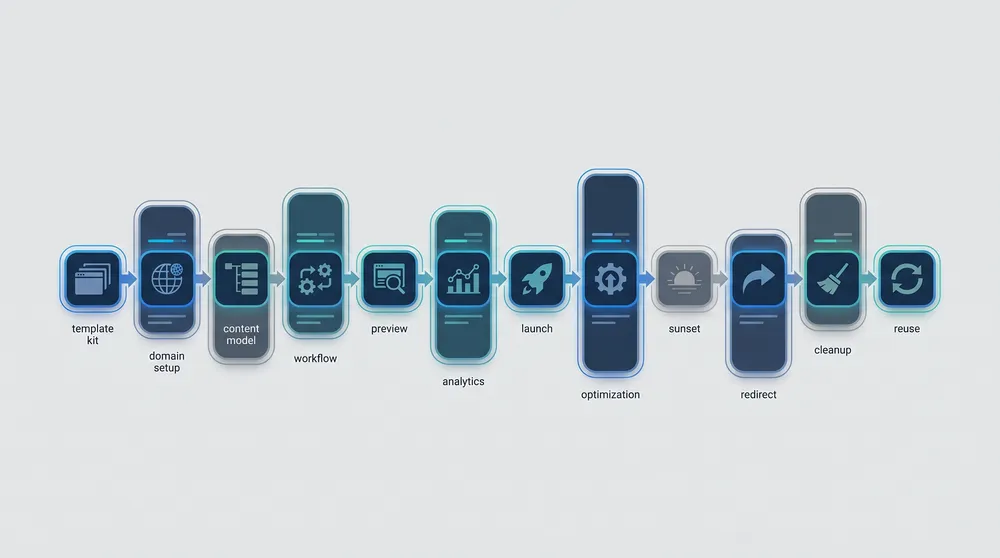
Build One Microsite System, Then Reuse It
The first microsite should create the reusable foundation. The second and third should be faster, cheaper, and easier to govern.
A Practical Microsite Rollout Plan
Phase 1: Define the microsite kit
Choose the standard page types, components, fields, SEO settings, analytics events, form patterns, legal blocks, brand settings, and launch checklist. Keep the first version lean. A microsite kit should make common work fast, not model every possible edge case.
Phase 2: Decide the architecture
Pick whether the microsite is a site root, folder, space, stack, project, branch, environment, or separate front end. Use the least separate architecture that still satisfies governance, brand, SEO, domain, and risk requirements.
Phase 3: Build preview and publishing
Editors need to see the microsite before it is public. Configure preview, roles, workflow, scheduled publishing, unpublishing, releases, redirects, and rollback before content loading begins.
Phase 4: Launch with measurement
Check forms, analytics, consent, accessibility, performance, SEO metadata, redirects, Open Graph images, sitemap behaviour, and CRM attribution. A microsite without measurement is only a pretty landing page.
Phase 5: Retire or fold back into the main site
When the campaign ends, archive content, export leads, capture learnings, redirect valuable URLs, unpublish outdated pages, and decide whether evergreen content should become part of the main website.
Common Microsite Mistakes
- Building a separate microsite because it feels fast, then paying later for duplicate hosting, analytics, consent, security, and maintenance.
- Letting campaign teams bypass brand, accessibility, legal, and privacy controls.
- Using a new domain when a folder under the main site would have kept SEO authority and analytics cleaner.
- Copying product, pricing, event, or inventory data into CMS fields instead of integrating the source of truth.
- Skipping scheduled unpublishing and leaving expired offers live.
- Creating one-off components that cannot be reused for the next microsite.
- Forgetting redirects, canonicals, sitemap rules, and post-campaign reporting.
Final Recommendation
If you need a microsite with minimum time and budget, start inside your current CMS unless there is a clear reason not to. Use Umbraco or Optimizely when a microsite can be another site root or visually assembled campaign site. Use Contentful or Contentstack when you need structured content, release planning, reusable models, and composable delivery. Use Hygraph when the microsite is API-first and needs GraphQL, content stages, or federated external data.
The smartest microsite investment is a reusable launch kit. Build the templates, content model, preview, analytics, domain rules, workflow, and sunset checklist once. Then every future campaign can launch faster without becoming another messy little website to maintain.
Sources Checked
- Umbraco multisite setup
- Umbraco scheduled publishing
- Optimizely multiple sites
- Optimizely Visual Builder
- Optimizely blueprints
- Optimizely approval sequences
- Hygraph content stages
- Hygraph scheduled publishing
- Contentful environments
- Contentful content model templates
- Contentful Launch
- Contentful scheduled publishing
- Contentstack branches
- Contentstack environments
- Contentstack Live Preview
- Contentstack releases