
Optimizely CMS Webhooks: Automate Content Workflows
Use Optimizely CMS webhooks to automate translation, cache, search, CRM and AI workflows with a reliable event-driven architecture and rollout plan.
Optimizely has added webhook support to Optimizely CMS (SaaS), giving content teams a direct way to trigger work in other systems when content changes. The capability was announced in the platform's 31 August 2026 release and is being rolled out progressively.
That sounds like a developer feature, but the business effect is broader: a publish event can refresh a cached website, queue a translation, update a search index, notify a campaign team, synchronise selected data or start a governed AI workflow. It replaces repeated polling and many manual hand-offs with an event that arrives when the work is needed.
The useful question is not simply, “Can we connect a webhook?” It is, “Which content event should cause which business action, with what controls if delivery is duplicated or a downstream system fails?” This guide answers that question for business owners, marketing and content teams, operations managers, and technology decision-makers.
Four facts to understand first
The feature is practical now, but reliable automation still depends on deliberate receiver design.
Released 31 August
Optimizely added CMS (SaaS) webhooks in its latest release, with availability progressing through ring deployments.
Content lifecycle events
Subscriptions can react to create, move, delete, publish, schedule and other supported content or configuration events.
UI or REST setup
Teams can manage subscriptions in CMS settings or through REST endpoints, although the management API is marked experimental.
Retries mean duplicates
Optimizely manages retries and dead-letter handling, so receiving systems must make repeat processing safe.
Why Optimizely CMS webhooks matter now
Many connected websites still discover content changes by checking the CMS on a timer. Polling adds requests, introduces delay and often creates awkward rules about what changed since the last check. A webhook reverses that relationship: CMS sends an HTTP POST to a chosen endpoint when a subscribed event occurs.
Optimizely's release supports event categories for content, content versions, display templates and webhook subscriptions. For everyday content operations, the most useful triggers are often contentVersion:preview1:published, scheduling events and content deletion. Optional filters can narrow delivery to relevant entities, reducing noise before it reaches your integration.
The REST management endpoints are currently labelled experimental, so businesses should avoid hard-coding an unchangeable provisioning process around them. Where practical, start with the CMS interface, document each subscription and isolate any API-based provisioning behind a small adapter that can be updated.
Where the commercial value appears
The webhook itself does not complete the business process. It provides a timely, structured signal that a controlled integration can turn into action. The highest-value opportunities usually remove repeated manual work, shorten the delay between publishing and customer visibility, or reduce mismatches between the CMS and connected systems.
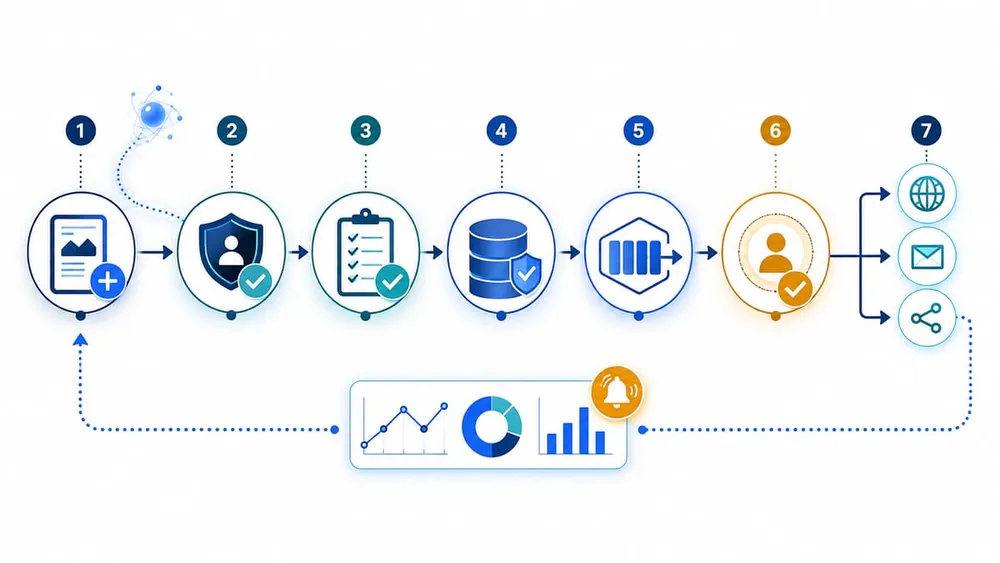
Turn one content event into a controlled workflow
Five practical automation patterns
| CMS event | Business action | Important guardrail |
|---|---|---|
| Content version published | Invalidate a website cache or trigger revalidation | Limit the refresh to affected routes and verify the new page successfully renders |
| Content version published | Send approved content to a translation workflow | Create a draft in the target locale and keep human review before publication |
| Content created or updated | Notify a campaign, legal or product-data owner | Route only relevant content types and avoid exposing sensitive payload data in chat tools |
| Content published or deleted | Update search, recommendation or catalogue systems | Use an upsert or deletion-safe operation and reconcile failures |
| Content changed | Start an Optimizely Opal workflow agent | Retrieve current content by key, validate context and require approval for high-impact actions |
Optimizely also documents webhook-driven cache invalidation for Astro frontends, allowing published content to appear within seconds without a full redeploy. That pattern can improve editorial speed while retaining the performance benefits of cached delivery.
CRM and marketing-automation use cases need extra discipline. A page publication is not automatically a customer-data event. Define exactly which fields should cross the boundary, whether the receiving system already holds the record, and who owns remediation when the update fails.
A reliable webhook receiver needs seven stages
- Authenticate. Confirm the bearer token before accepting the request. Store the secret outside source code and define a rotation procedure.
- Validate. Check the expected event type and payload structure. Reject malformed or unexpected requests before they can trigger downstream work.
- Record. Capture an event identifier or a stable key derived from the event type, subject and content version before processing.
- Acknowledge quickly. Keep the public endpoint lightweight. Place accepted work on a queue where practical instead of waiting for translations, APIs or AI steps to complete.
- Enrich. The payload identifies the affected entity; retrieve the current CMS content or connected data needed to make a safe decision.
- Route and act. Apply explicit business rules, permissions and approval gates before touching production systems.
- Monitor and reconcile. Track successes, failures, processing time and the last successful event for each destination.
This separation matters because Optimizely manages delivery retries and a dead-letter queue, but those settings are not configurable. Your receiver still needs to recognise duplicates, isolate downstream failures and make it easy for an operator to determine what happened.
Design for duplicate delivery before launch
Optimizely states that a failed delivery can be retried, so the same event may reach your endpoint more than once. This is normal for resilient event-driven systems. The receiving workflow must be idempotent: processing the same event twice should produce the same business result as processing it once.
For a cache refresh, repeating the action may already be safe. For a translation order, email notification, CRM update or paid external job, it may not be. Use a durable processing record keyed to the event and content version, and check it before creating a new side effect. Prefer upserts over blind inserts, and store the downstream reference so an operator can trace the outcome.
Microsoft's event-driven architecture guidance reinforces the same principle: duplicate events can arise from retries, lost acknowledgements or infrastructure restarts. It also recommends structured error handling, logging, bounded retries and failure-isolation patterns rather than silently swallowing exceptions.
Minimum monitoring signals
- events accepted, rejected and processed
- duplicate events safely skipped
- authentication and validation failures
- downstream error rate and processing latency
- oldest queued item and dead-letter count
- last successful event per subscription and destination
Secure the endpoint and minimise blast radius
Optimizely can send a static bearer token in the Authorization header and verifies that you control the endpoint before activating a subscription. Those are useful controls, but they are the beginning of the security design.
- Require HTTPS and reject requests without the expected bearer token.
- Keep the secret in managed configuration, not in code, logs or screenshots.
- Give each environment and integration a separate secret and subscription.
- Validate the event type and schema before looking up content or calling another system.
- Use filters to reduce irrelevant traffic and downstream permissions to restrict what the workflow can change.
- Avoid placing personal or commercially sensitive content in observability tools unless it is genuinely needed.
- Provide a simple kill switch by disabling the subscription or pausing the consumer.
Do not expose a webhook endpoint that directly performs broad administrative actions. Put a narrow integration boundary between the internet-facing receiver and systems such as CRM, commerce, search, translation and AI services.
Use AI agents as a controlled step, not an automatic publisher
Optimizely documents a direct connection between CMS webhooks and Opal workflow agents. The reference flow creates an agent, adds a webhook trigger, shares a bearer secret, retrieves the affected content by key and routes the next step conditionally.
That can be valuable for generating translation drafts, checking metadata, classifying content or flagging pages for review. It should not collapse governance. Give an AI step the minimum information and permissions needed, validate its output and keep a human approval point before publication, deletion, customer communication or other high-impact actions.
A useful first AI pilot is advisory: publish an approved source page, generate a translation or quality report as a draft, notify the responsible editor and measure acceptance, editing effort, turnaround time and failure rate. Expand autonomy only after the workflow is predictable and auditable.
A 30-day rollout plan for an Australian business
Week 1: choose one measurable workflow
Inventory current polling jobs and manual hand-offs. Select one low-risk process with a clear owner, such as cache refresh or a review notification. Record the event, destination, expected result, acceptable delay and rollback method.
Week 2: build the integration boundary
Create separate development and production subscriptions. Implement authentication, schema validation, deduplication, queuing, structured logs and environment-specific secrets. If provisioning through REST, isolate the experimental API behind a small maintainable component.
Week 3: test failure, not only success
Test duplicate delivery, an expired or wrong secret, a malformed payload, slow downstream responses, timeouts, rate limits, content deletion and a temporarily unavailable destination. Confirm that retries do not create duplicate side effects.
Week 4: operate a measured pilot
Run the workflow with a small content scope and named support owner. Compare processing time and manual effort with the previous method, review alerts and logs, and document how to disable, replay or reconcile work before expanding.
Questions to ask your implementation partner
- Which exact event and filter starts this workflow?
- How is every request authenticated and validated?
- What stable key prevents duplicate side effects?
- Where does accepted work wait if a downstream service is slow?
- How do we see failures, replay safely and reconcile missing outcomes?
- Which actions require human approval?
- Who owns the subscription, secret rotation and ongoing monitoring?
Optimizely CMS webhook FAQs
Build a reliable Optimizely automation workflow
Sources Checked
- Optimizely: 2026 CMS (SaaS) release notes (updated 1 September 2026)
- Optimizely: Use webhooks to automate the content lifecycle
- Optimizely: Subscribe to events with webhooks
- Optimizely: Send content events to Opal with webhooks
- Optimizely: Astro ISR caching and Optimizely Graph webhooks
- Microsoft: Resilient event-driven design guidance