
Shopify Automatic Discounts API: Migration Guide
Migrate Shopify automatic discount integrations to discountNodes with a practical audit, code-change, testing, rollout and monitoring plan.
Shopify announced on 18 September 2026 that the deprecated automaticDiscounts query will be removed from Admin GraphQL API version 2027-01. An affected request will not return an empty list or a warning after the upgrade: it will fail GraphQL validation because the field no longer exists on QueryRoot.
The immediate business risk is indirect. A storefront can keep selling while a promotion dashboard, campaign synchronisation job, reporting export, customer-service tool or internal approval workflow quietly loses visibility of automatic discounts. Teams may then make campaign, margin or support decisions from incomplete information.
Shopify's replacement is discountNodes with the search filter method:automatic. The migration is small in syntax but meaningful in response shape, generated types, filters, pagination and operational testing. This guide separates confirmed Shopify behaviour from VaniTech's recommended rollout process.
What Shopify is changing
The old query disappears in 2027-01, and the supported path uses one discount connection for automatic and code-based discounts.
Query removed
automaticDiscounts no longer exists on QueryRoot in API version 2027-01.
Validation failure
Requests that still select the removed field fail validation instead of returning discount data.
New query shape
Use discountNodes with query: method:automatic and read each discount through the node's discount field.
Types removed
DiscountAutomaticConnection and DiscountAutomaticEdge are also removed, so generated clients and schema snapshots can break.
Who is affected?
The change applies to any app or integration that calls automaticDiscounts while requesting API version 2027-01 or later. It also affects code, generated GraphQL types and schema snapshots that reference DiscountAutomaticConnection or DiscountAutomaticEdge.
Do not limit the audit to the public storefront. Check custom apps, private operational tools, scheduled exports, promotion calendars, BI pipelines, customer-service screens, ERP or CRM synchronisation, data warehouses, agency utilities, test collections and one-off scripts. A query can be embedded in a shared SDK or generated client even when its field name is not obvious in application code.
Apps already using discountNodes do not need this migration. Apps using automaticDiscountNodes are not broken by this specific removal, but Shopify has deprecated that query too. Moving there would create a second migration later.
The technical change is more than a rename
The supported query uses the general discount connection and filters it to automatic discounts. The inline fragments for individual discount types remain useful, but they move one level deeper onto the discount field of each DiscountNode.
# Before: 2026-10 and earlier
query AutomaticDiscounts($first: Int!) {
  automaticDiscounts(first: $first) {
    nodes {
      ... on DiscountAutomaticBxgy {
        title
        status
      }
    }
  }
}

# After: 2027-01
query AutomaticDiscounts($first: Int!, $after: String) {
  discountNodes(
    first: $first
    after: $after
    query: "method:automatic"
  ) {
    nodes {
      id
      discount {
        ... on DiscountAutomaticBxgy {
          title
          status
        }
      }
    }
    pageInfo {
      hasNextPage
      endCursor
    }
  }
}
The example adds pageInfo deliberately. A successful first page is not proof that an inventory, export or reporting job has read every discount.
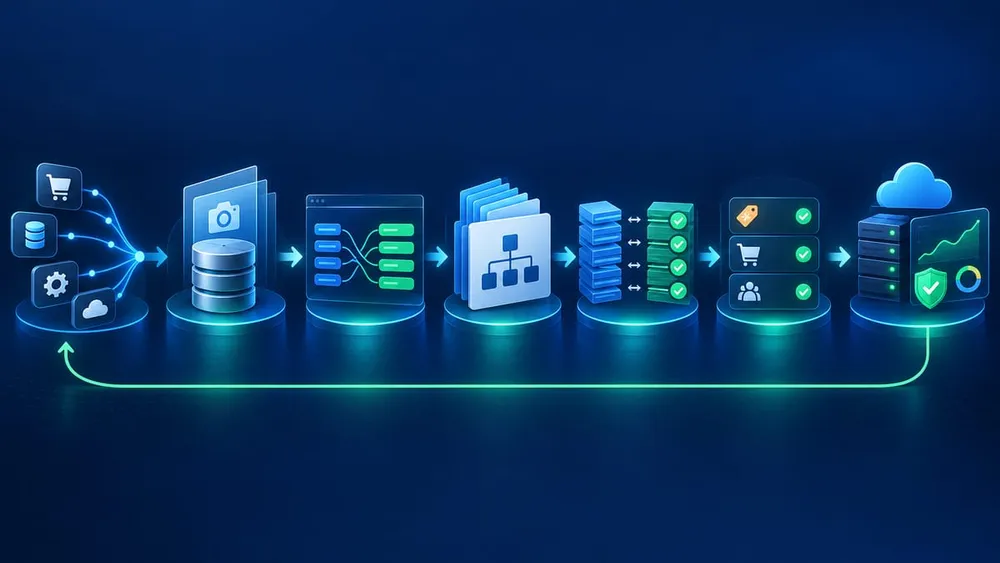
Move from discovery to verified rollout
A seven-step migration plan
Treat the change as a data-contract migration, not a search-and-replace exercise.
1. Inventory callers
Find queries, generated types, schema snapshots, jobs, dashboards, scripts and API collections.
2. Record the baseline
Capture representative automatic discounts, page counts, filters and downstream outputs on the current supported version.
3. Change query and mapping
Use discountNodes with method:automatic and map values from each node's discount field.
4. Regenerate clients
Build types and schema artifacts against 2027-01 so removed connection types fail during development.
5. Compare complete results
Page through both versions and compare IDs, types, statuses, dates and business totals.
6. Test business workflows
Exercise dashboards, exports, campaign tools, support screens and any downstream automations.
7. Roll out and monitor
Deploy gradually, watch query errors and verify that deprecated-call signals stop.
Build a complete caller inventory
Search the main application repositories for automaticDiscounts, DiscountAutomaticConnection and DiscountAutomaticEdge. Then inspect generated folders, persisted queries, GraphQL documents, API gateways, serverless functions, ETL jobs, monitoring checks, notebooks and collections used by support or QA.
Next, look outside source control. Ask who owns promotion reporting, merchandising dashboards, scheduled CSV exports, loyalty tooling, discount approval workflows and vendor integrations. Record the store, app, requested API version, call frequency, result consumer, business owner and deployment path for every caller.
Shopify's API health report shows deprecated calls made with an app's access token during the previous 14 days. Use it as evidence, not as the entire inventory: a monthly job, dormant campaign workflow or credential used by a third-party tool may not appear in a short observation window.
Preserve filters and response semantics
Shopify says discountNodes supports filters comparable to the removed query, including status, discount_type, discount_class, created_at and starts_at. Add method:automatic to every migrated list query so code-based discounts do not enter an automatic-discount workflow.
Do not copy filter strings blindly. Shopify's common search grammar supports terms, connectives, comparators, grouping and ranges, but the valid fields are defined by each resource. Invalid fields can be ignored and return broader results, so test both expected matches and expected exclusions.
Review the new wrapper explicitly. DiscountNode.id identifies the node, while the concrete automatic discount is exposed through discount. Update serializers, caches, joins and equality checks so they use the intended identifier and do not flatten away the concrete type needed by downstream code.
Prove pagination and data completeness
| Check | What to compare | Failure it catches |
|---|---|---|
| First page | IDs, concrete types, titles, status and date fields | Incorrect fragments or response mapping |
| Every page | hasNextPage, endCursor and total unique IDs | Silent first-page truncation or cursor mistakes |
| Each filter | Included and excluded records for status, type, class and date ranges | Invalid fields or changed filter composition |
| Large store | Runtime, API cost, retries and stable completion | A migration that works only on small development datasets |
| Downstream totals | Dashboard counts, export rows and reconciliation totals | Correct API data transformed incorrectly later |
Shopify GraphQL connections use cursor-based pagination and return at most 250 resources per page. If a tool needs a complete list, continue until hasNextPage is false and guard against duplicate or missing IDs. Keep a production-sized test dataset because page-boundary defects often remain invisible in small development stores.
Test the business workflows around the query
| Workflow | Test | Evidence |
|---|---|---|
| Promotion dashboard | Active, scheduled and expired automatic discounts display with correct labels and dates | Before-and-after record comparison |
| Campaign operations | Create or schedule a representative promotion, then confirm every dependent view refreshes | Discount ID, timestamps and screenshots where useful |
| Exports and BI | Run full and incremental exports across more than one page | Row counts, unique IDs and reconciliation totals |
| Customer support | Find the discount behind a test cart or order and explain its status | Support record and resolved discount type |
| App-managed discounts | Include automatic discounts created by Shopify Functions where the integration supports them | Concrete GraphQL type and downstream representation |
| Failure handling | Send the retired query to 2027-01 in a test environment and confirm alerts capture the validation error | Alert, trace and runbook link |
The migration changes how an integration reads discount configuration; it does not by itself change how a discount is applied at cart or checkout. Test both administrative data flows and buyer journeys when the same app also creates or manages discount logic.
Use the version window without creating a last-minute project
Shopify releases versioned APIs quarterly and supports stable versions for at least 12 months. Calls pinned to 2026-10 or earlier continue to work while those versions remain supported, so this is a planned migration rather than an emergency production outage.
That window should be used for evidence. Build the new query now, regenerate types against 2027-01, run parallel comparisons in a development store and schedule the rollout before the organisation's next API-version upgrade. Do not point production at unstable; Shopify describes it as an early-testing surface that can change without guarantee.
Also check the response header X-Shopify-API-Version. If it differs from the version requested, Shopify has fallen the call forward because the requested version is no longer accessible. An integration that relies on fall-forward behaviour can encounter several changes at once and is harder to diagnose.
Monitor after deployment
Watch GraphQL validation errors, request failure rates, empty-state changes, pagination completion, export row counts and the freshness of downstream promotion data. Add a business-level check—for example, the count of active and scheduled automatic discounts by store—so a syntactically successful query cannot silently feed an incomplete dashboard.
Use the API health report to verify that deprecated calls have stopped. Shopify says an updated app can remain in a warning state for up to 14 days after its last deprecated call; filter the report to the last day for a quicker operational check. Remember that Postman, Insomnia or support scripts using the same access token can keep the signal alive.
Close the change only when every known caller is on the supported query, generated artifacts no longer contain removed types, complete datasets reconcile, critical workflows pass and ownership of the next quarterly API review is recorded.
Questions to ask your Shopify developer or integration partner
- Which apps, jobs and dashboards still call
automaticDiscounts? - Are any generated clients or schema snapshots tied to the removed connection and edge types?
- Have all migrated queries added
method:automatic? - How are response wrappers, concrete discount types and identifiers mapped downstream?
- Do tests cover every page, filter and automatic discount type used by the business?
- Which development store and dataset are used to test API version
2027-01? - What alerts fire on GraphQL validation errors or incomplete exports?
- Who owns quarterly Shopify API upgrades and the API health report?
Sources checked
- Shopify developer changelog: automaticDiscounts removed in 2027-01
- Shopify: About discounts
- Shopify Admin GraphQL API: discountNodes
- Shopify API versioning
- Shopify GraphQL pagination
- Shopify search query syntax
- Shopify API health report
Sources were accessed on 19 September 2026. Shopify API documentation and release status can change, so confirm the current reference before deployment.