
Shopify Card Deposit mTLS: 15 October Migration Guide
Shopify will require a Shopify-issued mutual TLS client certificate on card-deposit calls from 15 October 2026. An affected app that misses the deadline will no longer be able to deposit new cardholder data, so creating or updating a vaulted credit card can fail even though the rest of the Shopify integration still appears healthy.
This is not a general change to Shopify checkout, ordinary card payments or every payment app. It targets a specialised flow used by apps that send cardholder data to Shopify's card-deposit endpoint before calling customerPaymentMethodCreditCardCreate or customerPaymentMethodCreditCardUpdate.
That distinction matters for business owners. The first job is not to install a certificate everywhere. It is to identify whether your subscription platform, migration utility, customer-account workflow or custom integration uses this exact path, then obtain evidence that the owner has completed the cutover.
Why this Shopify change is trending now
The enforcement date is nine days away at publication, and Shopify says first certificates are signed manually and can take several days. That compresses discovery, coordination, deployment and production verification into a short window.
The operational risk is easy to miss because the public storefront may remain available. Product pages, checkout and existing integrations can continue working while only the card-vault create or update path fails. The first visible symptom may be a customer unable to add a replacement card, a subscription migration that cannot create a saved payment method, or a support queue filling with payment-method errors.
Shopify introduced the requirement so cardholder-data traffic reaching the deposit endpoint can be attributed to an authenticated caller. It is a practical example of a broader shift toward stronger machine identity: API tokens still authorise application actions, while certificates authenticate the system making a sensitive transport request.
Who needs to act before 15 October?
Trace the implementation, not the business label. A subscription or payments feature is affected only when it uses Shopify's direct card-deposit path.
Affected: create
Apps that deposit raw card data to obtain a session ID, then call customerPaymentMethodCreditCardCreate.
Affected: update
Apps that deposit replacement card details, then call customerPaymentMethodCreditCardUpdate for an existing vaulted method.
Not affected: remote reference
Apps that only use customerPaymentMethodRemoteCreate to import a reference already held by an external gateway.
Likely not affected
Standard Shopify checkout and merchants with no custom card-vault or payment-method migration workflow.
Needs confirmation
Vendor-managed subscription, migration or customer-account tools where the merchant cannot see the underlying API calls.
Business owner action
Ask the technical owner for the exact mutation used, certificate status, production test evidence and rotation owner.
What changes—and what stays the same
The endpoint remains https://checkout-mtls.pci.shopifyinc.com/sessions. The create and update mutations keep accepting the session identifier returned by that deposit call. Shopify's GraphQL Admin API OAuth flow also remains unchanged.
The new control sits on the deposit request. From enforcement, the calling system must present a valid Shopify-issued client certificate during the TLS handshake. Shopify can then verify the machine identity before accepting cardholder data.
Do not confuse this with the mTLS direction used by a Shopify Payments App when Shopify calls the app's payment, refund, capture or void endpoints. The security principle is related, but the caller, certificate and trust configuration are different. Use the card-deposit changelog as the source of truth for this migration.
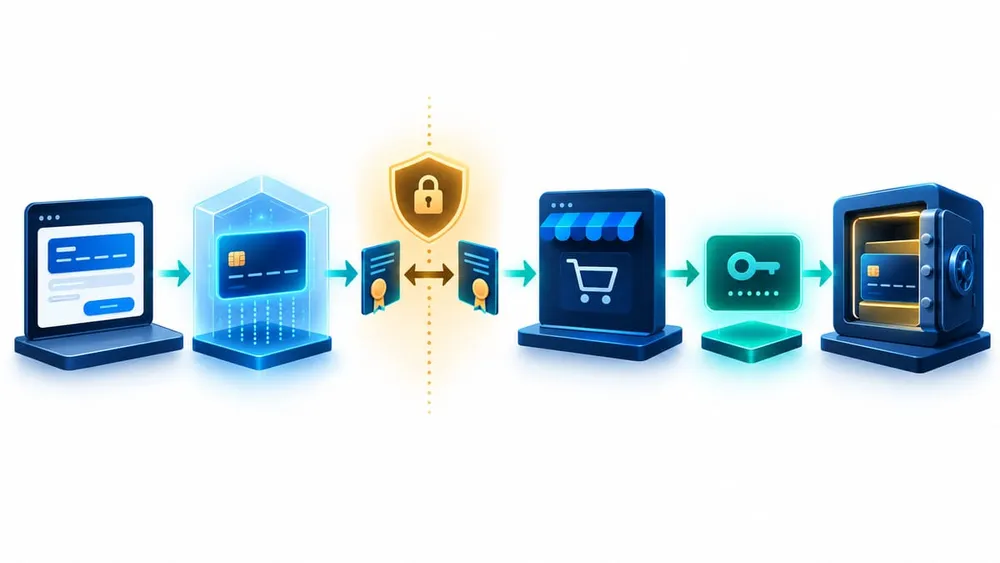
Authenticate the deposit, then keep the vault call unchanged
Step 1: find every affected integration
Start with code and traffic evidence rather than relying on product names. Search application repositories, integration services, API gateways and deployment configuration for:
customerPaymentMethodCreditCardCreateandcustomerPaymentMethodCreditCardUpdate;- calls to Shopify's card-deposit
/sessionsendpoint; - the component that handles raw card details before tokenisation;
- scheduled migrations, subscription imports and customer card-update flows;
- separate production, staging, regional or legacy deployments.
For a vendor-managed product, ask the vendor to confirm in writing whether it uses the affected endpoint. A statement that the product "supports Shopify payments" is too broad. Ask which mutation and deposit path it uses, whether the certificate has been issued, when production cutover will occur, and how success will be verified.
Create a small ownership register containing the app client ID, environment, service owner, deployment owner, certificate location, expiry date, alert destination and emergency contact. This becomes the foundation for both migration and annual rotation.
Step 2: request and deploy the certificate safely
Shopify instructs affected partners to request the first certificate through the contact listed in its changelog, including the API client ID and technical point of contact. Because initial signing is manual, request it immediately rather than waiting for a release window.
Treat the private key as production authentication material:
- generate and handle it within the approved process for your PCI environment;
- store it in a controlled secret-management or key-management service;
- grant runtime access only to the workload that calls the deposit endpoint;
- keep it out of source control, container images, tickets, chat, ordinary configuration files and logs;
- separate the people who can replace the certificate from routine support access where practical;
- document revocation and emergency replacement steps before cutover.
ASD guidance recommends managing certificates and secrets across their full lifecycle: governance, generation, storage, access, distribution, rollover, destruction and monitoring. The September 2026 PCI Key Management and Operations standard reinforces the same lifecycle mindset for cryptographic keys protecting account data.
Step 3: prove the complete flow
A successful TLS handshake is necessary but not sufficient. The business outcome depends on several linked steps: the deposit request is accepted, Shopify returns a session identifier, the app sends that identifier to the intended GraphQL mutation, processing completes, and the correct payment method is available to the intended customer or subscription flow.
Test at least these scenarios in an approved non-production setup, then run a controlled production verification with Shopify:
- create a new vaulted payment method through the certificate-authenticated deposit path;
- update an existing payment method, including a changed expiry or replacement card scenario;
- confirm invalid, missing and expired certificates fail clearly and do not trigger unsafe retries;
- confirm a successful deposit followed by a mutation error is reconciled and visible to support;
- check that sensitive card data, private keys and full session identifiers are not written to logs;
- exercise timeout, network and partial-failure behaviour;
- verify alerts and dashboards distinguish certificate failure from OAuth, GraphQL and business-validation errors.
Record the test timestamp, environment, app version, certificate fingerprint or non-sensitive identifier, result, evidence location and approver. Shopify says it validates the cutover on its side, so include that confirmation in the release record.
Six checks before production cutover
The change is ready only when security, functionality, support and ownership have all been verified.
Scope
Every app, environment and legacy worker using the deposit endpoint has a named owner and migration status.
Identity
The certificate belongs to the correct Shopify API client and is presented only by the intended workload.
Secrets
Private-key material is encrypted, access-controlled and absent from repositories, images, tickets and logs.
Function
Create and update journeys complete from card deposit through the GraphQL mutation and final state.
Failure
Missing, invalid, expired and network-failure cases are visible, bounded and recoverable without exposing card data.
Operations
Expiry alerts, rotation ownership, vendor contacts and an emergency revocation path are recorded and tested.
Cut over with observable, reversible changes
Deploy the certificate separately from unrelated feature work. Use a staged release where possible, compare success and error rates before and after, and keep the previous deployment artefact available for application rollback. Do not treat rollback as permission to return to an unauthenticated deposit after enforcement; it is only useful if the prior artefact can also consume the new certificate safely.
Monitor business and technical signals together:
- card-deposit request count, latency and status;
- TLS handshake and certificate-validation errors;
- session identifiers issued versus GraphQL mutations attempted;
- create and update mutation user errors;
- payment-method processing states and completion;
- customer-facing failures and support contacts;
- subscription or migration jobs waiting on a saved payment method.
A dashboard that shows only HTTP success can miss a later GraphQL or processing failure. A support dashboard that shows only customer complaints detects the problem too late. Join both views and assign an on-call owner through the enforcement window.
Build annual rotation into normal operations
Shopify states that the first certificate can be followed by self-service rotation through its Certificate Signing Service and that the certificate has a one-year lifetime. A migration that works on 15 October but has no renewal process merely postpones the outage.
Create alerts at several lead times, such as 90, 60, 30 and 14 days before expiry. Route them to a maintained team channel and ticket queue rather than one person's inbox. Test the new certificate in parallel, deploy it through the same controlled secret path, confirm production traffic, then remove and destroy superseded material according to policy.
Also define the compromise path. If a private key may have been exposed, the response should not wait for normal renewal. The owner needs authority and instructions to revoke or replace the certificate, deploy the replacement, review relevant logs and confirm that unauthorised use did not occur.
ASD guidance specifically calls for certificate-status and expiry monitoring, indicators-of-compromise detection, and alerts that trigger rollover or revocation. That turns certificate management from a calendar reminder into an owned operational control.
A practical plan for the remaining window
6–7 October: establish scope and ownership
Search the code and infrastructure, contact vendors, record every environment and request the first certificate immediately. Escalate any case where nobody can identify the API client or technical owner.
8–10 October: deploy outside production
Install the certificate through the approved secret path. Run create, update and failure tests. Confirm that logs contain enough diagnostic context without exposing cardholder data, session identifiers or private material.
11–13 October: controlled production cutover
Release the change with a named approver and support owner. Complete a production verification with Shopify, record evidence and monitor the full deposit-to-vault journey.
14 October: final readiness review
Check every app client ID and environment against the register. Resolve open vendor answers, confirm alert routing and brief support on the customer symptoms and escalation path.
15 October and after: monitor and close
Watch certificate, deposit, mutation and customer signals. Close the change only when all affected flows remain healthy and the rotation date, accountable owner and runbook are recorded.
What an SME should ask its Shopify partner
Most business owners will not perform this migration themselves, but they should own the assurance. Send the integration partner or software vendor these questions:
- Does our implementation call
customerPaymentMethodCreditCardCreateorcustomerPaymentMethodCreditCardUpdate? - Does it send cardholder data to Shopify's
/sessionsdeposit endpoint? - Which production and non-production app client IDs are affected?
- Has Shopify issued the certificate, and where is the private key stored?
- What evidence proves both create and update journeys work end to end?
- Who will monitor enforcement day and respond to customer failures?
- Who owns rotation before the one-year expiry, and where are the alerts and runbook?
If the provider says the product uses customerPaymentMethodRemoteCreate only, ask it to document that decision and the external gateway involved. Evidence should be proportional to the risk, but a clear written scope decision is better than an assumption.
For broader platform readiness, see VaniTech's Shopify 2026-10 API integration checklist and integration credential cleanup guide.
Sources Checked
- Shopify: Card deposit endpoint now requires mTLS certificate
- Shopify: customerPaymentMethodCreditCardCreate
- Shopify: customerPaymentMethodCreditCardUpdate
- Shopify: customerPaymentMethodRemoteCreate
- Shopify: Payments app implementation considerations
- Shopify: App Store requirements
- ASD/ACSC: Managing cryptographic keys and secrets
- PCI SSC: Key Management and Operations Standard v1.0
- PCI SSC: TLS and strong cryptography FAQ