
Sitecore API Authentication Deadline: October 2026
Prepare Sitecore Search and Events API integrations for mandatory APSE2 authentication on 15 October 2026 with this practical audit, test and rollout guide.
Sitecore will require a valid API key or access token for Search and Recommendation API and Events API requests in APSE2 from 15 October 2026. The same change applies in the US, while Sitecore says authorization is already required in EUC1. After the cutover, requests without proper authorization will return HTTP 401 Unauthorized.
For an Australian business, this is not a routine documentation update. A missed search request can break a customer-facing discovery journey. A missed Events API request can quietly damage analytics, recommendations and the behavioural data used to improve search. The visible website might still load while an important layer underneath it stops working.
This guide is for Sitecore owners, digital teams, developers, operations managers and technology decision-makers. It explains what the change affects, how to find every caller, which credential pattern fits each client, and how to deploy and verify the update without exposing a long-lived secret.
Three facts to act on now
Treat the change as an integration cutover with a customer-experience and data-quality impact.
15 October 2026
Mandatory authorization starts for Sitecore Search and Events API endpoints in APSE2 and the US.
Two API families
Review both customer-facing Search and Recommendation calls and Events API tracking calls.
401 on failure
Requests without valid authorization will be rejected rather than continuing anonymously.
Why the Sitecore API authentication change matters
Search and Recommendation API calls can power search results, suggestions, filters and personalised recommendations. Events API calls send visitor activity back to Sitecore Search. Sitecore says these events support analytics and recommendation quality, and that some events are required for Search to work as expected.
That creates two different failure patterns. Search requests usually fail visibly: a search page returns no results, a component errors or a fallback appears. Event failures can be quieter. Customers may continue browsing, but clicks, page views, conversions or other signals stop reaching Sitecore. Dashboards drift from reality and personalisation loses useful input.
The business risk therefore spans customer experience, marketing measurement, merchandising, reporting and incident support. A complete response must test the website and the data path behind it.
Resolve one documentation trap early
Sitecore's general authentication page currently describes a subdomain-host exception. The newer, dated changelog specifically says requests to affected US and APSE2 endpoints must include authorization from 15 October. For post-cutover planning, use the scheduled notice as the source of truth and confirm any unusual endpoint arrangement with Sitecore support or your implementation partner.
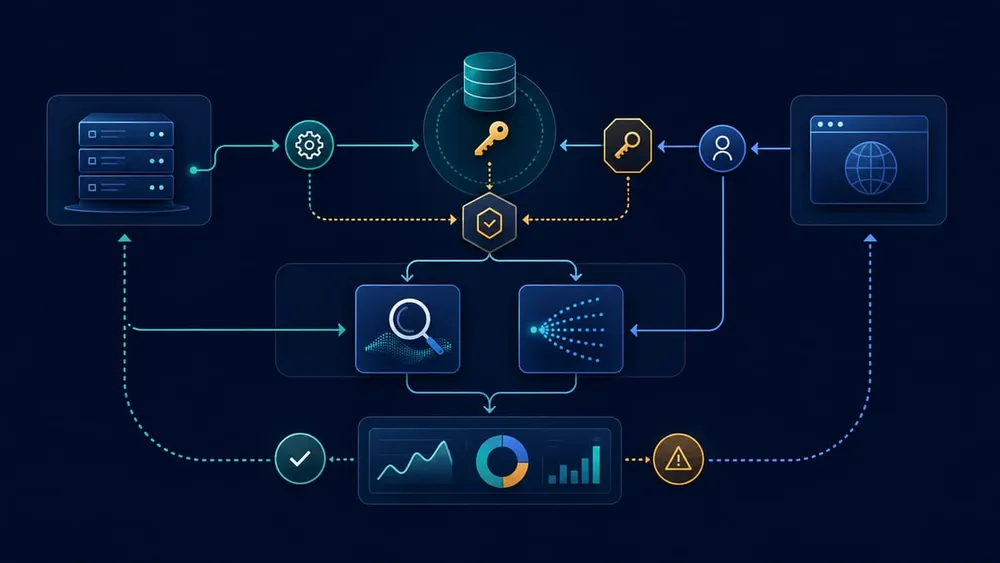
Put the right credential in the right place
Inventory every Sitecore API caller
Start with the Developer Resources area in Sitecore Search. The API Access tab provides the customer key, API hosts and available API keys. Use those details to create an endpoint register, then search code, configuration, tag managers, serverless functions and integration platforms for every host and route.
| Caller or system | What to find | Likely business impact |
|---|---|---|
| Search page or component | Search and Recommendation endpoint, domain ID, widget ID and request wrapper | Empty results or broken onsite search |
| Recommendation component | Discover calls, user identifiers and fallback behaviour | Generic or missing recommendations |
| Browser analytics | Events endpoint, customer key, page-view and click dispatch | Incomplete behavioural data |
| Server-side tracking | Event forwarding jobs, queues and retry handlers | Delayed or lost events |
| Mobile application | Embedded SDKs, custom clients and release versions still in use | Old app versions fail after cutover |
| Tag manager or marketing script | Custom templates, variables and direct HTTP tags | Tracking stops outside the main codebase |
| Middleware or API gateway | Header injection, proxy rules, caching and secret references | One shared fault affects several channels |
| Test and monitoring tools | Synthetic checks, Postman collections and smoke tests | False confidence or noisy alerts |
Record an owner, environment, region, endpoint, client type, credential method, scope, deployment path and test evidence for every row. Include dormant campaigns and older mobile releases; the integrations that are hardest to remember are often the ones that fail on deadline day.
Choose the authentication pattern by client type
Sitecore supports API keys and access tokens, but they are not interchangeable design choices. The correct pattern depends on whether the caller can protect a secret.
| Client | Recommended pattern | Reason |
|---|---|---|
| Backend service, serverless function or trusted middleware | Scoped API key stored in a managed secret store | Sitecore positions API keys for secure server-to-server integrations |
| Browser application or custom JavaScript frontend | Temporary access token obtained through a server-side token flow | A browser cannot safely hold the underlying API key |
| Sitecore Search SDK in a browser | Access token pattern supported by the integration | Sitecore recommends access tokens for browser-based SDK clients |
| Ingestion process | API key with the ingestion scope | Sitecore says the Ingestion API does not accept access tokens |
API key scopes include discover for Search and Recommendation, event for Events, and ingestion for ingestion. Apply only the scopes the caller needs. A valid credential with the wrong scope can still fail; Sitecore documents 403 for insufficient permission and notes that some scope-related problems may currently appear as 401.
Do not put an API key in frontend code
Sitecore explicitly warns against exposing API keys in browser client code because users can inspect network traffic and retrieve them. Environment variables bundled into client-side JavaScript are not secret. If a build tool can substitute the value into a browser bundle, the customer can read it too.
Treat the credential as a managed secret
Sitecore API keys are long-lived 52-character secrets and do not expire automatically. That makes storage, access control and a workable rotation process important. Access tokens are temporary; Sitecore documents defaults of one day for an access token and one week for a refresh token, with shorter lifetimes available.
Australian secure-by-design guidance treats API keys as secrets and recommends controlled registration, storage, access, auditing and lifecycle management. OWASP similarly recommends centralised secret storage, least privilege, rotation, revocation, access auditing and keeping plaintext secrets out of logs.
- Store centrally: use a cloud secret manager or equivalent protected store, not source code, shared documents or deployment notes.
- Separate environments: production, staging and development should not share the same credential.
- Limit access: grant each runtime and operator only the permissions required for its job.
- Mask logs: redact Authorization headers and prevent error tooling from capturing raw credentials.
- Document ownership: record the business service, technical owner, consumers, scopes, creation date and rotation process.
- Practise replacement: verify that a compromised or incorrectly scoped key can be changed without an emergency code release.
Implement the change as a controlled release
- Confirm region and endpoints. Verify that the integration uses APSE2 and record the exact Search and Events hosts from API Access.
- Create or confirm scoped credentials. Match
discoverandeventpermissions to the callers that need them. - Add the server-side secret path. Configure the runtime to retrieve the credential without embedding it in the repository or build output.
- Implement browser token handling. Keep the API key on a trusted server, request temporary tokens and handle refresh and expiry deliberately.
- Add the Authorization header consistently. Use one shared HTTP client or gateway rule where practical so individual components cannot drift.
- Make errors observable. Separate authentication, authorization, rate-limit and temporary service failures in logs and alerts.
- Deploy to a non-production environment. Run functional, negative and expiry tests before production.
- Roll out with a rollback plan. Keep the previous release available, but do not treat unauthenticated traffic as an acceptable fallback after the deadline.
A proxy or API gateway can simplify header injection across several trusted server-side consumers, but it also concentrates risk. Protect the proxy, restrict which routes it can call, and verify that it never forwards a secret to the browser.
Run a test matrix before 15 October
A successful request with a valid credential is only the first test. Verify the customer journey, event delivery and failure behaviour.
| Scenario | Expected result | Evidence to capture |
|---|---|---|
| Valid Search credential | Correct results, filters and recommendations return | Request ID, response status and screenshot |
| Valid Events credential | Page, click and conversion events are accepted | Request status and downstream analytics evidence |
| Missing Authorization header | Controlled 401 handling and a useful alert | Redacted log and alert notification |
| Wrong scope | 401 or 403 is distinguished from a service outage | Error classification and runbook link |
| Expired access token | Refresh succeeds without interrupting the journey | Token refresh trace with secrets masked |
| Expired refresh token | Server obtains a new token set safely | Recovery trace and duration |
| Sitecore 429 or 5xx | Bounded retry and safe customer fallback apply | Retry count, latency and final state |
| Secret unavailable | Service fails safely and alerts the owner | Incident path and recovery time |
| Older mobile or cached frontend | Supported versions continue or receive a defined upgrade path | Version-by-version test record |
For Events API tests, check more than the HTTP response. Confirm that representative events appear in the expected reporting or diagnostic path. A 2xx response proves acceptance, not that every downstream dashboard and recommendation process remains correct.
Use the remaining window deliberately
Finish production deployment before the deadline so the final days are reserved for observation, not first-time integration work.
Week 1: Discover
Confirm region, list every Search and Events caller, assign owners and identify browser-exposed risks.
Week 2: Build
Create scoped credentials, add secret storage, implement token handling and standardise request headers.
Week 3: Prove
Run positive, negative, expiry, retry, analytics and supported-client tests with captured evidence.
Before 15 October
Deploy production, monitor authentication and event health, rehearse rollback and keep owners on call.
Monitor both availability and data quality
After deployment, watch the integration as a business service rather than a collection of HTTP calls.
- Search and Events request volume by environment and client
- 401 and 403 rates, separated by endpoint and release version
- access-token refresh success and latency
- 429 and 5xx rates, retry volume and circuit-breaker activity
- search zero-result rate and component fallback rate
- event volume compared with page traffic and recent baselines
- analytics freshness and gaps by event type
- secret-store access failures and unusual secret access
Alert thresholds should reflect normal traffic. One 401 from a synthetic negative test is expected; a sudden cluster from a current mobile version is not. Keep credentials out of alert payloads, logs, traces and screenshots.
Common mistakes to avoid
- updating Search calls but overlooking Events API calls
- placing a long-lived API key in browser JavaScript or a public mobile bundle
- using one broad credential across production, staging and unrelated services
- testing only the happy path and treating every 401 as the same defect
- rotating a key without knowing all of its consumers
- accepting a successful HTTP response without verifying analytics and recommendations
- waiting until 15 October to deploy the first production change
Sources Checked
- Sitecore: mandatory Search and Events API authorization notice
- Sitecore: API authentication and authorization
- Sitecore: the API Access tab
- Sitecore: calling the Search and Recommendation API
- Sitecore: using the Events API to track events
- ASD's ACSC and DISR: managing cryptographic keys and secrets
- OWASP: Secrets Management Cheat Sheet