
Umbraco Cloud Alerts: Incident Response Guide
Turn new Umbraco Cloud email and webhook alerts into a practical incident-response workflow with routing, ownership, testing, evidence and escalation.
Umbraco marked Notifications and Alerting for Umbraco Cloud as delivered on 2 November 2026. Platform events can now reach a team by email or webhook instead of waiting for somebody to notice a problem in the Cloud Portal. Umbraco's announced events include DDoS mitigations and deployment status, with hostname-monitoring failures also named in earlier product guidance.
That is useful, but delivery is only the first step. A notification does not decide whether customers are affected, who should respond, how quickly they should act or what evidence to keep. Those decisions still belong to the business and its technical support partner.
This guide shows Australian organisations how to turn the new signals into a small, testable operating system: route each event, assign an owner and backup, verify the business journey, escalate by impact, record the outcome and improve the playbook after each exercise.
VaniTech supports Umbraco and CMS implementation, webhook and system integrations, cloud architecture and ongoing website support.
A New Signal Layer Arrived for Umbraco Cloud
The release closes a practical gap between platform events and the people responsible for a business website.
Delivered Now
Umbraco moved Notifications and Alerting into its delivered roadmap history on 2 November 2026.
Email or Webhook
Teams can route events to a shared inbox, chat channel, incident tool or integration workflow.
Operational Events
The announced event set includes DDoS mitigations and deployment status, with more expected over time.
What Umbraco Cloud Alerts changes
The new capability changes how a platform event reaches a team. Umbraco says alerts can be configured at organisation and project level and delivered by email or webhook. That makes it possible to send a production incident to the people who operate that project instead of relying on one account holder to watch the portal.
The initial announced examples are commercially meaningful:
- DDoS mitigation events can tell a team that the edge platform has acted against hostile or abnormal traffic.
- Deployment status events can surface whether a release completed or needs attention.
- Hostname-monitoring failures were also named in Umbraco's earlier product preview as an event that should reach the team.
Check the alert catalogue available in your own Cloud organisation before writing a playbook because enabled events, plan availability and product behaviour can evolve. Treat the vendor's current portal and documentation as the operational source of truth.
An alert is not a complete monitoring system
| Capability | Question it answers | Still needed? |
|---|---|---|
| Umbraco Cloud alert | Did a known platform event occur? | Yes—configure delivery and ownership |
| Availability monitoring | Can customers reach the website and complete key journeys? | Yes |
| Application and integration logs | What happened inside the site, API or connected system? | Yes |
| Performance telemetry | Are response times, CPU, memory or traffic patterns abnormal? | Yes |
| Incident playbook | Who responds, what do they check and when do they escalate? | Yes |
| Business communication plan | Who informs staff, customers and suppliers if impact is material? | Yes |
Umbraco Cloud provides usage and performance views for bandwidth, CPU and memory. Use those views as context after an alert, alongside external uptime checks, application telemetry, deployment history and checks of revenue- or service-critical journeys.
The Australian small-business cyber security handbook makes the same broader point: focus on useful events, centralise the evidence, protect access and support regular review with automated alerts. More notifications without an operating process can create noise rather than resilience.
Build an alert-to-action matrix first
Before connecting a webhook to another tool, write one row for each event you intend to enable. The matrix below is an operational starting point, not a statement that every event is available on every plan.
| Signal | Initial priority | Primary owner | First verification | Escalate when |
|---|---|---|---|---|
| DDoS mitigation | High during active impact; otherwise investigate | Technical support or operations | Check availability, traffic, performance and critical journeys | Customers are blocked, performance degrades or attacks persist |
| Deployment failed | High for production; medium for non-production | Release owner | Confirm live-site state, deployment logs and last known good release | Production is degraded, data changed or rollback is uncertain |
| Deployment succeeded | Low notification; verification required | Release owner | Run smoke tests for forms, login, search, checkout or booking | A business journey fails despite the successful platform status |
| Hostname-monitoring failure | High for a public production hostname | Operations or support | Check DNS, TLS, edge response and an independent uptime probe | The failure is externally reproducible or affects a primary domain |
Add the actual project name, environment, support hours, primary and backup contacts, target acknowledgement time, evidence location and customer-communication trigger. A short matrix that people use is more valuable than a detailed plan nobody can find.
Choose routing based on who must act
Email is suitable for a small team when a shared mailbox is monitored during agreed support hours and the message can become a tracked ticket. Avoid sending critical alerts only to a personal inbox. Staff leave, take holidays and change roles.
A webhook is better when the alert must join an operating workflow. An integration can create a ticket, post to a controlled channel, page an on-call responder or enrich the event with project ownership. Keep a human acknowledgement step for production incidents so the team knows the event was seen.
Route by project and environment. A failed production deployment and a failed development deployment should not page the same people with the same urgency. Use organisation-level rules for shared operational oversight, then project-level rules for the team closest to the site.
Always provide a backup route. Australian practitioner guidance recommends primary and secondary notification contacts with stated availability and responsibility. For a small business, that can be a support partner as primary and a business owner as escalation contact, provided the arrangement is written down and tested.
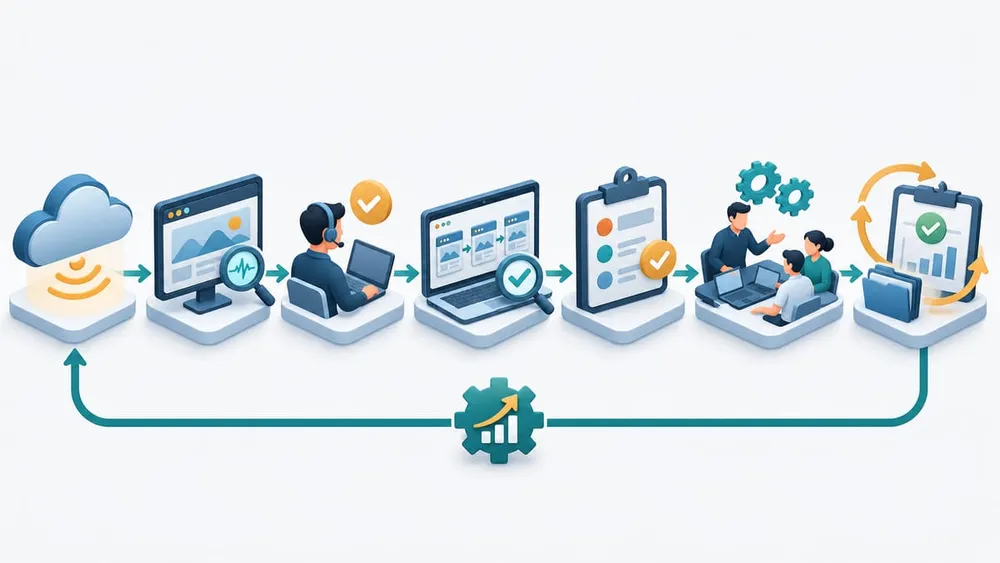
Use a seven-stage response workflow
- Deliver: send the event to a monitored destination that survives staff absence.
- Acknowledge: assign a named responder and timestamp. If nobody acknowledges within the target window, escalate to the backup.
- Verify: confirm the signal with an independent check. Test the public site, the affected environment and the business journey most likely to matter.
- Prioritise: rate the event by customer impact, data risk, revenue exposure, duration and recoverability—not by the wording of the notification alone.
- Respond: follow the relevant runbook. Pause releases, contact the hosting or integration owner, contain the change or invoke a tested recovery option.
- Communicate: tell business stakeholders what is known, what is not yet known, the current impact and the next update time. Use customer communication only when the agreed threshold is met.
- Close and improve: record evidence, resolution, duration and lessons. Update routing or the playbook when the exercise exposes a gap.
This turns a platform signal into an auditable business process. It also gives a managed support provider and the client a shared definition of what “monitoring” includes.
Keep webhook automation narrow and recoverable
A webhook should initially notify and organise work, not make an irreversible production change. Start with actions such as creating a ticket, adding project metadata, selecting an escalation policy and linking the responder to the runbook.
Before production use:
- send the webhook to an HTTPS endpoint you control or a trusted automation platform;
- confirm the authentication or validation options exposed by the current Umbraco Cloud implementation rather than assuming a signature format;
- store secrets outside source code and restrict who can view or change the workflow;
- accept only expected event shapes and reject oversized or malformed requests;
- make ticket creation idempotent so a retry does not create several incidents;
- log delivery time, project, environment, event type and downstream outcome without copying unnecessary sensitive data;
- provide a dead-letter or manual recovery path when the destination is unavailable.
These are integration design recommendations. Test them against the actual payload and delivery behaviour documented in your Cloud account before launch.
Test the route, not just the configuration
| Test | Evidence of success | Failure to catch |
|---|---|---|
| Delivery | Expected destination receives the event once | Wrong inbox, blocked webhook or duplicate tickets |
| Ownership | Primary responder acknowledges within target | Alert arrives but belongs to nobody |
| Backup | Unacknowledged event reaches the secondary contact | Silent gap outside support hours |
| Context | Ticket identifies project, environment and event type | Responder loses time finding the affected site |
| Verification | Runbook checks the relevant customer journey | Team trusts platform status without business testing |
| Recovery | Destination outage leaves a retrievable record or fallback | Alert disappears when the automation tool is down |
| Closure | Incident record contains timeline, action and outcome | No evidence for later review |
Run a controlled exercise during business hours. Do not simulate a DDoS attack against production. Use an event or test path supported by the platform, or walk the team through a tabletop scenario using a sample notification. Repeat the exercise after changing contacts, destinations or support arrangements.
Avoid Turning More Visibility Into More Noise
Most alerting failures are process failures rather than missing technology.
Personal Inboxes
A critical signal sent to one person has no reliable coverage during leave, role changes or after hours.
Every Event Is Urgent
If low-impact development events page the team, people learn to ignore the channel.
No Independent Check
A platform success or failure does not prove the customer's form, login, booking or checkout works.
Automation With Write Access
Allowing a first-version webhook to change production can turn a noisy signal into a larger incident.
Missing Evidence
Without timestamps, owners and outcomes, the team cannot measure response or improve the playbook.
Untested Escalation
A contact list is not a response capability until the route and backup have been exercised.
A practical seven-day setup for an SME
- Day 1—inventory: list Cloud projects, environments, primary domains and business-critical journeys.
- Day 2—ownership: name the primary responder, backup and business escalation contact for each production project.
- Day 3—matrix: classify the available events by priority, verification step and communication threshold.
- Day 4—routing: configure a shared email destination or a webhook that creates a tracked incident.
- Day 5—runbooks: write one-page procedures for DDoS, deployment and hostname events that are relevant to the organisation.
- Day 6—exercise: test delivery, acknowledgement, verification, fallback and closure during business hours.
- Day 7—review: fix gaps, record the evidence location and schedule a quarterly contact and playbook check.
For a larger portfolio, add an organisation dashboard, consistent severity labels, service-level objectives and monthly review of duplicate, unactionable or missed alerts. The goal is not the largest possible alert stream. It is timely action on the small set of events that matter.
Umbraco Cloud Alerting FAQ
Practical answers for business and technical teams configuring the new capability.
Sources checked
- Umbraco Roadmap History — delivery date and launch summary.
- Umbraco Product Update - Q3 2026 — configuration levels, delivery channels and initial event examples.
- Umbraco Product Update and Codegarden Keynote Highlights, Q2 2026 — earlier event and operational context.
- Umbraco Cloud FAQ — usage and performance monitoring context.
- ASD's ACSC small-business event logging guidance — useful events, centralisation, protection and automated alerts.
- ASD's ACSC people, training and incident readiness guidance — roles, contacts, continuity and exercises.
- ASD's ACSC incident response practitioner guidance — primary and secondary contacts, provider evidence and testing.
- ASD's ACSC event logging and threat detection best practices — prioritisation and alert-noise controls.
Sources were accessed on 4 November 2026. Product capabilities can change; confirm the current Umbraco Cloud portal and documentation before implementation.
Need an Umbraco Monitoring and Response Workflow?
VaniTech can configure Cloud alerts, webhook integrations, independent monitoring and practical runbooks around the business journeys your website must protect.