
Umbraco Cloud MCP: Safe AI Content Workflows
Umbraco made its CMS Editor MCP and CMS Developer MCP generally available as hosted remote connections on Umbraco Cloud on 19 November 2026. Editors can now connect compatible AI clients to a Cloud project and work with content, media, translations and publishing through conversation. Developers can connect a broader toolset to the Management API without maintaining the previous local MCP setup.
The commercial opportunity is straightforward: less copying between briefs, spreadsheets, chat tools and the backoffice; faster content audits; and a more direct path from a request to a structured CMS change. The risk is equally practical. An AI client can act with the permissions of the person who connects it, and some available tools can publish, unpublish, move, delete or change content in bulk.
This guide is for Australian business owners, marketing managers, content teams, website managers, Umbraco developers and technology decision-makers deciding whether to enable hosted MCP and how to operate it safely.
Why Umbraco Cloud MCP is trending now
Umbraco has offered local MCP tooling for developers, but the 19 November launch changes who can use it and how easily it can reach a live CMS. A hosted, project-specific URL lets web-based and desktop AI clients connect through an OAuth login instead of requiring every user to run a local Node.js process, maintain a configuration file and use an API account.
That makes the capability relevant to everyday content operations, not only development experiments. A marketer could bring a campaign brief from another connected service into the same AI conversation, create a draft in the correct Umbraco section, check metadata and leave the result for review. A content manager could identify stale pages, missing translations or broken content relationships without navigating every branch manually.
The launch is also timely because it puts a clear governance decision in front of businesses: which roles may connect an AI client, which environment they may reach, which tool collections they may see, and whether publishing remains a separate human decision.
What changed on 19 November
Hosted CMS MCP roles: Editor and Developer
2
Umbraco major versions in the hosted URL guide
17 & 18
Cloud project enablement with Umbraco.Mcp.HostedAuth
1 package
Planned hosted Forms, Engage and Automate MCP window
Q1 2027
Editor MCP and Developer MCP serve different jobs
Role separation is the first safety control, not a naming preference.
CMS Editor MCP
Designed for content teams. It covers content, media, translations, content health, relationships, bulk operations and members while staying out of Settings and user management.
CMS Developer MCP
Designed for developers. It exposes broad Management API capabilities, including schemas, data types, Settings and Users, so it belongs in an isolated development workflow with stronger review.
What the hosted connection actually changes
Hosted MCP is not an AI model installed inside Umbraco. It is a controlled bridge between an MCP-compatible AI host and the Umbraco Management API. On Umbraco Cloud, the shared MCP infrastructure runs at an Umbraco-managed domain. Your project becomes reachable after a developer installs the hosted-auth package and deploys it.
| Layer | Responsibility | Business decision |
|---|---|---|
| AI host | Interprets the request, selects tools and may ask for confirmation | Which approved AI clients may staff use, and how are data and logs handled? |
| Hosted MCP | Advertises Umbraco tools and carries authenticated requests | Editor or Developer endpoint, and which tool collections should be exposed? |
| OAuth identity | Connects the request to an Umbraco user | Which named user is signing in, and is their access still appropriate? |
| Umbraco permissions | Determines the sections, nodes and actions the user may access | Can the user draft, publish, delete, manage members or change settings? |
| Website process | Provides staging, approval, testing, release and rollback | What evidence is required before a change reaches production? |
The key point is that authentication answers who is connecting. It does not by itself answer whether the requested change is sensible, whether the AI host should be trusted with the source material, or whether the output has passed editorial and technical review.
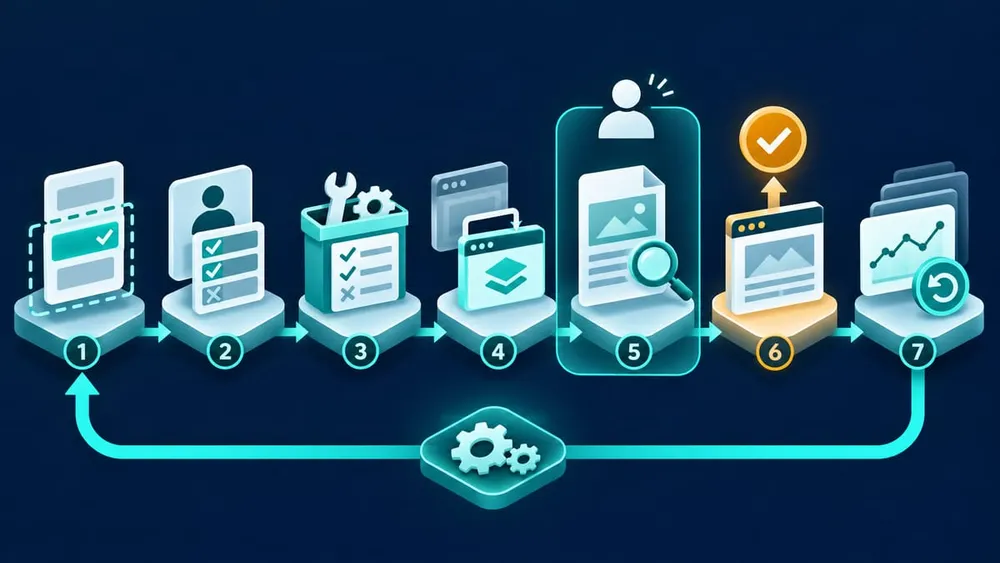
Use a five-layer control model
A safe rollout does not depend on a perfect prompt. It combines controls that still work when a request is ambiguous, the model chooses an unexpected tool, or a user approves too quickly.
- Approved use case. Define the job, the source data and the expected output before opening broad access.
- Least-privilege identity. Use a named Umbraco account with only the nodes, languages and actions needed for that job.
- Restricted tool surface. Use the Editor endpoint by default and exclude tool collections that the pilot does not require.
- Review and release gate. Create drafts first, compare the draft with published content and keep publication separate until quality is proven.
- Evidence and recovery. Retain prompts where appropriate, Umbraco change history, test results and rollback instructions.
This model follows the same principle as any integration: the AI client is another system acting through an API. It should receive no more authority than a conventional integration doing the same work.
Enable the Cloud connection deliberately
Umbraco's Cloud quick start is intentionally short, but a business rollout needs a little more preparation around it.
- Inventory environments. Record the development, staging and live aliases, regions and Umbraco major versions.
- Match the package line. Install the
Umbraco.Mcp.HostedAuthpackage version that matches the site's major version. The documentation uses18.*for Umbraco 18. - Deploy to a non-production environment first. Confirm the package starts, the project registers the expected OAuth clients and normal backoffice functions remain healthy.
- Build the correct endpoint. Umbraco documents separate editor and developer hostnames for versions 17 and 18. Do not copy an endpoint from another project or environment.
- Connect an approved AI host. Complete the OAuth consent and verify the project name, environment and signed-in account before accepting.
- Inspect available tools. Confirm that the client can see only the collections expected for the user's role and the pilot.
- Run a reversible draft task. Create or edit test content without publishing, then review the page, history and version information in Umbraco.
Record the endpoint owner, enabled environments, package version and client approval process in the site's operating documentation. Otherwise the connection can become an invisible dependency that future maintainers do not know exists.
Fix permissions before writing clever prompts
The hosted Editor MCP signs in as the backoffice user. If that account can publish a section, the AI can be offered publishing tools for that section. If the account can manage members, the connected workflow may reach member records. Prompt wording is not a durable substitute for permissions.
Review both layers of access in Umbraco Cloud:
- Project environment access: Cloud team permissions can differ between development, staging and live.
- Backoffice user groups: These determine content, media, language, node and action access inside Umbraco.
For an editorial pilot, create or use a group that can browse and update only the intended content branch. Remove direct publish, unpublish, delete, member-management and sensitive-data permissions unless the use case genuinely requires them. Give the pilot a separate test content area so bulk operations cannot spill into unrelated sections.
Do not assume the default Cloud team setting is safe for MCP. Umbraco's Cloud documentation notes that portal-level Read access can still correspond to an administrator in the backoffice unless those user groups are changed. Verify effective backoffice access for every environment.
Treat client confirmations as a convenience, not the only gate
Umbraco designs write actions to be confirmed, but its documentation is explicit that the prompt depends on the AI host and its settings. That matters because the Editor MCP includes direct tools for creating and publishing content, publishing descendants, unpublishing pages, bulk updates, moving media and sending items to the recycle bin.
Use three controls together:
- Server-side restriction: Exclude entire tool collections that the team does not need. A draft-only pilot usually does not need publishing, bulk operations, members, public access or recycle-bin tools.
- Host configuration: Require confirmation for write and destructive tools, and prevent unattended approval where the host supports it.
- CMS workflow: Keep the user's direct publish permission out of the pilot or route publication through an approval workflow.
A confirmation screen is useful friction, but users can still approve the wrong action. Make the confirmation meaningful by requiring the request to name the environment, content path, number of affected items and whether the result stays draft or goes live.
Keep the Developer MCP away from production by default
The Developer MCP is powerful because it can work across document types, data types, templates, users, content and other management areas. That makes it useful for prototyping schemas, repetitive setup and development diagnostics. It also increases the blast radius of a mistaken command.
Umbraco's Developer MCP documentation warns not to connect it to production and recommends a local or isolated development instance. Treat that warning as the baseline even though the hosted launch makes connection easier.
| Task | Recommended environment | Release control |
|---|---|---|
| Draft or update ordinary content | Staging first; production only after a controlled pilot | Editor MCP, draft-only role and human publish review |
| Change document types or data types | Local or isolated development | Source control, peer review, automated build and deployment pipeline |
| Bulk content migration | Restored production copy or dedicated migration environment | Dry run, counts, validation report, backup and rollback |
| Investigate production behaviour | Prefer logs, read-only evidence and a reproduced non-production issue | Time-boxed access with a named incident owner |
If a developer workflow creates a schema or configuration change, export it into the same governed deployment path used for human-made code. Do not let an AI conversation become a parallel production-change channel.
Test the whole content operation, not one successful prompt
A useful pilot proves accuracy, permissions, recovery and day-two ownership.
Content accuracy
Check fields, blocks, links, metadata, localisation, tone, factual claims and accessibility before publication.
Permission boundaries
Attempt out-of-scope nodes, publish actions, member tools and excluded collections to confirm that access is refused.
Failure recovery
Test partial failure, stale data, duplicate requests, rollback, recycle-bin restore and version comparison.
Operational ownership
Name who reviews changes, revokes access, updates packages, checks logs and responds when the AI host changes behaviour.
Build an evidence trail that supports review and rollback
The Editor MCP already exposes useful evidence. Teams can compare the current draft with the published version, list page versions, inspect page and media change history and roll a draft back to an earlier version. Use those capabilities as part of the process rather than only after something goes wrong.
For each pilot task, retain:
- the business request and approved source material;
- the environment, content path and signed-in user;
- the proposed item count before any bulk action;
- the draft-versus-published comparison;
- the reviewer, decision and publication time;
- the relevant Umbraco history or workflow record; and
- the rollback or restoration result for the test case.
Avoid storing secrets or personal information in prompt logs simply to create an audit trail. Record enough context to reconstruct the decision while following the retention and data-handling rules of the business and the chosen AI provider.
Review every connected data source, not only Umbraco
The value of MCP grows when an AI host can use a campaign brief, spreadsheet, email thread or project board alongside the CMS. The same connection can also cross data boundaries that were previously separate.
Before enabling a multi-system workflow, document:
- which service supplies the source material and which service receives the output;
- whether the content includes customer, member, employee, confidential or licensed information;
- which AI provider processes the prompt, attachments and tool results;
- where conversations and logs are stored, for how long and who can access them;
- whether data can be used for model improvement under the selected account terms; and
- how access is revoked when a staff member or supplier leaves.
Start with public or low-sensitivity content. Member management and cross-system customer-data workflows deserve a separate privacy and security review, even when the Umbraco account technically has permission to perform them.
A practical 30-day rollout plan
Week 1: define and restrict
- Select one repeatable, low-sensitivity task such as metadata drafting or stale-content review.
- Choose the Editor MCP and a non-production environment.
- Create the least-privilege user group and remove direct publishing.
- Approve one AI host and document its data, logging and confirmation settings.
Week 2: connect and test
- Install the matching hosted-auth package and deploy to staging.
- Confirm the endpoint, OAuth identity and visible tool collections.
- Run representative success, permission-denied and failure scenarios.
- Test version comparison, rollback and recycle-bin recovery.
Week 3: run a supervised pilot
- Use real but low-risk work with a reviewer watching every change.
- Measure time saved, corrections required, rejected outputs and any accidental tool choices.
- Review the Umbraco history and AI-host logs after each task.
Week 4: decide the operating model
- Keep, narrow or stop the use case based on evidence.
- Document owners, permitted tasks, prohibited data, review steps and incident contacts.
- Expand to production only when permissions and publishing separation are proven.
- Schedule access, package, client-setting and audit reviews.
Questions to ask your Umbraco or AI integration partner
- Which MCP endpoint will each role use, and why?
- Which Umbraco environments, nodes, languages and member data can the connected account access?
- Which tool collections are included or excluded at the server?
- Can the AI host run write tools without a fresh human confirmation?
- How do we keep content creation separate from publication?
- Where are prompts, attachments, tool results and tokens processed or retained?
- How will we test permission failures, bulk-operation limits and rollback?
- What appears in Umbraco history, workflow history and provider logs?
- Who owns package upgrades, access reviews and incident response?
- How will another developer take over the integration if the original implementer leaves?
A good implementation answer should name exact roles, environments, controls and evidence. A promise that the AI is secure or that OAuth handles everything is not an operating model.
What not to assume from the launch
The hosted MCPs are a significant operational change, but several boundaries matter.
- It is not automatic access. A developer must install and deploy the hosted-auth package, and a user must connect and authorise an AI client.
- It is not one permission model. Cloud environment access, backoffice groups, node permissions, server-side tool collections and client confirmations all play different roles.
- It is not yet whole-site automation for every editorial task. Umbraco says the current Editor MCP works with content in the same area of the tree; Global Actions are still on the roadmap.
- It does not make the Developer MCP safe for production. The official Developer MCP documentation continues to warn against production connection.
- It does not include every Umbraco product on Cloud today. Hosted Forms, Engage and Automate MCPs are planned for Q1 2027 rather than included in the 19 November CMS launch.
These limits are useful design inputs. A pilot built around current capabilities is safer than an architecture that assumes future roadmap items are already available.
Sources Checked
- Umbraco: CMS Editor MCP and Developer MCP launch announcement
- Umbraco Documentation: CMS Editor MCP Server
- Umbraco Documentation: Cloud quick start
- Umbraco Documentation: Hosted MCP setup
- Umbraco Documentation: Editor MCP available tools
- Umbraco Documentation: CMS Developer MCP Server
- Umbraco Documentation: Cloud team members and permissions
- Model Context Protocol: Security best practices
- Umbraco: Product roadmap
Sources were checked on 23 November 2026. Product capabilities and roadmap dates can change, so verify current Umbraco and AI-host documentation before enabling production access.