
Why Accessibility Overlay Widgets Are Not Enough: The Fix Most Websites Still Need
Accessibility overlay widgets can look like an easy compliance shortcut, but they cannot replace accessible design, semantic code, CMS governance, manual testing, and real WCAG remediation.
Accessibility overlay widgets promise a tempting shortcut: add a small script, show an accessibility icon, and let software repair the website for everyone. For a busy business owner or marketing team, that sounds perfect. The problem is that accessibility is not a layer you can reliably paste on top of a broken experience.
Overlays can help with limited user preferences, such as contrast controls or text spacing, when they are implemented carefully. But they cannot reliably fix missing form labels, poor heading structure, keyboard traps, inaccessible modals, misleading ARIA, missing captions, inaccessible PDFs, unclear content, or broken checkout flows.
The better strategy is source-first accessibility: accessible design, semantic frontend code, CMS content guardrails, editor checks, workflow approvals, automated scans, manual keyboard testing, screen reader testing, and regular audits.
Why Overlays Are Not Enough
An overlay may change what users see, but it does not reliably fix what browsers and assistive technologies need to understand.
They Guess Meaning
Many accessibility issues require context. A script cannot reliably infer the purpose of every button, image, field, chart, error message, or custom interaction.
They Miss Journeys
Real accessibility depends on complete tasks: opening menus, completing forms, checking out, logging in, filtering products, and recovering from errors.
They Can Conflict
Overlays may interfere with screen readers, keyboard focus, browser settings, reduced motion preferences, or assistive technology users already rely on.
They Create False Confidence
Teams may stop fixing root problems because a badge or toolbar gives the impression that compliance has been solved.
They Add Third-party Risk
A runtime script can affect performance, privacy, reliability, security review, and user trust if it loads slowly or fails.
They Do Not Govern Content
Overlays do not teach editors to write alt text, use clear links, create accessible headings, caption video, or avoid inaccessible documents.
What Accessibility Overlays Actually Do
An accessibility overlay is a third-party script that modifies a website after the page loads. It may add a floating toolbar, scan the page, inject ARIA attributes, change colours, adjust font size, add reading aids, or attempt to rewrite parts of the page for assistive technologies.
Some features can be useful as optional preferences. For example, a user may appreciate a pause animation control, clearer focus mode, high contrast toggle, or direct link to an accessibility statement. But those features support accessibility; they do not prove the website is accessible.
WCAG 2.2 is a technical standard based on testable success criteria under four principles: perceivable, operable, understandable, and robust. To meet those criteria, the website itself must be accessible. The content, code, components, media, forms, navigation, documents, and user journeys all matter.
The Legal and Trust Problem
Accessibility overlay marketing has attracted scrutiny because some products have claimed more than automation can safely deliver. In April 2025, the United States Federal Trade Commission approved a final consent order requiring accessiBe to pay USD 1 million after allegations about unsupported claims that its accessWidget could make websites WCAG compliant.
The European Disability Forum and the International Association of Accessibility Professionals also issued a joint statement warning that accessibility overlays do not guarantee compliance with European accessibility legislation. Their warning is especially important for teams that buy overlays instead of fixing their actual website.
For Australian businesses, the practical lesson is straightforward: do not rely on a toolbar as evidence that users can access your site. Test the actual experience.

Overlays Patch Symptoms, Not Systems
Most accessibility failures come from templates, components, content models, media workflows, JavaScript interactions, forms, and editorial habits. Those need source-level fixes.
What an Overlay Cannot Reliably Fix
These are the problems that usually require design, code, CMS, content, or QA changes.
Keyboard Flow
Menus, modals, filters, tabs, checkout steps, and forms need logical focus order, visible focus, and no traps.
Form Meaning
Labels, instructions, errors, required fields, grouping, and success states must be coded and written clearly.
Component Semantics
Buttons, links, accordions, tables, alerts, status messages, and custom widgets need correct HTML and state management.
Media Alternatives
Images, icons, charts, video, audio, PDFs, captions, transcripts, and downloads need content-level decisions.
Editorial Quality
Headings, link text, plain language, page titles, document structure, and calls to action must be maintained by editors.
Governance
Teams need validation, workflow checks, ownership, audits, training, and regression monitoring after launch.
CMS Options: What to Do Instead
The best replacement for overlay dependency is not one tool. It is a CMS-backed accessibility workflow. Umbraco, Optimizely, Hygraph, Contentful, and Contentstack can all support better accessibility if they are configured around governance rather than quick-fix optics.
| CMS | Useful accessibility controls | How it helps beyond overlays | Watch-out |
|---|---|---|---|
| Umbraco | Mandatory image ALT text, configurable workflows, custom validation, approval workflows, structured headings and tables, rich text configuration, TinyMCE accessibility checker options, and API integrations. | Umbraco gives teams strong source-level control over document types, media types, templates, validation, and editor workflow. | Adding a widget package is possible, but it should not replace accessible templates, media governance, and manual testing. |
| Optimizely | Opal Accessibility Assistant, Web Accessibility Evaluation agent, accessible multimedia guidance, accessible HTML guidance, FEAT templates, Visual Builder workflows, and enterprise governance. | Optimizely is better suited to accessibility as part of enterprise QA, templates, content workflow, and URL-based scanning than as a simple overlay layer. | Project implementation still matters. Image alt text, frontend components, personalization variants, and forms must be built and tested properly. |
| Hygraph | Asset model extensions, AltText.ai integration, GraphQL content modelling, reusable components, localization, content stages, custom roles, granular permissions, and workflows. | Hygraph lets teams model accessibility metadata and editorial constraints directly into structured content before it reaches the frontend. | The final accessibility result depends on the frontend app, because Hygraph is headless and frontend-agnostic. |
| Contentful | Content model validation, custom roles, app ecosystem, asset descriptions, AltText.ai partner integration, AI Actions, content QA, localization, and editorial governance. | Contentful can help teams scale content checks, metadata, reusable content, and AI-assisted editorial review across channels. | AI-generated accessibility text still needs human review, and the frontend must render semantic, keyboard-friendly components. |
| Contentstack | Mandatory fields, validation, headless content governance, Assets configurable metadata, AI alt text suggestions, localization, roles, workspace controls, and third-party testing tool integrations. | Contentstack is useful for enterprise asset and content governance, especially where metadata, localization, approval, and reuse matter. | Contentstack states customers control the accessibility of delivered experiences, so frontend WCAG testing remains essential. |
What the CMS Should Enforce
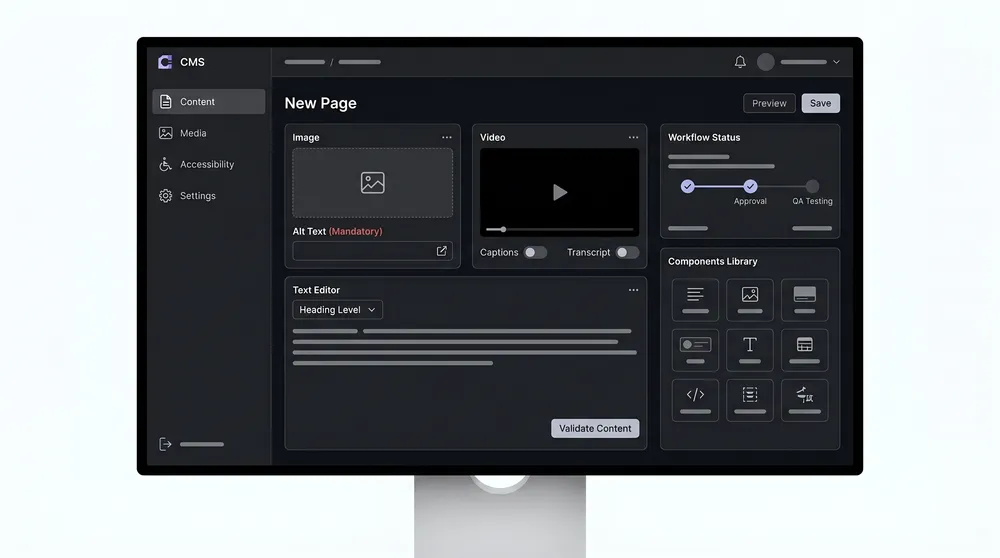
The CMS should make accessible publishing easier than inaccessible publishing. That means requiring alt text where appropriate, allowing decorative images to be marked intentionally, adding caption and transcript fields, limiting heading choices, validating required fields, guiding link text, locking accessible components, and routing high-risk pages through review.
When a Widget Can Still Be Useful
There is a narrow, honest role for accessibility widgets. They can provide optional preference controls, direct users to an accessibility statement, expose contact details for accessibility feedback, or make existing controls easier to discover.
Use a widget only if it passes these checks:
- The widget itself is keyboard accessible.
- It works with screen readers without duplicate announcements, focus traps, or confusing state changes.
- It does not override user browser, operating system, or assistive technology preferences unexpectedly.
- It does not make unsupported WCAG, ADA, DDA, EAA, or compliance claims.
- It does not block real remediation work in the backlog.
- It is reviewed for privacy, performance, security, and third-party script risk.
What Real Remediation Looks Like
Real remediation starts with an audit or targeted review. Then fixes are mapped to the right owner: design, frontend, backend, CMS, content, media, QA, legal, or vendor. A missing form label is not solved by the same person as a missing video transcript. A keyboard trap in a modal is not solved by the same workflow as a missing image description in the media library.
A practical remediation plan should prioritise business-critical journeys first: navigation, search, contact forms, quote forms, checkout, account login, bookings, support, payments, downloads, and any public-service or regulated content.

Replace Overlay Dependency With a Real Program
The goal is not to remove every preference tool. The goal is to stop pretending a preference tool can do the job of accessible design, development, content, and testing.
Recommended Action Plan
1. Stop making compliance claims based on the widget
If the site has an overlay, describe it as an optional support feature only. Do not claim the website is compliant because a toolbar is installed.
2. Audit the highest-risk journeys
Start with pages and flows that affect revenue, support, legal access, public information, or customer trust. Automated scans are useful, but include keyboard and screen reader checks.
3. Fix design system and frontend components
Repair buttons, links, forms, modals, navigation, accordions, tabs, tables, alerts, focus states, status messages, and error handling at the component level.
4. Add CMS guardrails
Configure fields, validation, required metadata, captions, transcripts, heading controls, approval workflows, and content checks in Umbraco, Optimizely, Hygraph, Contentful, or Contentstack.
5. Retest and monitor
Run follow-up testing after fixes, then add recurring checks before major campaigns, redesigns, CMS migrations, and component releases.
Final Recommendation
Accessibility overlay widgets are not enough because accessibility is not only a visual preference problem. It is a design, content, code, workflow, governance, and testing problem.
Keep a widget only if it genuinely helps users and does not interfere. But put the serious budget and effort into source-level accessibility. That is what improves user experience, reduces risk, supports SEO foundations, and keeps the site maintainable after the next campaign or CMS update.
Sources Checked
- FTC final order on accessiBe
- European Disability Forum overlay warning
- W3C WCAG overview
- WebAIM Million 2026 report
- Umbraco web accessibility features
- Umbraco accessibility checking
- Optimizely Web Accessibility Evaluation agent
- Optimizely Opal Accessibility Assistant
- Optimizely accessible multimedia content
- Hygraph AltText.ai integration
- Hygraph roles, permissions, and workflows
- Contentful accessibility statement
- Contentful AI Actions
- Contentstack accessibility statement
- Contentstack Assets metadata and AI suggestions
- Contentstack mandatory fields