
WordPress 7.1.5 Security Update: Patch Guide
WordPress released version 7.1.5 on 18 November 2026 and recommends that site owners update immediately. The security release addresses 20 issues across core, including privilege escalation, SQL injection, cross-site scripting, information disclosure and denial of service. One unauthenticated privilege-escalation issue involving Template Part block attributes could lead to remote code execution.
For an Australian business, this is not just an administrator notification. A WordPress site may publish marketing content, collect enquiries, hold customer accounts, process orders, connect to a CRM or expose operational data through plugins. The right response is therefore both fast and controlled: identify every site, preserve useful evidence, take a recoverable backup, install the matching fixed version, test important journeys, verify production and investigate anything suspicious.
This guide is for business owners, marketing managers, ecommerce teams, website managers, IT providers and technology decision-makers responsible for WordPress websites.
Why WordPress 7.1.5 is trending now
The release is timely because the risk is broad, the affected software is internet-facing and several issues can be reached without an authenticated administrator account. The official list includes unauthenticated stored cross-site scripting through shortcode attributes in comments, private taxonomy-term disclosure through the REST API, denial of service through batched XML-RPC pingbacks and the Template Part issue that could lead to remote code execution.
Other fixes matter for sites with editorial teams or multisite networks. They cover SQL injection paths, a multisite Administrator-to-Super-Admin escalation, user-email disclosure, comment-editing authorisation bypass and several stored or reflected cross-site scripting issues reachable by different roles.
WordPress has published fixed releases for affected branches from 7.1 back to 4.7. That reduces the immediate exposure for sites that cannot complete a major-version upgrade today, but WordPress also states that only the most recent version is actively supported. A backport is an urgent risk reduction step, not a long-term maintenance strategy for a legacy site.
What the official advisory confirms
security issues listed for WordPress 7.1.5
20
2026 public release date
18 Nov
oldest branch with a listed fixed release
4.7
WordPress update recommendation
Immediate
The fixes affect more than one technical layer
Prioritise by exposure and business impact rather than trying to reduce the release to a single vulnerability label.
Code execution and privilege
The highest-impact paths can change authority or, in one unauthenticated case, lead to remote code execution. Multisite networks need a separate Super Admin review.
Injected content and scripts
Stored and reflected cross-site scripting fixes cover comments, media, oEmbed, Openverse metadata, blocks and Customizer previews.
Queries and data exposure
SQL injection and REST or XML-RPC information-disclosure fixes can affect confidentiality even when the website still appears normal.
Service availability
The XML-RPC pingback fix addresses an unauthenticated denial-of-service path that can turn request handling into a customer-facing outage.
Editorial roles
Contributor, Author, Editor, Administrator and Subscriber paths mean role review matters on sites with agencies, guest authors or stale accounts.
Legacy maintenance
Branches down to 4.7 received listed fixes, while 4.6 and earlier no longer receive security updates and need a takeover or migration decision.
Match the site to the correct fixed branch
Do not assume every WordPress installation should jump directly to 7.1.5 during an emergency change. First record the exact current version, hosting environment, multisite status, PHP version, active theme, must-use plugins, ordinary plugins, deployment method and whether the site uses managed automatic updates.
| Current branch | Fixed release listed by WordPress | Practical decision |
|---|---|---|
| 7.1 | 7.1.5 | Apply the current security release and verify the running version. |
| 7.0 | 7.0.9 | Use the matching backport if a 7.1 move cannot be completed safely today, then schedule the supported-version upgrade. |
| 6.9 to 6.5 | 6.9.12, 6.8.13, 6.7.12, 6.6.12 or 6.5.15 | Apply the exact branch fix, document why the site remains behind and set an owned upgrade date. |
| 6.4 to 4.7 | Branch-specific fixed releases are listed in the official version page | Patch immediately, but treat the legacy branch as a material maintenance and takeover risk. |
| 4.6 or earlier | No security update | Restrict exposure where possible and begin an urgent rebuild, migration or specialist recovery plan. |
The official version page lists how many of the 20 issues affect each older branch. Use that matrix rather than assuming every historical version has identical exposure. The commercial conclusion is still clear: an internet-facing site on an unsupported branch should not remain a permanent exception.
Separate patching from compromise assessment
A successful update closes the published vulnerable code paths. It does not prove that the site was untouched before the update. That distinction matters when a website handles customer details, member accounts, ecommerce records or sensitive form submissions.
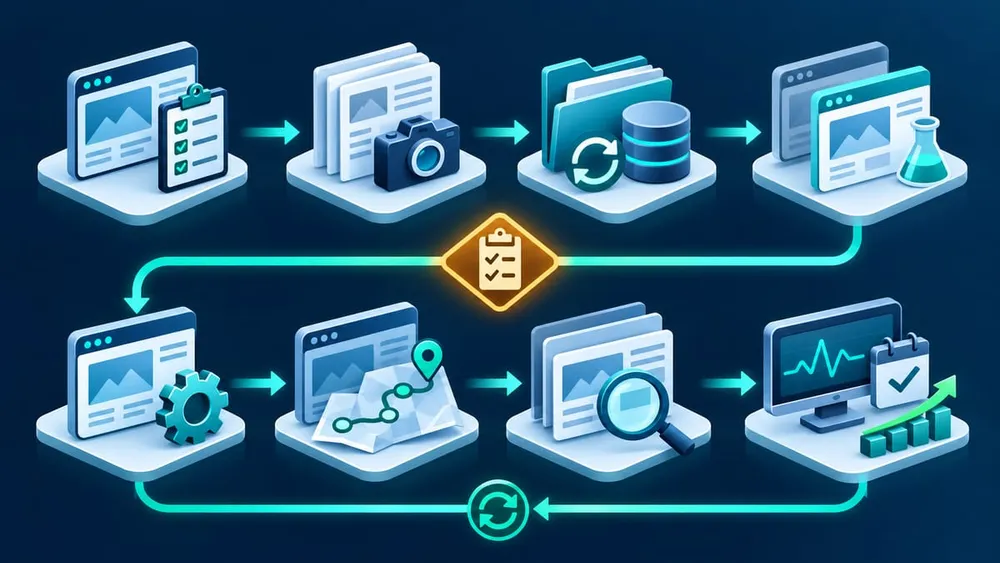
Use two work lanes with one incident owner:
- Remediation lane: confirm scope, back up the site, test the update, deploy the matching fixed release and verify customer journeys.
- Assessment lane: preserve available logs and snapshots, compare files, review users and roles, inspect suspicious content or configuration changes and decide whether specialist incident response is needed.
If there are no indicators of compromise, the assessment can remain proportionate. If there are unexpected administrator accounts, modified PHP files, unfamiliar scheduled tasks, suspicious requests, changed payment settings, unexplained redirects or missing logs, stop treating the job as routine maintenance. Escalate before cleanup destroys evidence needed to understand scope.
Start with evidence, inventory and recovery
Speed matters, but the first few actions should make the change safer rather than merely faster.
- Name the owners. Assign a technical lead, business decision-maker and communication contact. Record when the team learned about the release and what systems are in scope.
- Inventory every installation. Include production, staging, development, campaign microsites, multisite networks, disaster-recovery copies and forgotten subdomains.
- Preserve what is available. Protect web-server, application, WAF, CDN, authentication, hosting, deployment and database logs. Take snapshots where appropriate and record times in one time zone.
- Capture the current state. Export versions, active plugins and themes, users and roles, scheduled tasks, file checksums or repository differences, recent deployments and security alerts.
- Create a recoverable backup. Back up both files and the database. Keep the pre-change copy outside the live site and verify that the restore procedure and credentials are available.
- Confirm the update path. Check managed-hosting controls, deployment automation, plugin or theme notes and any reason automatic background updates may have failed.
WordPress recommends a backup before updating and notes that plugin and theme compatibility can affect the correct order. Australian Signals Directorate guidance likewise calls for clear responsibilities, an application inventory and confirmation that updates have actually been applied.
Use a controlled update sequence
- Rehearse on a production-like copy where practical. Restore the current database and files into an isolated environment, then apply the matching security release through the same method used for production.
- Resolve plugin and theme dependencies. Review vendor notes. Some extensions need updating before core, while others require the newer core version first.
- Keep custom code visible. Core edits are overwritten during updates. If the site contains modified core files, treat that as technical debt to remove rather than silently recreating the changes.
- Run a smoke test. Confirm the homepage, key landing pages, login, editor, media, forms and error logs before opening a broader acceptance test.
- Deploy with rollback ready. Use an accountable change window, capture the pre-deployment state and keep the person who can restore files and the database available.
- Verify the actual running version. Do not rely only on a hosting email or a green deployment job. Check the WordPress version on every relevant instance.
- Clear and warm caches carefully. Verify that the CDN, page cache and object cache are serving the updated application and have not left mixed assets or stale pages.
For a simple brochure site, this sequence may take a short controlled window. For a busy store, membership platform or heavily customised build, it deserves a production-like rehearsal and a business owner who can approve the change outcome.
Test the customer journey, not just the homepage
| Area | Minimum acceptance check | Evidence to retain |
|---|---|---|
| Public pages | Load key templates on mobile and desktop; check navigation, search, media, embeds and structured data. | URLs, screenshots or synthetic checks, status codes and browser-console result. |
| Forms | Submit a safe test through validation, spam controls, email and CRM delivery. | Submission ID, destination record and notification result. |
| Ecommerce | Test browse, cart, discount, checkout, payment sandbox or low-risk transaction, order creation, email and fulfilment handoff. | Order reference, payment outcome and downstream records. |
| Accounts | Test login, password reset, role boundaries and member-only content. | Expected allow and deny results without exposing real credentials. |
| Editorial | Create, preview, publish and revise representative block and classic content; upload media and test comments where enabled. | Test content reference and reviewer sign-off. |
| Integrations | Exercise webhooks, CRM, analytics, search, email, booking and scheduled jobs. | Correlation IDs, queue status and source-to-destination record match. |
| Operations | Review PHP, web-server and application errors; confirm backup, monitoring, WAF and alerts remain healthy. | Deployment record, version proof and monitoring checkpoint. |
The release touches blocks, comments, media, Customizer behaviour, REST endpoints, XML-RPC and query handling. That makes a broad but risk-based regression test more useful than checking only whether the front page renders.
Verify automatic updates instead of assuming they worked
WordPress supports automatic background updates for minor and security releases on capable sites. That is valuable, but an update policy is not evidence that this particular site reached the fixed version.
Check each installation directly and investigate exceptions:
- Was the site already on 7.1.5 or the matching fixed branch when checked?
- Did the update job complete without filesystem-permission, disk-space or maintenance-mode errors?
- Did managed hosting stage or delay the update under its own policy?
- Is version control or immutable infrastructure expected to deploy core instead of the Dashboard?
- Did a previous failed update leave the site with mixed or incomplete files?
- Are staging and disaster-recovery environments still vulnerable even if production updated?
Record the automatic-update owner and alert path. A useful control reports failure or version drift; it does not wait for someone to notice a banner during the next content edit.
Review the exposure window for suspicious activity
Start with the period from the site's last known-good evidence through successful production verification. Expand the window if logs, file timestamps or other indicators suggest earlier activity.
- Files: new or modified PHP, JavaScript, theme, plugin, upload-directory or root files that are not explained by an approved deployment.
- Users and roles: new administrators, changed email addresses, unexpected Super Admin membership, stale agency accounts or unexplained password resets.
- Content and configuration: injected scripts, changed templates, unfamiliar redirects, altered payment or email settings, new application passwords and modified scheduled tasks.
- Requests: unusual REST, XML-RPC, comment, Customizer, media, block or login activity; bursts of errors; requests from unexpected locations; and security-rule matches.
- Business records: unexplained orders, customer exports, CRM changes, form access, payment-setting changes or outbound messages.
WordPress hardening guidance describes logs as essential to understanding what happened and recommends file monitoring for additions and changes. A lack of retained evidence is itself an operational finding: improve log coverage and retention before the next incident.
Know when privacy and incident obligations enter the response
A vulnerable site is not automatically a notifiable data breach. The decision turns on evidence about unauthorised access, disclosure or loss of personal information, the likelihood of serious harm and whether remedial action prevents that likely harm.
If there are reasonable grounds to suspect an eligible breach, involve the organisation's privacy or legal owner early and start a documented assessment. The Office of the Australian Information Commissioner says covered organisations must assess suspected eligible breaches quickly and notify affected individuals and the OAIC when the eligibility conditions are met.
Do not send speculative breach notices merely because a patch exists. Equally, do not close the work as a successful update when evidence shows unexpected access to customer, employee, member or enquiry data. Preserve facts, record what is known and unknown, and use qualified incident-response and privacy advice where the consequences are material.
Clarify what managed hosting and support actually cover
A managed host may update WordPress core automatically, but that does not necessarily include plugin compatibility testing, business acceptance, log review, compromise assessment, privacy decisions or repair of custom code. A development agency may maintain the theme but not own hosting alerts or backups. A marketing team may own content while nobody owns the full technical response.
For every WordPress site, document:
- who receives WordPress, plugin, theme, PHP and hosting advisories;
- who can deploy core and extensions in each environment;
- who checks automatic-update failures and version drift;
- who owns backups and when restoration was last tested;
- who runs customer-journey tests after a security change;
- who can access logs and preserve evidence;
- who decides whether specialist incident response or privacy assessment is required;
- who communicates with customers, staff and suppliers during disruption.
If these answers depend on one unavailable freelancer or an expired hosting login, the security release has exposed a support-risk problem as well as a software problem.
Move from alert to verified closure
The exact timing depends on site complexity and evidence, but ownership and sequence should be explicit.
First two hours: control
Name owners, inventory every site, preserve logs and snapshots, capture versions and take a recoverable files-and-database backup.
Next four hours: rehearse
Apply the matching fixed release in a production-like environment, resolve plugin and theme dependencies and run high-risk journey tests.
Same day: deploy
Release with rollback ready, verify every production instance, clear caches and confirm forms, login, checkout and integrations.
Same day: assess
Review files, users, roles, requests, content, configuration and business records for indicators of compromise.
By 24 hours: decide
Escalate suspicious findings, start a privacy assessment where required and record residual risk for unsupported or legacy branches.
After closure: improve
Fix update ownership, monitoring, log retention, restoration testing and the supported-version roadmap before the next release.
Questions to ask your WordPress provider
- What exact WordPress version is running on production, staging and every related site?
- Which fixed branch was deployed, when and by whom?
- Did the update run automatically, through a hosting control or through the deployment pipeline?
- Where are the pre-change files-and-database backup and restore instructions?
- Which plugin, theme, PHP and business-journey tests passed?
- How was the running production version independently verified?
- What logs and file-integrity evidence cover the exposure window?
- Were users, roles, application passwords, scheduled tasks, payment settings and injected scripts reviewed?
- Were any suspicious findings identified, and who owns incident or privacy escalation?
- If the site remains on an older branch, what is the funded date for moving to an actively supported version?
A useful answer includes evidence: version output, deployment records, test results, monitoring, backup identifiers and an incident decision. A generic statement that updates are managed is not enough.
Sources checked
- WordPress.org: WordPress 7.1.5 Release
- WordPress.org Documentation: Version 7.1.5
- WordPress.org Documentation: Updating WordPress
- WordPress Developer Resources: Backups
- WordPress Developer Resources: Hardening WordPress
- Australian Signals Directorate: Patching applications and operating systems
- Australian Signals Directorate: Cyber security incident response planning
- Office of the Australian Information Commissioner: When to report a data breach
Sources were accessed on 24 November 2026. The article distinguishes confirmed WordPress release information from VaniTech's recommended implementation sequence. Site-specific risk still depends on the deployed branch, configuration, users, plugins, themes, hosting and available evidence.