
WordPress vs Umbraco for Australian SMEs
A practical comparison of WordPress and Umbraco for Australian SMEs, covering cost, hosting, ecommerce, security, editor experience, governance, integrations, scalability, and when each CMS makes sense.
WordPress and Umbraco can both run excellent SME websites. The right choice depends less on which CMS is more famous and more on the business model behind the site: who edits content, how much custom functionality is needed, what integrations matter, how serious governance is, and who will maintain the platform after launch.
For many Australian SMEs, WordPress wins when the goal is a fast, lower-cost marketing site, simple ecommerce store, or content-heavy site that benefits from a huge plugin and theme ecosystem. Umbraco wins when the site needs structured content, stronger editorial governance, custom workflows, Microsoft-stack integrations, Azure alignment, cleaner developer control, or a lower tolerance for plugin sprawl.
This guide compares the real options, not just the slogans. Pricing was checked on 11 May 2026. US-dollar prices are converted to AUD using your requested planning rate of 1.7x. Euro prices are converted using an approximate EUR-to-AUD planning rate of 1.63x based on current exchange data. Treat all costs as planning estimates because exchange rates, taxes, plans, overages, regions, and vendor packaging can change.
What Australian SMEs Should Compare
The best CMS decision is usually about operating model, not only licence price.
Launch Budget
WordPress usually starts cheaper because themes, plugins, hosting options, and freelancers are abundant. Umbraco often needs a stronger development partner from day one.
Maintenance
WordPress maintenance often means managing core, theme, plugin, security, and hosting updates. Umbraco maintenance is usually more developer-led but can be cleaner when the site is custom.
Editor Experience
WordPress is familiar and flexible. Umbraco is structured, tidy, and strong for teams that need reusable content types, permissions, and predictable publishing workflows.
Security Risk
WordPress can be secure, but plugin volume increases governance work. Umbraco has a smaller ecosystem and more controlled architecture, which can reduce operational risk.
Integrations
WordPress has many ready-made integrations. Umbraco is often a better fit for bespoke integrations, .NET teams, Microsoft identity, Azure services, CRMs, ERPs, and custom back-office systems.
Growth Path
WordPress is excellent for small-to-mid content sites. Umbraco becomes attractive when the website is becoming a platform rather than a brochure.
Options and Cost Snapshot
Pricing checked on 11 May 2026. USD prices use the requested 1.7x AUD planning conversion. EUR prices use an approximate 1.63x AUD planning conversion. Implementation, migration, design, content, SEO, integrations, maintenance, GST, payment fees, and agency support are separate unless noted.
| Option | Cost snapshot | Best for | What you get | Watch-outs |
|---|---|---|---|---|
| WordPress.org self-hosted | WordPress CMS is free and open source. Budget separately for hosting, domain, premium themes, plugins, security, backups, developer time, and maintenance. | SMEs that want maximum flexibility and a large supplier ecosystem. | Full control over hosting, code, plugins, themes, SEO tools, ecommerce, forms, membership, and integrations. | Cheap to start can become expensive to maintain if the site depends on many plugins or weak hosting. |
| WordPress.com managed plans | Free plan available. Personal is USD 4/month annually or USD 9/month monthly, about AUD 6.80 or AUD 15.30/month. Premium is USD 8 or USD 18/month, about AUD 13.60 or AUD 30.60/month. Business is USD 25 or USD 40/month, about AUD 42.50 or AUD 68/month. Commerce is USD 45 or USD 70/month, about AUD 76.50 or AUD 119/month. Enterprise starts at USD 25,000/year, about AUD 42,500/year. | Small teams that want managed WordPress without choosing separate hosting. | Managed hosting, WordPress editing, plan-based storage and features. Business and Commerce unlock plugin and theme flexibility needed by many real business sites. | Plan restrictions matter. Plugin access starts on higher tiers, and serious custom work may still push you to self-hosted or managed WordPress hosting. |
| Managed WordPress hosting - WP Engine | Startup starts at USD 30/month, about AUD 51/month. Professional starts at USD 55/month, about AUD 93.50/month. Growth starts at USD 109/month, about AUD 185.30/month. Scale starts at USD 276/month, about AUD 469.20/month. Core starts at USD 400/month, about AUD 680/month. Promotional first-year pricing may vary. | WordPress sites that need stronger hosting, backups, staging, CDN, support, updates, and security tooling. | Managed WordPress platform with developer tools, backups, staging, CDN, security features, and WordPress-specific support. | Hosting cost is only one part of the budget. Premium plugins, custom development, security add-ons, and maintenance can still add up. |
| Managed WordPress hosting - Kinsta | Single-site plans start at USD 35/month, about AUD 59.50/month, or USD 30/month on annual billing, about AUD 51/month. Higher single-site plans list USD 50, USD 90, USD 170, USD 290, and USD 375/month, about AUD 85, AUD 153, AUD 289, AUD 493, and AUD 637.50/month. Enterprise starts at USD 500/month, about AUD 850/month. | Performance-focused WordPress hosting, agencies, ecommerce, and SMEs wanting Australian data centre options. | Managed WordPress hosting, CDN, backups, migrations, security features, and selectable data centres including Sydney and Melbourne. | Resource limits, add-ons, and overages need review if the site is ecommerce, membership-based, media-heavy, or high traffic. |
| WooCommerce on WordPress | WooCommerce core is free. WooCommerce says typical hosting for stores is USD 25 to USD 350/month, about AUD 42.50 to AUD 595/month. Extensions are commonly USD 29 to USD 299/year, about AUD 49.30 to AUD 508.30/year per extension. | Australian SMEs selling products, services, bookings, subscriptions, or simple online catalogues on WordPress. | Open-source ecommerce, no WooCommerce platform revenue share, large extension marketplace, and strong content-plus-commerce flexibility. | Payment processing, shipping, tax, subscriptions, bookings, product feeds, and performance features can become a stack of separate extensions. |
| Umbraco CMS self-hosted | Umbraco CMS core is free and open source. Budget separately for .NET hosting, SQL database, development, DevOps, monitoring, upgrades, support, and any add-ons. | SMEs with .NET capability, custom content models, bespoke integrations, or a desire for a cleaner custom CMS build. | Open-source .NET CMS, structured content modelling, user management, multilingual support, custom backend, marketplace packages, headless APIs, and webhooks. | Usually needs a skilled Umbraco/.NET developer or agency. The ecosystem is smaller than WordPress, so custom work may be more common. |
| Umbraco Cloud | Starter is EUR 45/month, about AUD 73.35/month. Standard is EUR 280/month, about AUD 456.40/month. Professional is EUR 730/month, about AUD 1,189.90/month. Enterprise is custom. Extra environments can add EUR 45, EUR 70, or EUR 110/month, about AUD 73.35, AUD 114.10, or AUD 179.30/month depending on plan. | SMEs that want Umbraco with managed Azure hosting, automated updates, deployment workflow, CDN, TLS, backups, and regional hosting. | Managed Umbraco hosting on Microsoft Azure, Cloudflare CDN, security features, Forms Builder, Deploy, automatic patch updates, and region selection including East Australia. | Higher monthly platform cost than entry WordPress options. Complex custom builds still need developer support. |
| Umbraco add-ons | Forms is included on Umbraco Cloud and standalone Forms is EUR 100/year, about AUD 163/year. Workflow is EUR 2,800/year, about AUD 4,564/year. Engage starts at EUR 800/year for Analytics, about AUD 1,304/year, and rises to EUR 18,800/year, about AUD 30,644/year, before custom enterprise. | Teams that need forms, workflow approval, analytics, A/B testing, personalization, or content governance inside Umbraco. | First-party add-ons built and maintained for Umbraco, reducing the need to assemble critical workflows from unrelated plugins. | Commercial add-ons can make Umbraco more expensive, but may reduce integration and governance complexity for the right team. |
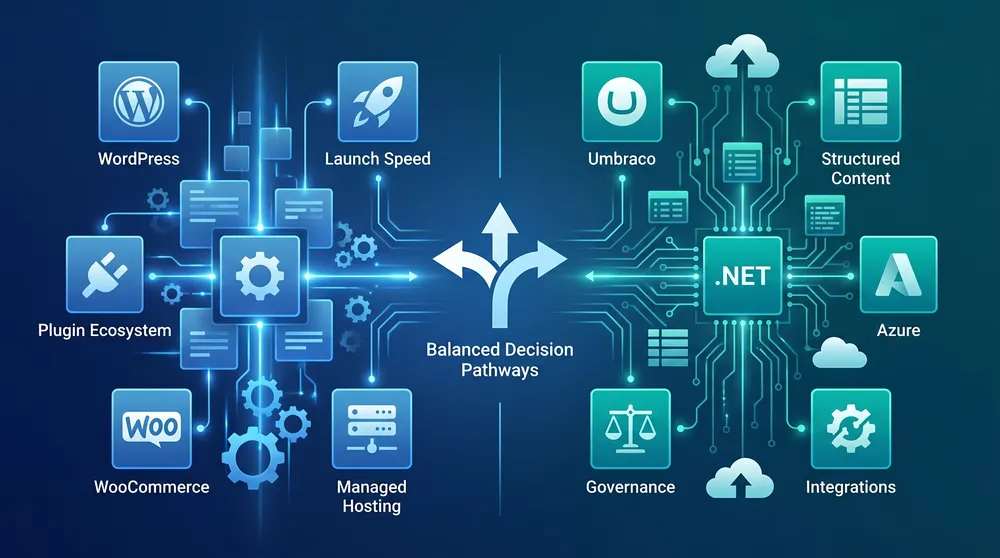
WordPress Starts Fast, Umbraco Scales Cleanly
For Australian SMEs, the decision often comes down to whether the website is primarily a marketing channel or a business-critical content platform.
Choose the CMS That Fits the Operating Model
These checks help separate a good demo from a good long-term platform decision.
Budget Reality
Compare total first-year and ongoing costs, not just hosting or licence fees.
Editor Needs
Check how many people edit content, who approves it, and whether content must be reused across pages or channels.
Plugin Load
List every plugin or package needed for forms, SEO, search, ecommerce, security, caching, integrations, and analytics.
Security Model
Decide who owns patching, backups, vulnerability checks, access control, hosting hardening, and incident response.
Integration Fit
Score CRM, ERP, booking, membership, payment, identity, marketing automation, and reporting integrations before choosing.
Local Hosting
For Australian audiences or data preferences, check available Australia regions, CDN behaviour, backup location, and support coverage.
WordPress vs Umbraco: Practical Comparison
| Area | WordPress | Umbraco |
|---|---|---|
| Best fit | Marketing sites, blogs, small ecommerce, fast launches, budget-conscious builds, and businesses that want a huge plugin ecosystem. | Structured content platforms, custom websites, Microsoft-stack teams, regulated publishing, multi-site setups, and deeper integrations. |
| Technology | PHP, MySQL or MariaDB, themes, plugins, and a very large open-source ecosystem. | .NET, C#, SQL Server, structured content types, custom development, APIs, and Azure-friendly architecture. |
| Editor experience | Familiar block editing and lots of visual-builder options, but editing can become inconsistent when many plugins add their own UI. | Clean backoffice and controlled content models. Better when editors need consistency, permissions, and structured reusable content. |
| Security | Can be secure with disciplined updates, good hosting, minimal plugins, MFA, backups, and monitoring. | Smaller attack surface in many builds, fewer third-party packages, and a more controlled developer workflow. |
| Ecommerce | WooCommerce is strong for SMEs and gives a large marketplace of payment, shipping, subscription, booking, and product extensions. | Umbraco Commerce is a better fit when commerce needs to be deeply integrated into a custom .NET content or product platform. |
| Maintenance | More frequent plugin/theme governance. Managed hosts can reduce risk, but the plugin stack still needs ownership. | More developer-led, but often more predictable when custom functionality is built cleanly instead of assembled from many plugins. |
| Australian hosting | Depends on provider. Kinsta documents Sydney and Melbourne data centres, and many other WordPress hosts offer nearby or CDN-backed delivery. | Umbraco Cloud documents East Australia as an available region, with no regional price difference noted in its FAQ. |
| Supplier market | Very large pool of freelancers, agencies, themes, plugins, and low-cost support options. | Smaller but more specialised .NET/Umbraco supplier pool; better alignment when the business already uses Microsoft technologies. |
The Real Cost Difference
WordPress is usually cheaper in month one. A simple brochure site can run on inexpensive hosting, and many features can be added quickly with plugins. The risk is that an SME may slowly accumulate a stack of plugins, builder dependencies, security tools, form tools, SEO tools, ecommerce extensions, and custom fixes that nobody fully owns.
Umbraco usually costs more to plan and build because it expects a stronger content model and more developer involvement. The benefit is that the platform can be cleaner when the site needs custom content types, integrations, approvals, structured publishing, or fewer third-party dependencies.

When WordPress Is the Better Choice
- You need a marketing site, blog, landing pages, or simple ecommerce store quickly.
- Your budget is tight and the site does not need heavy custom integration.
- Your team already knows WordPress and prefers a large plugin marketplace.
- You want WooCommerce, memberships, bookings, events, forms, SEO tools, and marketing features with many off-the-shelf options.
- You have a reliable WordPress maintenance provider who can control plugins, updates, backups, staging, and security.
When Umbraco Is the Better Choice
- You want a custom CMS that matches the business instead of adapting the business to a theme or builder.
- Your website needs structured content, reusable components, approval workflows, permissions, or multi-site governance.
- Your technology stack is .NET, Azure, Microsoft 365, Dynamics, Power Platform, or custom C# services.
- You need deeper integrations with CRM, ERP, product data, member portals, booking systems, or internal databases.
- You want fewer plugin dependencies and a clearer separation between content, templates, integrations, and deployment.
Australian SME Scenarios
| Scenario | Likely fit | Reason |
|---|---|---|
| Local service business with 10 to 30 pages | WordPress | Fast launch, lower cost, plenty of SEO and form plugins, and easy content editing. |
| Professional services firm with approvals and gated resources | Umbraco | Structured content, permissions, workflow, and integration control matter more than cheap plugins. |
| Retailer starting online sales | WordPress with WooCommerce | Fastest path to ecommerce with a large ecosystem of payment, shipping, marketing, and product extensions. |
| Manufacturer with complex product data and dealer integrations | Umbraco | Custom content modelling and .NET integrations are usually more valuable than off-the-shelf page building. |
| SME with no ongoing technical support | Managed WordPress or Umbraco Cloud with partner support | The CMS matters less than having a responsible maintenance owner. |
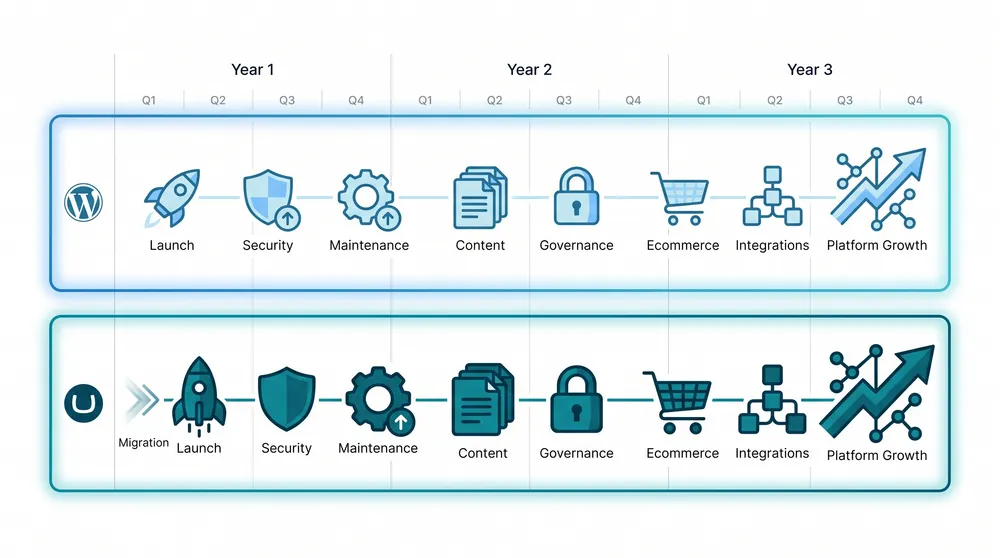
Choose by the Next Three Years, Not the First Three Weeks
The right CMS is the one your team can afford to improve, secure, and govern after the launch excitement fades.
Recommended Plan by Budget
Budget: AUD 0 to AUD 100/month in platform and hosting
Use WordPress if the site is simple and you have a disciplined maintenance plan. WordPress.com Business, entry managed WordPress hosting, or careful self-hosting can fit this range. Avoid stacking too many paid plugins just because the hosting is cheap.
Budget: AUD 100 to AUD 500/month
This range can support better managed WordPress hosting or Umbraco Cloud Starter/Standard depending on needs. WordPress still wins if you need many off-the-shelf marketing features. Umbraco becomes attractive if content modelling, Azure hosting, and cleaner deployment matter.
Budget: AUD 500 to AUD 1,500/month
Both platforms can work. WordPress can sit on stronger managed hosting with premium support and ecommerce extensions. Umbraco Cloud Standard or Professional becomes realistic for teams that want managed .NET CMS hosting, better governance, and fewer plugin dependencies.
Budget: AUD 1,500+/month
Choose based on operating model. WordPress may still be right for content velocity and ecommerce flexibility. Umbraco may be better for multi-site governance, complex integrations, security controls, workflow, personalization, and Microsoft-stack alignment.
Final Recommendation
Choose WordPress if your SME needs a fast, flexible, cost-effective website with lots of ready-made features and a broad supplier market. It is especially strong for simple marketing sites, blogs, local SEO, and WooCommerce stores.
Choose Umbraco if your website is becoming a structured business platform and you need stronger content governance, custom integrations, .NET/Azure alignment, fewer plugin dependencies, and cleaner long-term architecture.
The smartest decision is to cost the next three years: hosting, maintenance, security, plugin or add-on renewals, editor time, integrations, rebuild risk, and the cost of fixing things when the site outgrows its first version.
Sources Checked
- WordPress.org - open-source CMS overview
- WordPress.com pricing
- WordPress.org documentation - updating WordPress
- WP Engine managed WordPress hosting plans
- Kinsta WordPress hosting pricing
- Kinsta data centre locations
- WooCommerce pricing
- WooCommerce marketplace pricing examples
- Umbraco pricing and products
- Umbraco Cloud pricing
- Umbraco Cloud FAQ - regions and backups
- Umbraco CMS documentation - packages
- Umbraco Forms pricing
- Umbraco Workflow pricing
- Umbraco Engage pricing
- EUR to AUD exchange reference