
Umbraco Personalization Guide
Compare first-party, community, custom, CRM, and external personalization options for Umbraco, including pricing and implementation trade-offs.
Personalization in Umbraco can mean several different things: changing CMS-managed page content for a visitor segment, showing or hiding components based on known rules, using CRM or marketing automation data to trigger journeys, or adding an external experimentation platform on top of the website. The best option depends on how close personalization needs to be to the Umbraco backoffice, how much first-party data you want to own, and how much governance your marketing team can realistically maintain.
Pricing checked on 10 May 2026 shows one clear pattern: simple rules can be delivered with custom development or a free community package, but enterprise-grade segmentation, analytics, A/B testing, profiling, and reporting usually require a paid platform. For most serious Umbraco websites, the best native option is Umbraco Engage. For smaller use cases, Personalisation Groups or carefully scoped custom rules can be enough. For account-based marketing, CRM-driven journeys, or experimentation programs already owned by marketing, external tools can sit beside Umbraco through scripts, APIs, webhooks, or marketplace integrations.
Quick Recommendation
If the goal is to let editors create personalized variants directly in Umbraco, start with Umbraco Engage. If the goal is lightweight rule-based component visibility, consider Personalisation Groups or custom code. If the goal is lead nurturing, email journeys, or account-based personalization, connect Umbraco to HubSpot, Dynamics 365, Salesforce, Mutiny, VWO, Optimizely, or a similar platform and keep Umbraco focused on content quality and structured publishing.
Main Personalization Paths for Umbraco
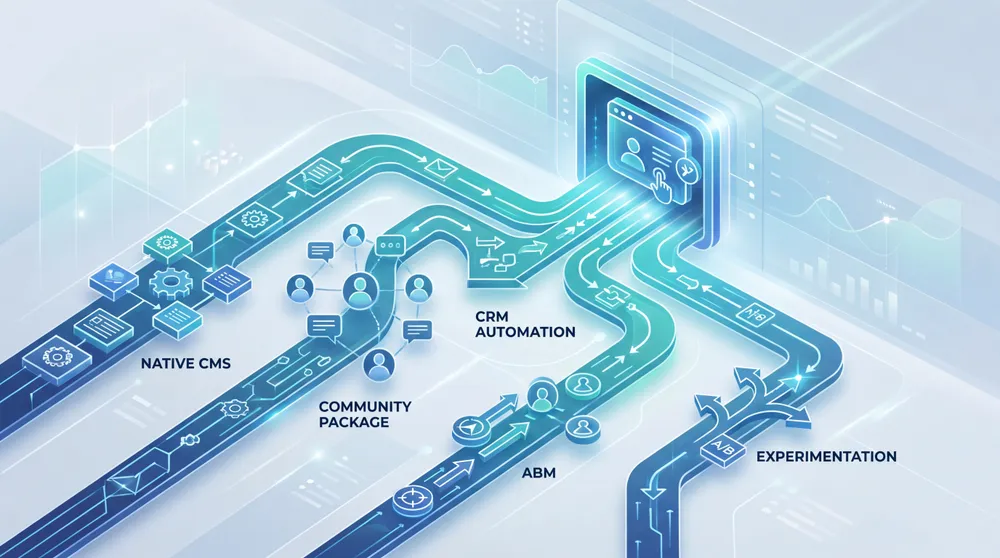
These are the practical routes available when planning personalization for an Umbraco website.
Custom Umbraco Rules
Use member state, query strings, cookies, location, campaign source, or CRM flags to render different content in your templates or frontend. Lowest license cost, but the logic is developer-owned.
Personalisation Groups
A free community package for showing, hiding, or ordering content for visitor groups using criteria such as time, referral, cookies, query strings, geography, visits, pages viewed, and member profile data.
Umbraco Engage
Umbraco's first-party suite for server-side analytics, profiling, personalization, A/B testing, reporting, and data ownership directly inside the CMS workflow.
CRM and Marketing Automation
Connect Umbraco forms and events to HubSpot, Dynamics 365, Salesforce, Zoho, or Pipedrive through marketplace packages, APIs, webhooks, Zapier, Make, or n8n.
External Personalization Platforms
Tools such as Mutiny, VWO, Optimizely, and AB Tasty can personalize experiences outside the CMS using scripts, audiences, experiments, and integrations.
Hybrid Architecture
Use Umbraco for content and governance, Engage or rules for website-level personalization, and CRM/CDP tools for lifecycle journeys, ABM, and cross-channel segmentation.
Pricing and Option Snapshot
The prices below are vendor-published list prices or public pricing positions found during research. They are useful for budgeting, but final cost can change based on currency, region, traffic, contacts, onboarding, support, and contract terms.
| Option | Pricing snapshot | Best fit | Watch-outs |
|---|---|---|---|
| Custom Umbraco rules | Umbraco CMS is free. Optional Umbraco Cloud hosting starts at EUR 45/month, with Standard at EUR 280/month and Professional at EUR 730/month. | Simple personalization such as logged-in vs anonymous, campaign landing pages, region-specific CTAs, or member-only content. | There is no marketer-friendly testing, reporting, or segment UI unless you build it. Ongoing maintenance is a development cost. |
| Personalisation Groups | Free open-source package with an MIT license on NuGet. | Lightweight content visibility rules where budget is tight and your team is comfortable with community package support. | Check compatibility with your exact Umbraco version before install. It is not a complete analytics, profiling, or experimentation suite. |
| Umbraco Engage | Analytics license listed at EUR 750/year. Full license starts at Standard EUR 4,780/year, Professional EUR 8,810/year, Enterprise EUR 17,000/year, with Custom Enterprise by quote. | Personalized CMS variants, first-party analytics, profiling, A/B testing, reporting, and data ownership inside Umbraco. | For personalization, budget for the Full license, not just the analytics-only entry license. Pageview and domain limits matter. |
| HubSpot Marketing Hub | Free tools at USD 0/month. Starter listed at USD 9/seat/month annually. Professional is USD 800/month annually plus USD 3,000 onboarding. Enterprise is USD 3,600/month plus USD 7,000 onboarding. | CRM segmentation, forms, email automation, lead scoring, landing pages, and marketing journeys connected to Umbraco forms or events. | Website personalization is not managed as native Umbraco content unless you design the integration carefully. Contacts and seats affect cost. |
| Dynamics 365 Customer Insights | Free trial available. Base plan listed at USD 1,700 tenant/month paid yearly. Attach pricing is USD 1,000 tenant/month for qualifying Dynamics customers. | Enterprise customer data, journey orchestration, unified profiles, and Microsoft-heavy organisations. | It is a customer data and journey platform, not a simple CMS personalization plugin. Implementation planning matters. |
| Mutiny | Free plan at USD 0/month. Business listed at USD 50/seat/month. Enterprise starts at USD 30,000/year. | B2B account-based personalization, AI-assisted page variants, and Salesforce or HubSpot-connected campaigns. | Enterprise CRM integrations sit on the higher tier. Treat it as a layer beside Umbraco, not an Umbraco backoffice feature. |
| Optimizely, VWO, AB Tasty, and similar CRO platforms | Mostly quote-based for personalization and enterprise experimentation tiers. | Mature conversion programs with dedicated testing teams, traffic volume, QA processes, and analytics ownership. | Can overlap with Umbraco Engage. Avoid buying an experimentation platform before you know who will run the tests. |
Choose Based on Ownership, Not Just Features
The first decision is where personalization should be owned. If editors need to create page variants in the CMS, Umbraco Engage is the cleanest route. If developers own the logic, custom rules or Personalisation Groups may be enough. If marketing owns journeys across email, CRM, and paid campaigns, external marketing automation may be the better centre of gravity.
How to Pick the Right Personalization Option
Use these signals before choosing a platform or implementation approach.
Editor Ownership
If editors need to create personalized variants without developer help, choose a CMS-integrated tool such as Umbraco Engage.
Measurement Depth
If personalization needs conversion reporting, A/B testing, goals, or heatmaps, avoid simple rule-only approaches.
Segment Complexity
Campaign source, referral, cookie, and member rules are manageable. Behavioural scoring and journey stages need stronger tooling.
Data Ownership
First-party analytics and consent-aware storage are important for regulated organisations and privacy-conscious teams.
CRM Alignment
If the sales and marketing team already works from HubSpot, Dynamics, or Salesforce, connect Umbraco rather than duplicating audiences.
Implementation Effort
Simple targeting can be fast. Multi-source identity, consent, analytics, QA, and reporting require a proper implementation roadmap.
How Umbraco Engage Personalization Works
Umbraco Engage uses segments to identify visitor groups, then applies personalized content for those segments. The official documentation describes personalization as a fully integrated feature that can personalize visitor experiences within Umbraco. After a segment is created, personalization can be applied on a specific page, across multiple pages, or per Document Type.
The marketer-friendly workflow is the reason Engage is the most natural first-party choice. Editors can work from the Personalization content app on a page, create a personalized variant, edit fields in a split-view editor, preview the variant, then publish so visitors in the selected segment see different content while everyone else sees the default version.
Explicit vs Implicit Personalization
Explicit personalization uses direct facts such as browser, query string, login state, location, member group, or campaign source. Implicit personalization uses behaviour and scoring to infer interests, personas, or customer journey stage. Explicit rules are easier to reason about. Implicit rules are more powerful, but they need enough traffic, clear scoring, and ongoing review.
Where Developers Still Matter
Even when marketers own the CMS workflow, developers still matter for segment parameters, custom scoring, retrieving segment information in code, consent handling, performance, QA, and integration with systems such as CRM, commerce, membership, or CDP platforms.

Recommended Implementation Roadmap
Phase 1: Define Personalization Use Cases
Start with a small number of high-value use cases. Good examples include changing a hero CTA by campaign source, showing industry-specific proof points, recommending content by persona, or changing conversion prompts for returning visitors.
Phase 2: Design Segments and Consent Rules
Document each audience, the signal used to identify it, whether consent is required, how long the signal is stored, and what fallback content appears when the signal is missing.
Phase 3: Prepare the Content Model
Do not personalize every field. Choose controlled fields such as headline, CTA, proof point, image, offer, form, or recommended content. This keeps governance manageable and prevents editors from maintaining too many variants.
Phase 4: Implement Measurement
Every personalized experience should have a measurable goal, such as form completion, quote request, content click, login, purchase, or booked consultation. Without measurement, personalization quickly becomes guesswork.
Phase 5: Launch Small and Review Often
Personalization should start as a controlled program, not a website-wide rewrite. Launch one or two segments, review results, remove weak variants, and only then expand to more pages or more complex behavioural scoring.

Keep Personalization Useful, Measurable, and Maintainable
The hidden cost of personalization is content governance. Every variant needs ownership, QA, expiry rules, accessibility checks, SEO awareness, analytics, and a fallback. A smaller number of well-measured personalized experiences usually performs better than a large number of unmaintained variants.
Final Recommendation by Scenario
- Small business or campaign site: Use custom rules or Personalisation Groups if the targeting is simple and reporting expectations are modest.
- Marketing-led Umbraco website: Use Umbraco Engage when editors need native personalization, analytics, A/B testing, and reporting in the backoffice.
- CRM-led sales funnel: Connect Umbraco Forms and site events to HubSpot, Dynamics, Salesforce, or another CRM, then use those platforms for journeys and lead scoring.
- ABM website: Consider Mutiny or a similar account-based personalization layer when the primary audience is named accounts rather than anonymous site visitors.
- Enterprise CRO program: Consider VWO, Optimizely, AB Tasty, or a comparable experimentation platform when there is enough traffic, process, and team capacity to run tests properly.
The safest overall path is to start with one measurable personalization use case, prove it, and then add capability. Technology helps, but personalization succeeds when segmentation, content, privacy, analytics, and ownership are designed together.
Sources Checked
- Umbraco pricing
- Umbraco Engage pricing and features
- Umbraco Engage personalization documentation
- UmbracoPersonalisationGroups on NuGet
- Umbraco CRM integrations
- HubSpot Marketing Hub pricing guide
- Dynamics 365 Customer Insights pricing
- Mutiny pricing
- Optimizely plans and pricing
- VWO pricing and plans
Planning personalization for an Umbraco website?
Vanitech can help you choose the right personalization architecture, content model, measurement plan, and integration path for your budget and team.
Umbraco Personalization FAQs
Short answers to the most common planning questions.