
BigCommerce WebMCP: AI Shopping Readiness Guide
BigCommerce and Cloudflare launched WebMCP for eligible storefronts on 21 October 2026. BigCommerce says it is enabled by default on all Stencil storefronts and Catalyst storefronts hosted on Cloudflare. That means some merchants may already have the browser bridge even though they have not deployed a theme change or asked a developer to add it.
The practical question is not whether every customer will shop through an AI agent tomorrow. Browser support is still limited and evolving. The useful question is whether your store is intentionally ready for an agent to discover products, compare options, build a cart and hand the shopper back to your checkout.
This guide explains what is active by default, what requires Storefront MCP, how product and cart tools work, and how an Australian merchant can test data quality, permissions, privacy, Content Security Policy, checkout handoff and monitoring before treating AI shopping as a sales channel.
Why BigCommerce WebMCP is trending now
The timing comes from three changes landing close together. BigCommerce made its B2C and B2B Storefront MCP tool sets generally available on 8 October. Commerce and Cloudflare announced the WebMCP storefront partnership on 21 October. BigCommerce then documented that WebMCP is on by default for eligible Stencil and Cloudflare-hosted Catalyst storefronts.
The rollout turns agentic commerce from a future architecture discussion into an operating decision. A store can now expose a browser-readable tool bridge without a theme release. If the merchant also enables Storefront MCP, product search, product details, related products, cart changes and checkout-link creation can be exposed through the same browser-agent path.
That does not mean autonomous purchasing is generally available. BigCommerce's current B2C tools stop at creating a checkout URL; the shopper reviews and completes checkout on the merchant's storefront. Chrome also describes WebMCP as a proposed standard in an origin trial, with a local testing flag. The opportunity is real, but the channel should be treated as an emerging progressive enhancement, not a replacement for accessible pages, search, navigation or checkout.
WebMCP, Storefront MCP and checkout do different jobs
Separate discovery, commerce actions and transaction completion when you assess readiness.
WebMCP bridge
Cloudflare injects a same-domain bridge script at the edge. In a compatible browser, it registers the storefront's available tools so an in-browser agent can discover them.
Storefront MCP tools
BigCommerce runs the commerce tools. When Storefront MCP is enabled, product, cart and checkout-link tools are synchronised into WebMCP.
Merchant checkout
The agent can prepare the journey and return a checkout URL. The shopper reviews the cart and completes the purchase on the storefront.
What is enabled by default—and what is not
BigCommerce's documentation separates the WebMCP toggle from Storefront MCP. That distinction matters.
| State | What the browser agent can receive | Merchant decision |
|---|---|---|
| WebMCP enabled, Storefront MCP off | Default image-scanning tools that read C2PA content-provenance metadata from visible images | Confirm the bridge is expected and decide whether these default tools fit your policy |
| WebMCP and B2C Storefront MCP enabled | Product search and details, related products, cart add/update/remove and checkout-link creation | Accept terms, verify catalogue truth and test guest plus signed-in journeys |
| B2B Storefront tools available | Buyer Portal tools such as shopping lists and quotes, subject to B2B Edition and buyer permissions | Test each role, account and approval path rather than assuming B2C behaviour |
| WebMCP disabled | No injected bridge; browser agents may fall back to reading and operating the human interface | Record why the feature is off and review the decision as standards and browser support mature |
Opting out is not instant. BigCommerce says full disablement can take a couple of days, and re-enabling after an opt-out requires support. Treat the toggle as a governed production change with an owner and verification step.
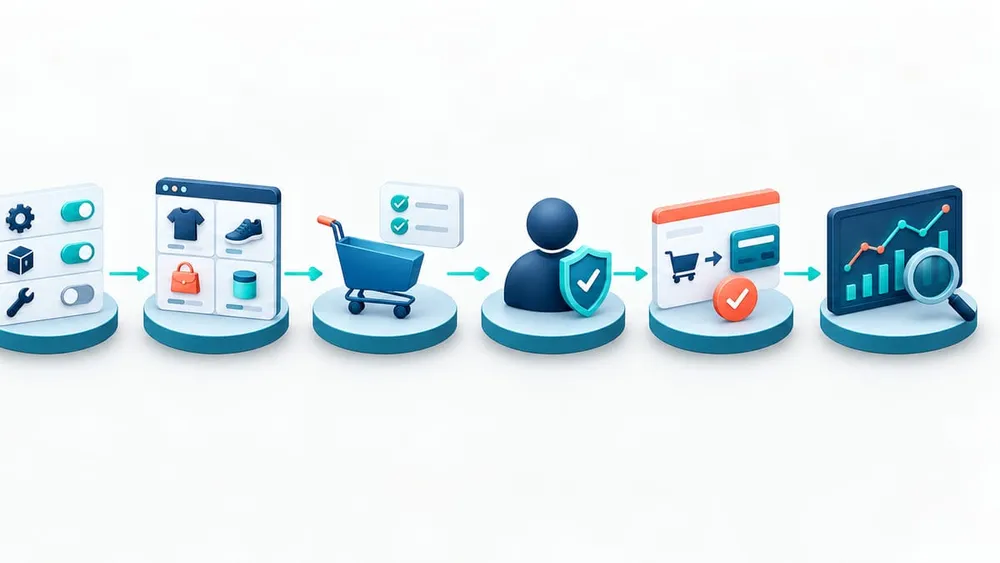
Move from discovery to monitored AI shopping
Start with a storefront and ownership inventory
Do not treat the control-panel toggle as the whole implementation. First list every storefront and identify the parts of the stack that shape the response an agent receives.
- Storefront type: Stencil, Catalyst on Cloudflare, another Catalyst host, or a custom headless storefront.
- Domains and edge: production and non-production domains, Cloudflare ownership, DNS, caching and CSP ownership.
- Commerce configuration: channels, markets, price lists, customer groups, inventory locations, promotions, currencies and checkout customisations.
- Source systems: PIM, ERP, OMS, search, DAM, reviews, CRM, loyalty and fulfilment integrations.
- Agent controls: who can enable WebMCP, who can accept Storefront MCP terms, which tools are exposed and who approves changes.
- Evidence: how product, price, stock, cart and checkout outputs will be tested and monitored.
BigCommerce documents WebMCP as automatic for Stencil and Cloudflare-hosted Catalyst, while custom headless storefronts on Cloudflare can request enablement. That makes storefront classification the first dependency. One business may have several channels with different readiness, policies and customer groups.
Audit what is active before enabling more
For each production storefront, open Settings → API and MCP → MCP and record the WebMCP state, Storefront MCP state and listed tools. Then request a storefront page and confirm whether the /.webmcp/bridge.js module is present.
Use that evidence to answer four questions:
- Is WebMCP enabled on every storefront where you expect it?
- Are only the intended default or shopping tools listed?
- Does the bridge load without a CSP error?
- Does an unsupported browser fall back to the ordinary storefront without a visible regression?
Do this before switching on Storefront MCP. It establishes a known baseline and helps separate bridge-delivery issues from product, cart or session problems.
Product truth is the first conversion control
WebMCP reduces the need for an agent to guess from buttons and rendered HTML. It does not repair incomplete catalogue data. The B2C tools return product names, descriptions, options, variants, SKUs, images, related items and storefront-specific commerce information. Those outputs are only as reliable as the systems behind them.
Before exposing shopping tools, verify at least:
- stable product, variant and SKU identifiers;
- structured size, colour, compatibility and other selection attributes;
- current channel, market and customer-group pricing;
- stock and sellability rules for each location and fulfilment method;
- accurate product claims, images, delivery information and return policies;
- consistent related-product relationships and merchandising logic; and
- clear ownership when the CMS, PIM, ERP and BigCommerce disagree.
An AI agent can make a poor data problem more visible because it may compare several products quickly and present a confident summary. VaniTech's guide to AI shopping product-data freshness covers the reconciliation layer in more detail.
Use a scenario matrix, not a single happy-path prompt
Test the agent path against real commercial rules. A useful acceptance matrix includes the following scenarios.
| Scenario | What to verify |
|---|---|
| Guest product search | Relevant results, correct currency, public prices, available variants and no private catalogue data |
| Option selection | The agent requests required size, colour or configuration before adding an item |
| Promotion | Eligibility, exclusions, dates and cart totals match the storefront |
| Low or unavailable stock | Unavailable variants are not presented as purchasable and backorder messaging remains accurate |
| Logged-in B2C customer | Customer-group catalogue and personalised pricing follow the shopper's active session |
| B2B buyer | Company permissions, shopping lists, quotes and approval rules match the signed-in buyer |
| Cart update and removal | Quantity, options and line totals stay synchronised between agent and storefront |
| Checkout handoff | The checkout URL opens the intended cart, recalculates authoritative totals and leaves final purchase confirmation with the shopper |
| Failure and fallback | MCP unavailability, unsupported browsers and expired sessions do not break the human storefront |
Reconcile the agent's summary against the product page, cart and checkout. A successful tool response is not sufficient if the human sees a different variant, price or delivery promise.
Check Content Security Policy and custom storefront behaviour
Cloudflare delivers the WebMCP bridge by adding a module script to the storefront response at the edge. BigCommerce says the bridge is served from the storefront's own domain and exits when the browser does not support WebMCP.
A restrictive Content Security Policy can still block the script. BigCommerce documents a browser-console error when script-src does not permit the storefront's /.webmcp/bridge.js path. Test the effective production headers, not only a local template. If you change CSP, preserve the strongest policy that allows the exact same-origin resource rather than weakening script controls broadly.
Custom headless stores need an additional check. Confirm which host terminates the storefront response, how Cloudflare injects the bridge, whether the same product and cart context reaches the agent, and whether deployments or CDN rules could strip the script. Keep the standard website fully usable because unsupported agents and browsers will continue through the ordinary interface.
Signed-in shopping needs session-specific testing
BigCommerce's Storefront Session Sync links an MCP session to a shopper's existing Stencil session without exposing browser cookies. The initial token is opaque, single-use and valid for 60 seconds. When an agent creates a cart and cookies rotate, the MCP server can return a one-time reverse sync code, also with a 60-second lifetime, so the browser receives the updated session.
This is a useful design, but it creates acceptance cases that guest testing will not reveal. Verify that:
- the agent sees the correct signed-in identity, catalogue and personalised pricing;
- a newly created cart appears when the shopper returns to normal browser navigation;
- expired or already-used sync tokens fail safely;
- login and logout terminate the old MCP session and trigger reinitialisation;
- B2B tools appear only for eligible buyers and permitted actions; and
- support staff can distinguish a session-sync problem from an inventory or checkout problem.
BigCommerce warns that failing to apply the reverse sync code can leave subsequent browser activity unable to find the cart or carrying stale session state. Include that failure deliberately in testing.
Treat privacy and agent trust as separate controls
BigCommerce says WebMCP tool calls run in the shopper's active browser session on the storefront domain, pass through Cloudflare unchanged and keep checkout on the merchant's site. Those are helpful boundaries. They do not remove the need to understand the browser agent itself, its extension permissions, or how prompts and outputs may be handled by its provider.
The OAIC says privacy obligations apply when AI handles personal information and recommends due diligence, transparent notices, human oversight, regular review and attention to who can access data entered into or generated by the product. For a WebMCP rollout, apply that thinking to the complete path:
- avoid putting personal information into optional search context;
- separate public catalogue access from authenticated customer and B2B data;
- document which agent or browser products are approved for staff testing;
- review agent-provider terms, data retention and secondary-use settings;
- keep final checkout review visible to the shopper; and
- log operational events without copying unnecessary personal or prompt data.
Use test accounts and non-production carts during evaluation. BigCommerce's own documentation warns that browser extensions can read and run WebMCP tools on pages a tester visits.
Australian consumer-law duties still follow the product promise
An agent does not create a separate standard for product and price accuracy. The ACCC says information about prices, images, descriptions, benefits, shipping options and delivery times must be accurate, truthful and based on reasonable grounds. It also says the total price must include taxes and unavoidable or pre-selected fees before purchase.
For merchants, that means the agent result, cart and checkout should agree on:
- the exact variant and quantity;
- currency and GST-inclusive pricing where required;
- promotion conditions and exclusions;
- availability, backorder status and delivery timing;
- mandatory fees and pre-selected extras; and
- material product limitations or eligibility rules.
Keep deterministic commerce services authoritative. The agent can search and orchestrate; it should not invent a price, infer stock from a marketing description or promise a delivery date that the fulfilment system cannot support. If your store accepts delayed inventory, use the controls in VaniTech's BigCommerce backorder integration guide.
Approve the channel only when these four layers agree
A production-ready result is a consistent customer journey, not merely a visible tool list.
Tool exposure
The intended WebMCP and Storefront MCP tools are visible for each storefront, customer state and B2B role—and no unexpected tool is exposed.
Commerce truth
Products, variants, prices, stock, promotions, delivery rules and related items match the authoritative BigCommerce and connected-system state.
Session continuity
Guest, signed-in and B2B carts remain synchronised across agent actions, ordinary navigation, login changes and checkout handoff.
Operational control
Owners can verify deployment, observe errors, respond to customer issues, disable the feature and re-test after catalogue or integration changes.
Monitor the new path without overstating demand
WebMCP is early enough that usage may be small. Build observability that answers whether the feature works and whether it creates value, without assuming every cart came from an agent.
Track:
- bridge availability and CSP failures by storefront;
- MCP tool errors, latency and unavailable periods;
- product searches with no useful result;
- variant-selection failures and cart mutations rejected by commerce rules;
- session reinitialisations and stale-cart incidents;
- checkout links created, carts reaching checkout and completed orders where attribution exists;
- price, stock or product-description mismatches reported by customers; and
- support contacts linked to browser-agent journeys.
BigCommerce has introduced an optional externalSource field for GraphQL cart and checkout creation, but do not assume the managed WebMCP path populates every analytics field you want. Verify actual payloads and reports in your implementation. Treat unverified attribution as directional rather than decision-grade.
A practical seven-day readiness plan
Day 1: classify storefronts and owners
List Stencil, Catalyst and custom headless storefronts, production domains, Cloudflare ownership, MCP decision-makers and support contacts.
Day 2: capture the live state
Record WebMCP and Storefront MCP toggles, exposed tools, injected bridge presence, response headers and browser-console results.
Day 3: audit product and commercial data
Sample high-volume, promotional, configurable, low-stock and customer-group products. Compare the source systems, agent tool result, page and cart.
Day 4: run guest and failure scenarios
Test search, option selection, related products, cart changes, checkout handoff, unsupported browsers, MCP outage and CSP blocking.
Day 5: run authenticated scenarios
Test signed-in B2C pricing, cart sync, login changes, B2B roles, shopping lists and quotes where applicable.
Day 6: review privacy, consumer and support controls
Confirm approved testing tools, data handling, customer notices, price and delivery consistency, incident ownership and disablement steps.
Day 7: approve, limit or opt out
Keep the current state, enable Storefront MCP for a controlled scope, or opt out with a documented reason. Set a review date because browser support and the proposed standard will continue to change.
Questions to ask your BigCommerce implementation partner
- Which of our storefronts currently have WebMCP enabled?
- Which tools are active before and after Storefront MCP is switched on?
- Who accepted the Storefront MCP terms and owns future tool changes?
- Which systems are authoritative for price, stock, delivery and product claims?
- How will customer-group and B2B permissions be tested?
- Does our CSP allow the bridge without widening script access?
- How will agent-created carts remain synchronised with the browser session?
- What analytics can reliably identify an agent-assisted journey?
- How will support diagnose an MCP, catalogue, session or checkout problem?
- What is the rollback or opt-out process, and how will we verify it completed?
If the answers are unclear, begin with an audit rather than enabling more tools. The goal is controlled discoverability and cart assistance—not exposure for its own sake.
What merchants and ecommerce teams are asking
Sources Checked
- Commerce: WebMCP partnership announcement
- BigCommerce: Browser-based AI agents on storefronts
- BigCommerce Documentation: WebMCP
- BigCommerce Developer Changelog: 21 October 2026
- BigCommerce Documentation: Storefront MCP overview
- BigCommerce Documentation: B2C Storefront tools
- BigCommerce Documentation: Storefront Session Sync
- Chrome for Developers: WebMCP
- Cloudflare: Give any website a WebMCP interface
- ACCC: False or misleading claims
- ACCC: Price displays
- OAIC: Privacy and commercially available AI products
Sources were accessed on 27 October 2026. WebMCP is an emerging proposed standard; confirm current BigCommerce eligibility, browser support, tool behaviour and terms before changing a production storefront.