Disability and care · Design concept

NDIS provider website

A welcoming website concept for disability support providers, with service pages, homes and vacancies, and individual property details.

About this template

See how a disability support provider can introduce its services, help people explore homes, and make the next step clear. Banksia Living pairs a calm teal and ivory palette with editorial headings, warm imagery, and straightforward page layouts.

Page previews

Choose an image to view the full page. These are generated design concepts; forms and filters shown in them are not interactive.

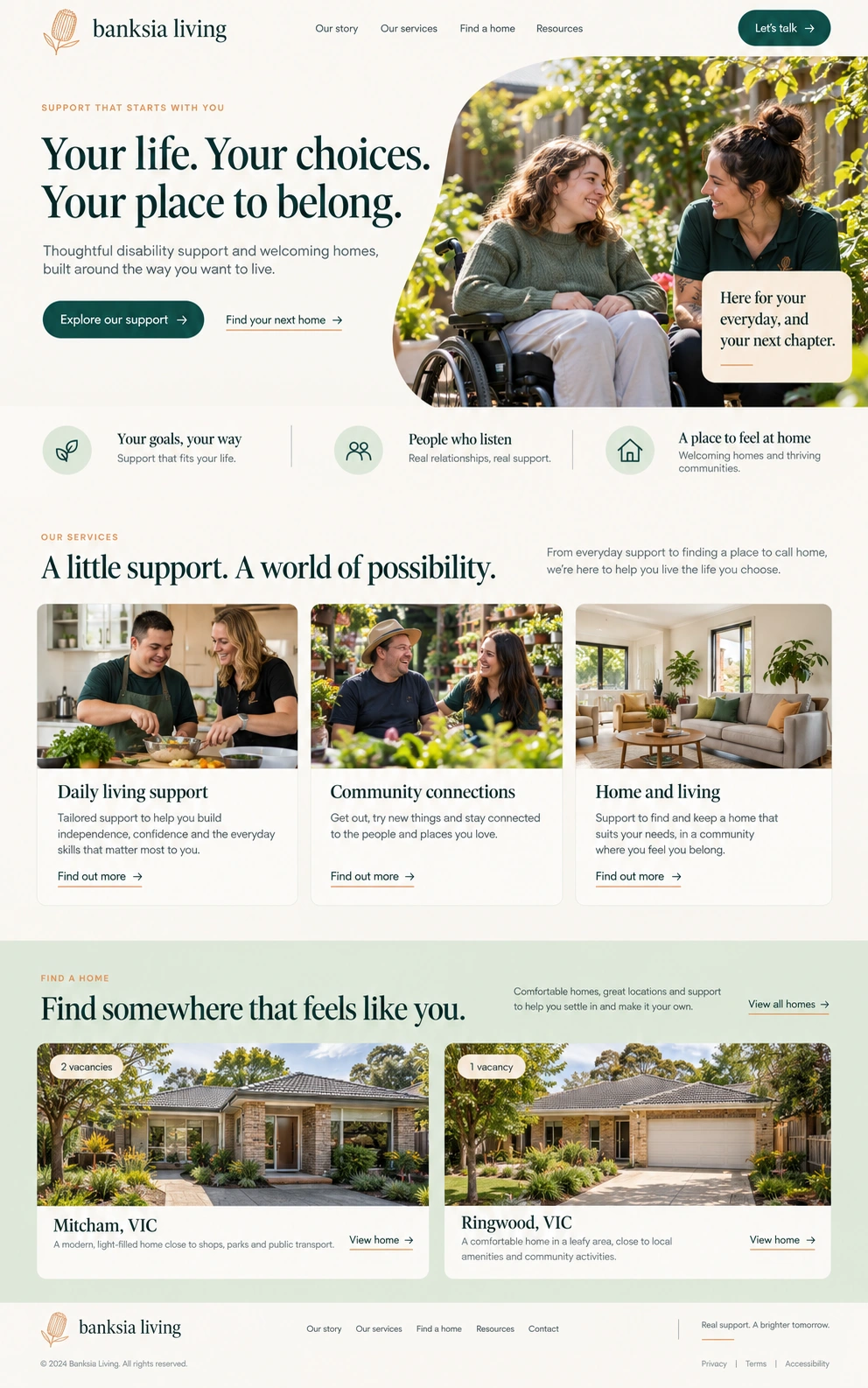
Banksia Living home page design
View full page

Page type 01

Home

Introduce the provider and give visitors clear paths to support services and available homes.

Hero and navigationSupport valuesService cardsFeatured homesVacancy badges

Planned journeys connect the introduction to services, home listings, and an enquiry.
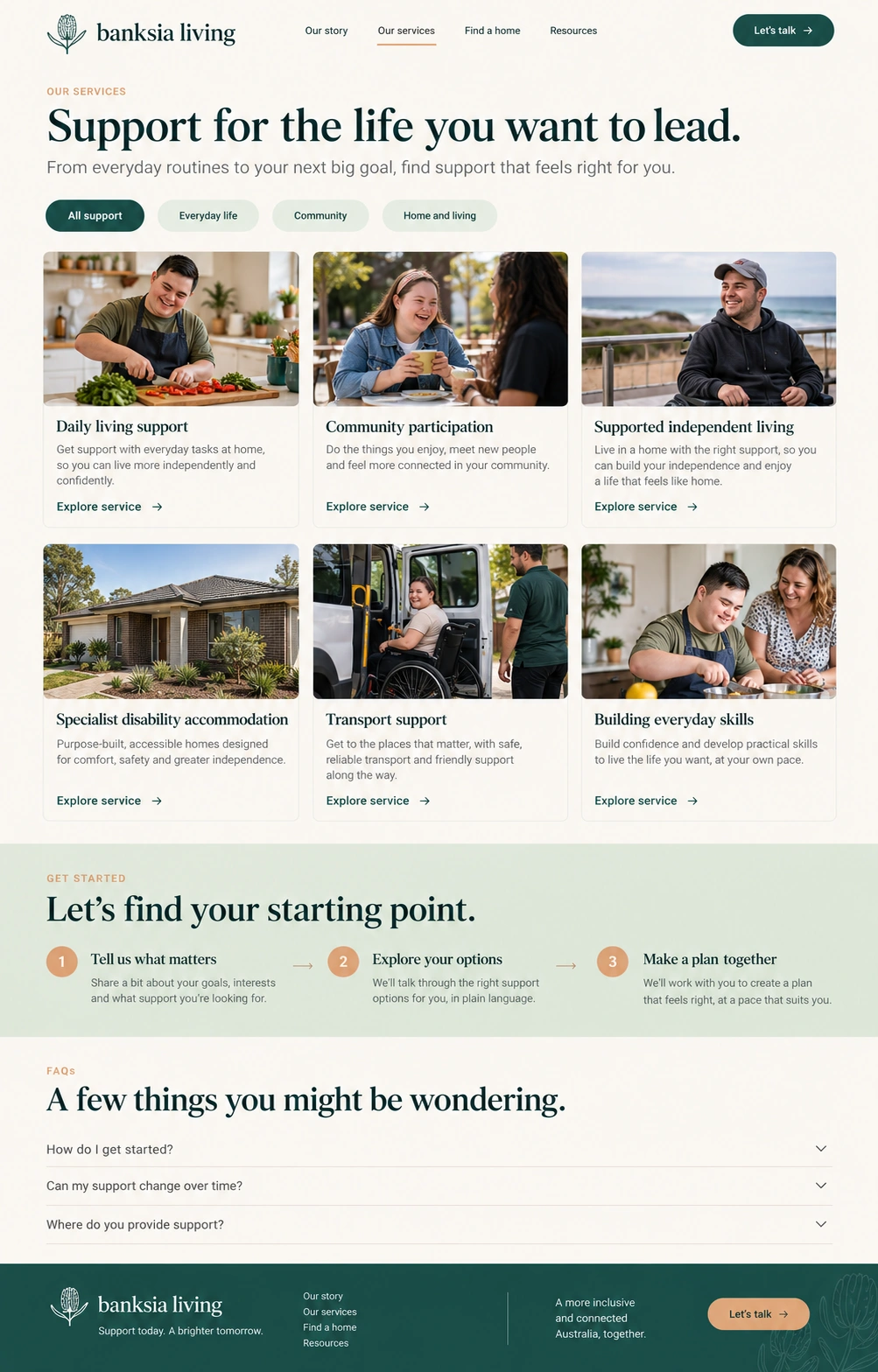
Banksia Living services page design
View full page

Page type 02

Services

Help participants and families find the support that suits their everyday life and goals.

Service categoriesService card gridGetting started stepsFAQ accordion

The design shows service categories, detail links, and expandable questions for a future implementation.

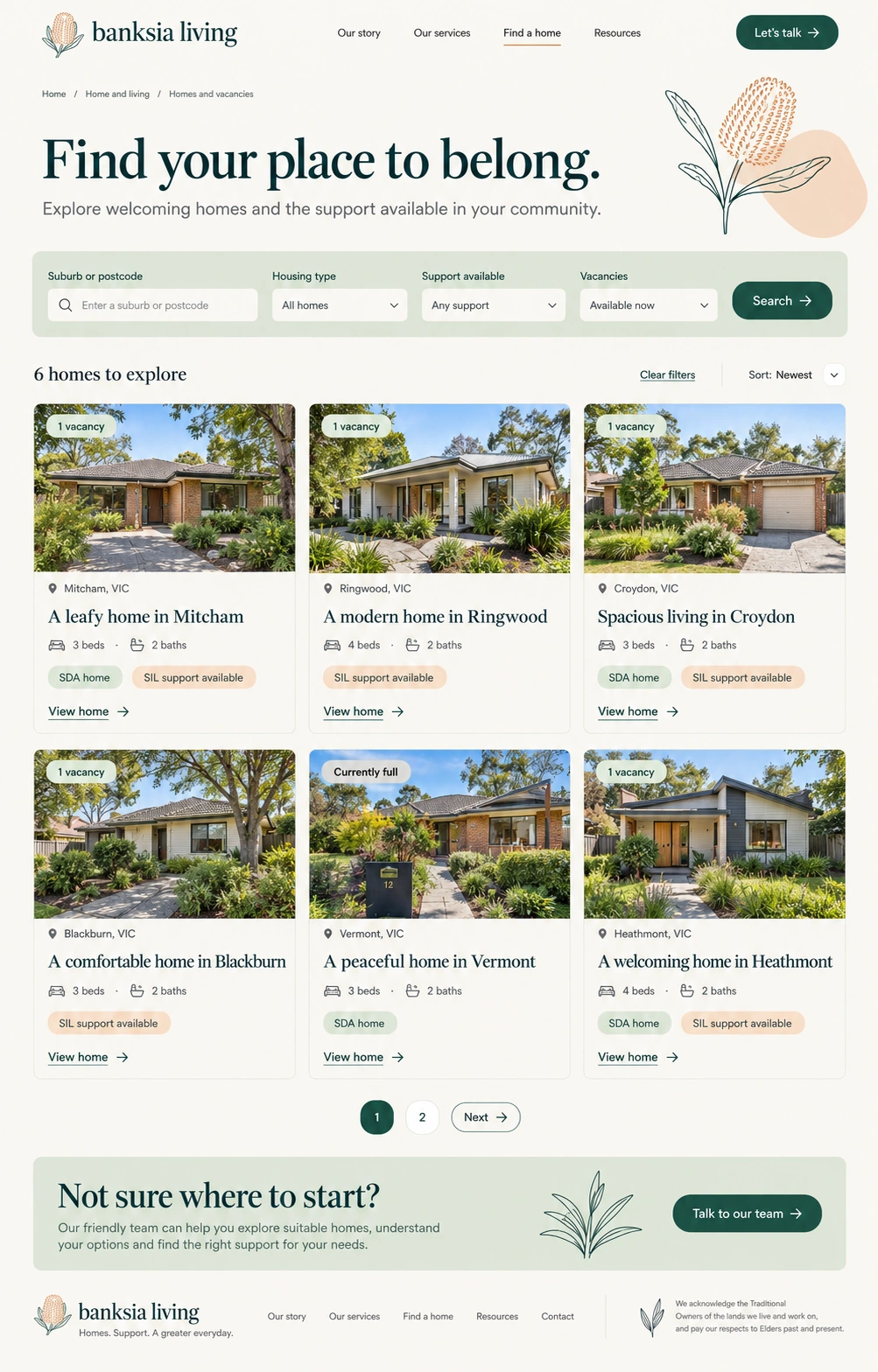
Banksia Living homes and vacancies page design
View full page

Page type 03

Homes and vacancies

Present a collection of homes with clear location, accessibility, support, and vacancy information.

Location searchHousing and support filtersProperty cardsVacancy statusSorting and pagination

Planned filters help visitors find homes by location, housing type, available support, and vacancies.

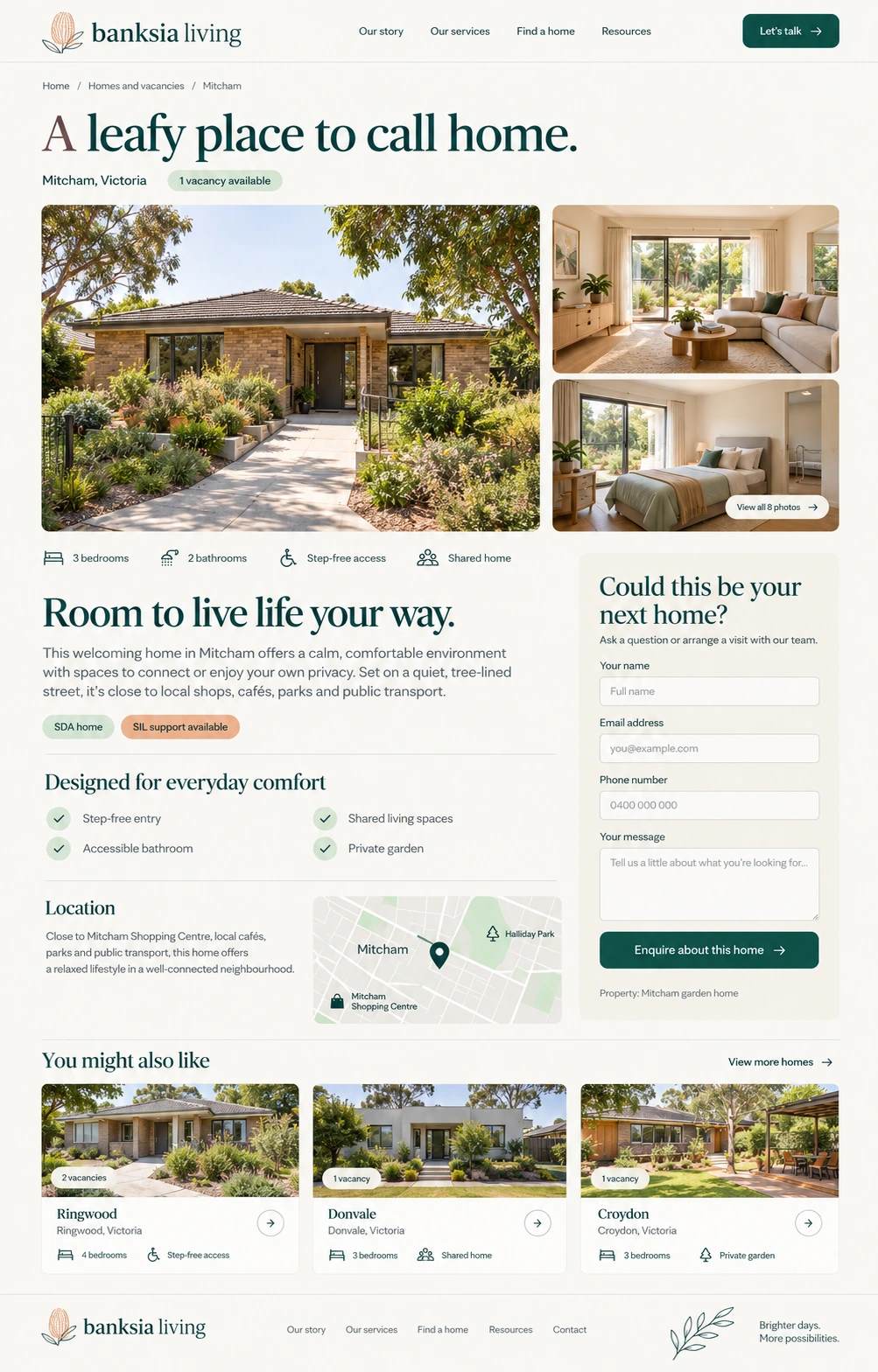
Banksia Living property detail page design
View full page

Page type 04

Property detail

Give each home its own page with photos, useful facts, and a clear way to enquire about that property.

Photo galleryProperty factsAccessibility featuresLocation panelProperty enquiryRelated homes

A future enquiry carries the selected home through the viewing request or enquiry journey.

What this template offers

Components and forms, at a glance.

See what appears in the page designs and what you could add when we build your website. Preview links take you to the relevant page layout.

Shown in design
Visible in a page preview; functionality is still to be built.
Working in demo
Implemented and available to try in a working provider demo.
Optional addition
An extra we can plan with you; not part of the current previews.

Components

The sections and features that help visitors explore the website.

Explore support

  • Introduction and navigation
    Shown in design

    Introduce the provider and give visitors clear paths to services, homes, and contact information.

  • Service cards
    Shown in design

    Summarise each support service with an image, a short explanation, and a clear next step.

  • Service categories
    Shown in design

    Group support options around everyday life, community, and home and living.

  • Getting started steps
    Shown in design

    Explain what happens from the first conversation to planning suitable support.

  • Frequently asked questions
    Shown in design

    Present common questions about starting support in an expandable question-and-answer layout.

Find a home

  • Property cards and vacancy badges
    Shown in design

    Compare homes using photos, suburbs, bedrooms, bathrooms, and availability, with housing and support shown separately.

  • Property facts and accessibility
    Shown in design

    Make bedrooms, bathrooms, access features, housing category, and available support easy to find.

  • Location information
    Shown in design

    Introduce the neighbourhood and nearby shops, parks, and transport.

Get to know the provider

  • Team profiles
    Optional addition

    Introduce the people behind the services and their approach to support.

  • Service area finder
    Optional addition

    Let visitors check which services are available in their suburb or region.

  • Resources and policies
    Optional addition

    Provide participant information, accessible documents, and links to feedback and privacy information.

Forms and enquiries

Ways for visitors to ask a question or take the next step.

Ask about support

  • Service enquiry and callback
    Optional addition

    Ask about a service or request a callback using the visitor's preferred contact method.

    Suggested fields: Name · Preferred contact method · Service of interest · Suburb · Short message

  • Participant referral
    Optional addition

    Allow participants, families, and support coordinators to introduce a support request with permission to share the referral details.

    Suggested fields: Participant and referrer details · Relationship to participant · Requested support · Location · Permission to make the referral

Ask about a home

  • Property viewing enquiry
    Shown in design

    Ask a question or arrange a visit, keeping the selected home attached to the enquiry. The property detail preview shows the enquiry layout; viewing times can be agreed in follow-up.

    Suggested fields: Selected property · Name · Email address · Phone number · Message

Share feedback

  • Feedback and complaints
    Optional addition

    Offer a clear way to share feedback or raise a concern, including an anonymous option and alternative contact methods.

    Suggested fields: Feedback type · Description · Optional contact details · Preferred response method

A starting point, made yours.

Your branding, services, locations, photos, and contact details shape the finished website. We agree on the pages and features your business needs before building.

Other pages we can plan with you

  • About us
  • Service detail
  • Home and living
  • Service areas
  • FAQ
  • Contact and referral

These additional pages are proposed scope and are not shown in the current previews.

Website build

Website builds from $3,000 one-off, with default SEO and accessibility foundations. We agree the pages and functionality in your quote; the design previews illustrate what we can build.

All prices are in AUD excluding GST. Hosting is separate from the build; the platform and resource limits are confirmed in your quote. Extended services and additional scope are quoted separately.

Choose your SEO & accessibility service tier

Every industry build starts with default foundations. Extend the scope for your search and accessibility goals when you need more. These describe delivery services; the template images remain design concepts.

Tier 1 · Included by default

Default SEO & accessibility

SEO setup and practical accessibility foundations included in your website build.

Read the default service scope

Tier 2 · Customise your scope

Extended SEO, accessibility, AEO & GEO

Keep the default foundations and choose separately scoped search and accessibility work.

Read the extended service scope

Could this work for your business?

Let’s talk about your services, your audience, and the pages you want to include.

Discuss this template

Contact us

Tell VaniTech about your business and the pages you need. Email [email protected] or send a message below.

Get in touch with us

Send us a message

We are committed to protecting your privacy. We will never collect information about you without your explicit consent.

← Back to all website templates